

Linux Architecture
Linux architecture explains the structure and interoperability of the Linux operating system’s various components. Because of its tiered architecture, every layer has a distinct function and interacts with the layers above and below. Because of its design, Linux is reliable, safe, and effective.
Overview of Linux Architecture Layers
There are five main levels in the Linux architecture:
- Hardware
- Kernel
- System Libraries
- Shell
- User Applications
Every layer is essential to the functioning of the system.
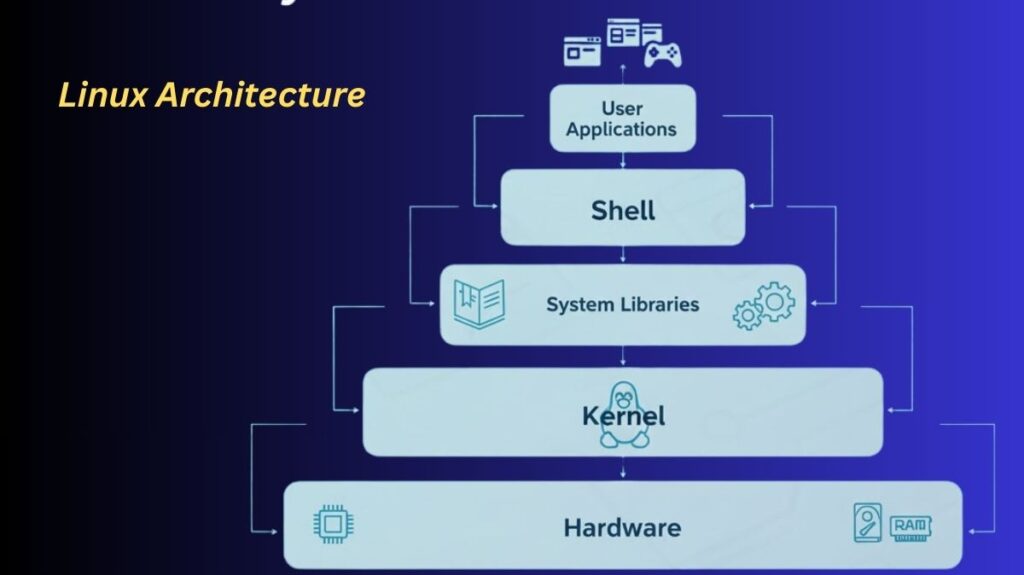
1. Hardware
The system’s physical base is known as the hardware layer. It consists of elements like:
- CPU (processor)
- Memory, or RAM
- SSD or hard drive
- Devices for input and output (keyboard, mouse, printer)
Linux uses the kernel to indirectly communicate with the hardware. Because users and apps never have direct access to hardware, system stability and safety are increased.
2. Kernel (Linux Core)
Kernel is Linux’s core. It serves as a link between software and hardware.
Key Roles of the Linux Kernel:
- Process management regulates how processes are created, scheduled, and ended.
- Memory management controls paging, virtual memory, and RAM utilization.
- Device Management communicates with physical devices through device drivers.
- File System Management arranges and regulates directory and file access.
- Permissions and Security uses group and user permissions to enforce access restriction.
Because the Linux kernel is monolithic, performance is enhanced because the majority of services operate in kernel space.
3. System Libraries
Applications utilise system libraries’ key functions to communicate with the kernel. They serve as a conduit between kernel services and user programs.
Examples:
- The GNU C Library (glibc)
Among the functions are:
- File management
- Control of processes
- Allocation of memory
Libraries increase portability and security by enabling applications to function without requiring direct kernel access.
4. Shell (User Interface)
The command-line interface that enables users to interact with the operating system is called the shell. After interpreting user commands, it sends them to the kernel so they can be executed.
Common Linux shells:
- Bash
- Zsh
- Sh
The shell’s functions include:
- Carries out commands
- Executes scripts
- Controls the environment’s variables
Although graphical user interfaces (GUIs) are also supported by Linux, the shell is still a strong and popular tool.
5. Applications for Users
The Linux architecture’s top layer is this one. It covers any software that end users utilize, including:
- Browsers
- Editors for text
- Players for media
- Systems for databases
Applications use the shell and system libraries to ask the kernel for services.
Why Linux Architecture Is Important
- Linux is adaptable due to its modular design.
- Layered access improves security.
- Long system uptime is made possible by stability.
- Scalability enables everything from tiny devices to massive computers.
Components of Linux
Hardware is essentially worthless without an operating system, which serves as the software layer that gives it functionality. Several essential parts make up the Linux operating system:
- The Kernel: Often referred to as the “heart” of the system, it maintains security enforcement, schedules programs, allots memory, and directly controls the CPU hardware.
- User Space vs. Kernel Space: Linux runs the kernel in a confined space known as kernel space to avoid system crashes. Because user tools and applications operate independently of the kernel in user space, they are unable to alter vital system components.
- The Shell: The Shell is the command-line interface (CLI) that lets users send text commands to the kernel. Fish, Zsh, and Bash are examples of common shells.
- Daemons: These are background programs that wait for particular network requests or system conditions to happen, such as sshd for secure remote login.
- Shared Libraries: These ensure that apps don’t have to “reinvent the wheel” for every operation by providing the code and functions they need to complete common operations.
Also Read About What Is Linux? A Brief History And Evolution Of Linux