

What is Linux Kernel?
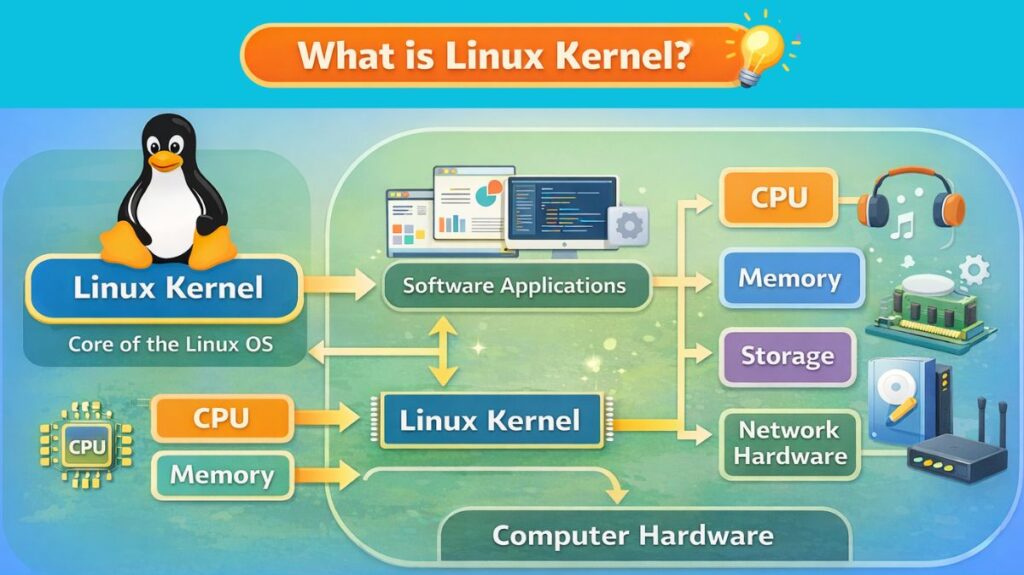
The Linux Kernel is the core part of the Linux operating system. It serves as a link between the software that people use on a daily basis and computer hardware. Applications could not utilize the CPU, memory, storage devices, or network hardware without the kernel.
To put it simply, the Linux kernel is in charge of ensuring that every component of a computer system functions properly, effectively, and safely.
What Is a Kernel?
A kernel is the core, essential program of an operating system (OS), acting as a bridge between software applications and computer hardware, managing vital resources like CPU, memory, and I/O, and handling fundamental tasks such as process scheduling, device management, and system calls to ensure smooth, secure, and efficient operation. It’s the first part of the OS loaded at startup, residing in memory to control hardware and provide services, running in a protected “kernel space” separate from user applications in “user space”.
Also Read About What Is Linux? A Brief History And Evolution Of Linux
Role of the Linux Kernel in an Operating System
The Linux kernel carries out a number of vital functions that maintain the system’s dependability:
- Controls the amount of CPU time used by programs.
- Regulates the amount of memory used by the system
- Manages activities for input and output.
- Interacts with hardware
- Guarantees the stability and security of the system.
The kernel is essential to the effective operation of every command you execute and every program you launch.
Components of the Linux Kernel
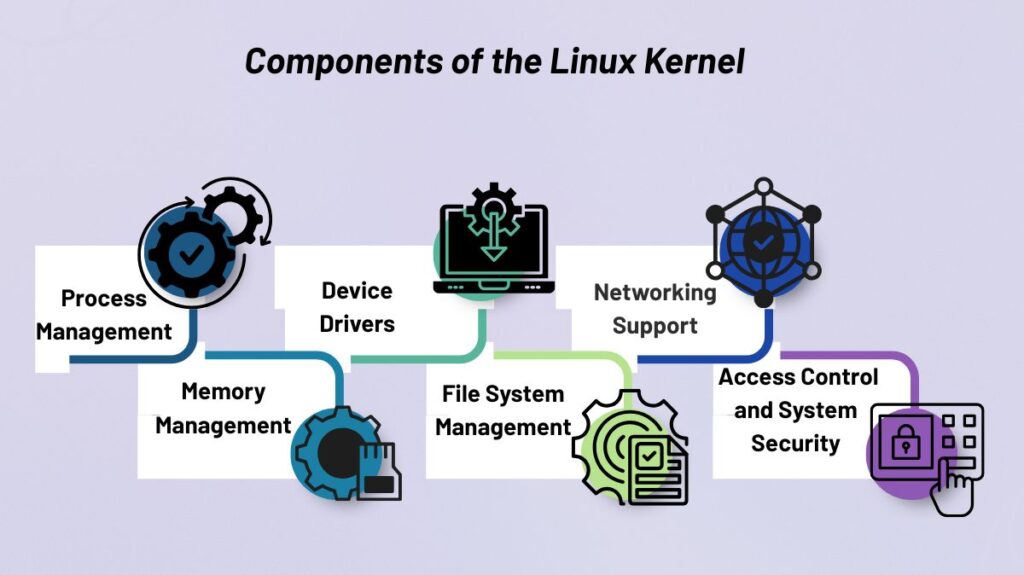
1. Process Management
The kernel can run numerous programs simultaneously to process management. The kernel determines:
- Which process is given CPU time?
- The duration of a procedure
- When to halt or restart a process
This skill, known as multitasking, guarantees equitable and effective processor utilization.
2. Memory Management
The allocation and release of RAM are governed by memory management. The kernel of Linux makes sure that:
- Every program receives the memory it requires.
- Programs don’t conflict with one another.
- Memory that is not in use is effectively repurposed.
Even with low physical RAM, the system can run huge applications to strategies like virtual memory and paging.
3. Device Drivers
The kernel can interact with hardware elements like keyboards, printers, hard drives, and network cards to device drivers. A large variety of hardware is supported by the Linux kernel since drivers can be:
- Integrated inside the kernel itself
- Dynamically loaded as kernel modules
Linux is adaptable and hardware-friendly because of its design.
4. File System Management
The kernel controls the storage and retrieval of data from storage devices. Numerous file systems are supported, such as:
- ext4
- XFS
- Btrfs
- NTFS and FAT
Data integrity, permissions, and effective file and directory access are all guaranteed by the kernel.
5. Networking Support
Networking features are integrated into the Linux kernel. It manages:
- Internet-based communication
- TCP/IP and other network protocols
- Transmission and receipt of data
Linux is frequently used in servers, cloud systems, and networking devices due to its robust networking capabilities.
6. Access Control and System Security
One of the main responsibilities of the Linux kernel is security. It imposes:
- Permissions for users and groups
- Isolation of processes
- Safe access to system resources
Linux is a reliable option for crucial systems because of features like AppArmor and SELinux, which improve kernel-level security.
Kernel Space vs User Space
Linux divides its functions into two categories:
Kernel Space:
- Executes important system code
- Has complete hardware access
- Carries out driver and kernel code
User Space:
- Executes user programs and apps
- Restricted availability of system resources
- Communication with the kernel is done via system calls.
- System security and stability are enhanced by this division.
Also Read About How Linux Works And Why Linux Is Important For Developers
Linux Kernel Modules
Code segments known as kernel modules can be added or withdrawn from the kernel while the system is operating. They permit:
- Hardware drivers should only be loaded when required.
- Decreased memory usage
- Updates to the system are simpler.
One of Linux’s greatest technical advantages is its modular architecture.
Linux Kernel Development Model
Thousands of developers worldwide work together to create the open-source Linux kernel. Important traits consist of:
- Transparent method of development
- Frequent enhancements and updates
- Strong corporate and community support
- The kernel is managed by Linus Torvalds, who guarantees its consistency and quality.
Why the Linux Kernel Is Important
Numerous systems are powered by the Linux kernel, such as:
- Computers, both desktop and laptop
- Cloud platforms and servers
- Android smartphones
- Supercomputers
- Internet of Things(IoT) and embedded devices
It is among the most significant software initiatives in history due to its dependability, adaptability, and performance.
Basic Linux Kernel Commands with Examples
1. uname – Check Kernel Version
Used to identify the currently running kernel.
uname -rExample output:
6.1.0-17-amd64This helps you confirm kernel compatibility before compiling modules or debugging issues.
2. lsmod – View Loaded Kernel Modules
Displays all kernel modules currently loaded in memory.
lsmodYou can verify whether a driver or feature is active.
3. modinfo – Get Module Details
Shows information about a kernel module.
modinfo ext4Provides description, license, dependencies, and file location.
4. insmod – Insert a Kernel Module
Loads a kernel module manually.
sudo insmod mydriver.koUsed mainly for testing custom kernel modules.
Requires caution and root privileges.
5. rmmod – Remove a Kernel Module
Unloads a module from the kernel.
sudo rmmod mydriverHelpful when updating or debugging modules.
6. modprobe – Load Module with Dependencies
Preferred over insmod because it resolves dependencies automatically.
sudo modprobe usb_storageSafe and commonly used.
7. dmesg – View Kernel Messages
Displays kernel logs related to hardware and drivers.
dmesg | tailUsed to debug boot issues and module errors.
8. journalctl -k – Kernel Logs (Systemd Systems)
Shows kernel logs managed by systemd.
journalctl -kUseful on modern Linux distributions.
9. cat /proc/version – Kernel Build Information
Displays kernel version and build details.
cat /proc/version10. cat /proc/cpuinfo – CPU Information
Shows processor data detected by the kernel.
cat /proc/cpuinfo11. free -h – Kernel Memory Usage
Shows how the kernel manages system memory.
free -h12. top / htop – Process Monitoring
Displays processes managed by the kernel in real time.
top13. ps aux – Process Status
Lists all running processes.
ps auxHelpful for checking kernel threads (shown in brackets).
14. sysctl – View Kernel Parameters
Displays kernel tuning parameters.
sysctl -aUsed to inspect networking, memory, and process limits.
5. make – Compile the Kernel or Modules
Used when building the kernel or kernel modules.
make
make modules
Essential for kernel development.
16. ls /lib/modules/(uname -r) – Kernel Modules Directory
Shows modules for the running kernel version.
ls /lib/modules/(uname -r)17. grep – Search Kernel Logs or Source Code
Used frequently while debugging.
dmesg | grep errorAlso Read About What Is The Difference Between Linux And Windows? Explain