

Ubuntu Operating System
One of the most widely used Linux distributions worldwide is Ubuntu. It is based on the Debian Linux system and is intended to be easy to use, dependable, and straightforward. Ubuntu was developed to make Linux available to all users, including developers, businesses, students, and novices. The project’s emphasis on transparency, community, and sharing is reflected in the name “Ubuntu,” which is derived from an African concept that meaning “humanity toward others.”
Use, modification, and distribution of Ubuntu are all free. It is a comprehensive operating system that may be used for both personal and professional purposes because it comes with the Linux kernel, system libraries, desktop environments, and thousands of open-source apps.
History of Ubuntu
Canonical, a corporation created by Mark Shuttleworth, published Ubuntu for the first time in 2004. Linux systems were strong at the time, but they were frequently challenging for novice users to set up and maintain. Ubuntu sought to address this by offering consistent releases, easy installation, and robust hardware support.
Ubuntu has maintained a consistent release schedule since its inception. A Long Term Support (LTS) version is released every two years, and a new version is released every six months. LTS versions are perfect for servers and production systems because they receive security upgrades and support for a number of years.
Ubuntu Architecture
The Linux kernel, upon which Ubuntu is based, controls hardware resources like CPU, memory, storage, and devices. Ubuntu has system libraries, such as the GNU C Library, on top of the kernel that let programs communicate with the operating system.
A package management system built on APT (Advanced Package Tool) is another feature of the operating system. Using straightforward instructions or graphical tools, this approach makes it simple to install, update, and remove software. Thousands of apps that are tested and kept up to date for security and reliability can be found in Ubuntu repositories.
Why Its Use?
You may be wondering why someone would abandon the convenience of macOS or Windows. The “real talk” about why people switch is as follows:
- It’s Free: No license key is required. It is not necessary to “activate” it. Simply download it and start using it.
- Privacy is the Default: Unlike other major operating systems, Ubuntu doesn’t want to trace every click you make in order to provide you with more relevant advertisements.
- The “LTS” Safety Net: Every two years, Ubuntu publishes a version known as “Long Term Support” (LTS). These versions receive security upgrades for a minimum of five years and are incredibly reliable. This is Linux’s “set it and forget it” variant.
- The Snap Store: The most challenging aspect of Linux used to be program installation. It’s now as simple as using a phone app store to the Snap Store (and conventional APT).
Also Read About What Is Linux? A Brief History And Evolution Of Linux
Features of ubuntu operating system
In 2026, Ubuntu is more than just a desktop style; it’s a system that at last seems to have been designed with the user, not the data-miner, in mind.
The “Resolute Raccoon” desktop version (GNOME 50+)
GNOME 50 has become the emphasis of Ubuntu’s most recent iterations, especially the 26.04 LTS roadmap.
- The sensation is smoother. The complete dedication to Wayland as the display protocol ensures that the animations don’t stutter, even on older hardware.
- The Tiling: “Snapping” windows has always been a boast of Windows users. “Enhanced Tiling” is now integrated into Ubuntu. Without the need for additional addons, you may quarter a window by simply dragging it to a corner.
A Rewrite in Rust (Speed & Security)
Behind the scenes, Ubuntu’s plumbing is evolving. Developers are gradually switching to Rust from outdated C-based technologies.
- Why it matters: Rust stops the “memory leaks” that cause computers to lag over time. Tools like the Resources app, which took the role of the System Monitor in 2026, are faster and need a much less battery life on laptops.
The “Snap” Evolution
The Linux community used to despise “Snaps” (containerized programs). But because they simply function, Ubuntu has stepped up its efforts.
- Complete Isolation: The “Snap” sandbox keeps the virus from viewing your private documents or images in the event that your web browser is compromised.
- Automatic updates: No more “Check for Updates”. The background system manages things while you sleep.
Hardware-Backed Encryption (TPM)
- Today, security goes beyond passwords. Ubuntu now connects to your Windows 11-required TPM chip.
- Encrypt the entire hard disk with your computer’s hardware key. When someone steals your laptop and takes out the drive, all they see is junk.
Integration of Local AI
- Ubuntu has pushed toward local AI, whereas everyone else is pushing “Cloud AI” that transfers your data to a server.
- Ubuntu 26.04 is made to run Large Language Models directly on your GPU using programs like Ollama or the Agentic AI Foundation libraries. You don’t need an online connection to summarize your own local documents.
Also Read About How Linux Works And Why Linux Is Important For Developers
Ubuntu Features
| Feature | Ubuntu | Windows/Mac |
| System Updates | Background & non-intrusive | Often forced reboots |
| Telemetry | Opt-in (Truly private) | Always on (Data mining) |
| Software Management | App Center & Terminal | Fragmented installers |
| Customization | Change everything | “Take what you’re given” |
Ubuntu Pro is the “Hidden” MVP
The fact that Ubuntu Pro is now free for personal use (up to five workstations) is not widely known. You will receive security updates for 12 years as a result. Consider this: Ubuntu would remain safe until 2038 if you were to install it on a laptop today. In the “buy a new phone every two years” era, such longevity is unheard of.
Advantages and disadvantages of ubuntu
Advantages
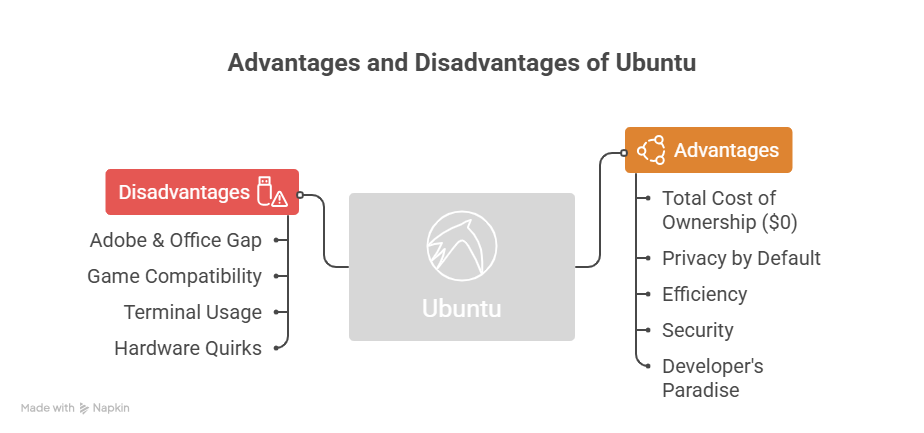
- Total Cost of Ownership ($0): No license keys need to be purchased. It is free to install on 100 PCs. Beyond the operating system, thousands of free professional tools can be found in the “app store” (Ubuntu Software Center).
- Privacy by Default: Ubuntu does not preinstall “Recall” or AI-driven telemetry on your desktop, in contrast to Windows 11. Your clicks are not tracked for advertising. Your data belongs to you.
- Ubuntu is far more efficient than Windows in terms of speed and resource management. Because Ubuntu uses significantly less RAM and background CPU when idle, a computer that “lags” on Windows frequently feels brand new on Ubuntu.
- Security: Ubuntu’s architecture makes it far more difficult for conventional viruses to operate, even if no operating system is impenetrable. The majority of malware is made for Windows (.exe files), thus it just won’t run on Linux.
- A Developer’s Paradise: Ubuntu is the industry standard if you’re learning to develop. Here, “native” tools like Python, Ruby, Docker, and Git frequently operate more quickly and dependably than they do through Windows layers like WSL.
Disadvantages
- The largest obstacle is the “Adobe & Office” Gap. Office, Photoshop, and Premiere are not supported by Ubuntu. GIMP, Kdenlive, and LibreOffice are decent alternatives, but professionals must adjust.
- After “Proton” from Valve/Steam, Ubuntu supports 80% of Windows games. Strong anti-cheat games like Call of Duty or Valorant occasionally won’t work because their security software doesn’t recognize the Linux kernel.
- You must copy and paste commands in the “Terminal” but can do 90% with the mouse. Though frustrating, this feels like “hacking” others.
- Hardware quirkiness: Most modern hardware works well, although RGB software for high-end gaming mice, Wi-Fi cards, and scanners may not have Linux drivers.
Also Read About Linux Architecture Layers: Kernel, Shell, And Hardware