

Understanding Security-Enhanced Linux (SELinux)
Standard Permissions (Read, Write, Execute) are quite common among Linux security users. However, these fundamental measures are insufficient for high-security environments. Security-Enhanced Linux, or SELinux, is a potent kernel security module that offers a way to enable security policies for access control.
A standard feature of distributions like Red Hat Enterprise Linux (RHEL), Fedora, and CentOS, SELinux was first created by the National Security Agency (NSA) of the United States.
What is SELinux in Linux?
Mandatory Access Control (MAC) is what SELinux is. It must contrast it with the default Discretionary Access Control (DAC) used by Linux in order to comprehend it.
- User-owned files in DAC. Who can view a file is up to you if you own it. A process that executes as “root,” for example, has the ability to access the whole system.
- What each process is allowed to do is defined by the system (the “Policy”) under SELinux (MAC). If the policy doesn’t specifically permit it, SELinux can prevent a process with root privileges from accessing certain files or network ports.
SELinux Architecture
The Flask security framework, which was created to address a significant issue with operating systems the hard-coding of security logic is the foundation of the SELinux architecture.
The “enforcer” (code) and the “rules” (policy) are combined in traditional systems. By separating them, SELinux produces a system that is adaptable and allows you to alter the security model as a whole without having to change a single kernel line.
A distinct request, decision, and enforcement flow separates the architecture.
Process or Subject
Usually, the “Subject” is a process that wishes to carry out an activity, such as a web server or a user shell. Each subject has a label, or Security Context.
Object Manager (OM)
The part that truly “owns” the resource is the Object Manager.
- The Kernel File System serves as the Object Manager for processes that wish to read files.
- The Networking Stack is the Object Manager for processes that wish to open a network socket.
- The OM simply knows how to execute or block the action; it has no idea if it is permitted.
Security Server
Situated within the Linux kernel, this is the “Brain” of SELinux. The Security Server examines the Loaded Policy and responds with a “Yes” or “No” when an Object Manager sends a request to it asking, “Is Subject A allowed to do Action X to Object B?”
Access Vector Cache (AVC)
System performance would be destroyed if the entire policy were checked for each and every system call (thousands per second).
Recent Security Server decisions are stored in the AVC. The Object Manager looks at the AVC first the following time the same process requests the same file. As a result, the performance hit is almost eliminated.
How the Components Interact (The Workflow)
Request: An operation (like open()) is attempted to be performed on a file (Object) by a process (Subject).
Hook: This request is intercepted by the LSM (Linux Security Modules) framework of the Linux kernel using “hooks.”
Cache Check: To find a cached decision, the Object Manager looks through the AVC.
Policy Decision:
- The OM instantly enforces the decision if it is cached.
- The Security Server verifies the binary policy in memory after receiving a query from the OM if it is not cached.
Enforcement: The Object Manager either gives a “Permission Denied” error or permits the system call to continue.
Logging: The event is sent to auditd and recorded in /var/log/audit/audit.log if the action is rejected (or specifically designated for auditing).
Internal Architecture Layers
| Layer | Responsibility | Key Component |
| Userspace | Policy management and high-level tools. | libselinux, policycoreutils, semanage |
| Kernel Interface | Bridge between userspace and the kernel. | selinuxfs (mounted at /sys/fs/selinux) |
| Kernel Core | The Flask engine and decision logic. | Security Server, AVC, Policy Database |
| LSM Hooks | Intercepting system calls. | Linux Security Module framework |
Why “Flask”?
The “Enhanced” status of SELinux is due to the “Flask” architecture (Flux Advanced Security Kernel). Since the Security Server is independent, you can utilize many security models, such as:
- Type Enforcement (TE) is the practice of limiting processes according to their “domain.”
- Specifying the capabilities of roles (admin, user) is known as role-based access control, or RBAC.
- Multi-Level Security (MLS): Managing “Public” and “Secret” information.
How SELinux Works
Labeling is the foundation upon which SELinux functions. Files, processes, ports, hardware, and other system components are all given a security context label.
The kernel uses the straightforward rule, “Can a subject with Label A perform Action X on an object with Label B?” to guide its decisions.
The Security Context
Labels usually have the following format: user:role:type:level. Often called Type Enforcement (TE), the Type is the most important component for the majority of administrators.
- Process (such as an Apache web server) is the subject.
- Resource or file (e.g.,
/var/www/html/index.html) is object. - Policy: The set of regulations. If “The
httpd_ttype can read files labeledhttpd_sys_content_t,” is stated in the policy, then access is allowed. Access is by default denied if the policy is absent.
Key Features of SELinux
- Access is defined according to the type of object and process using Type Enforcement (TE).
- RBAC, or role-based access control, gives authorization to roles as opposed to specific people.
- Adding sensitivity designations (such as Public, Confidential, or Secret) for high-clearance situations is known as Multi-Level Security (MLS).
- Fine-Grained Policy: This allows you to specify which individual files or ports a service can alter.
SELinux Modes
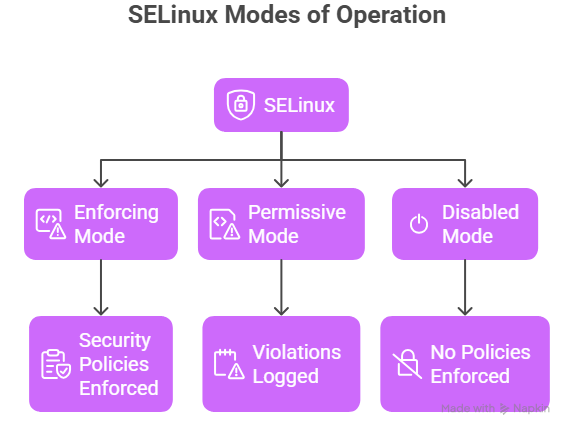
SELinux runs in three modes:
1. Enforcing Mode
- Policies are actively enforced.
- Violations are blocked.
- Recommended for production systems.
Check mode:
bash

getenforce
Enable enforcing:
bash

setenforce 1
2. Permissive Mode
- Policies are not enforced.
- Violations are logged.
- Useful for debugging.
Enable permissive:
bash

setenforce 0
3. Disabled Mode
- SELinux is completely turned off.
- Not recommended for secure environments.
Check status:
bash

sestatus
SELinux command in Linux
Check status:
bash

sestatus
Check file context:
bash

ls -Z filename
Check process context:
bash

ps auxZ
Restore default context:
bash

restorecon -v filename
View audit logs:
bash

ausearch -m avc
Managing SELinux: Common Commands
If you are working with SELinux, these tools are your best friends:
sestatus: View the current SELinux status.ls -Z: View the SELinux labels on files.ps -Z: View the labels on running processes.semanage fcontext: Used to permanently change file labels.restorecon: Applies the policy-defined labels to files (fixes labeling mismatches).setsebool: Toggles specific “Booleans” (on/off switches for common tasks, like allowing a web server to send email).
Advantages and Disadvantages of SELinux
| Advantages | Disadvantages |
| Mitigates Zero-Day Exploits: Even if a hacker gains root access to a web server, SELinux prevents them from moving into other parts of the system. | Complexity: The learning curve is steep. Writing custom policies requires deep expertise. |
| Privilege Escalation Protection: Limits the damage a compromised “root” process can do. | Troubleshooting Overhead: Many “permission denied” errors are actually SELinux blocks, which can frustrate admins. |
| Standardized Security: Provides a consistent security framework across the entire organization. | Performance: There is a very slight (usually negligible) overhead for checking labels on every action. |