

What Are Embedded Linux Systems? Embedded Linux Applications, Examples, Tools for Embedded Linux Development, Why Is It Different?, Architecture of Embedded Linux, Types, Commands & Useful Examples, and Desktop vs. Embedded were all covered in this blog.
What are embedded Linux systems?
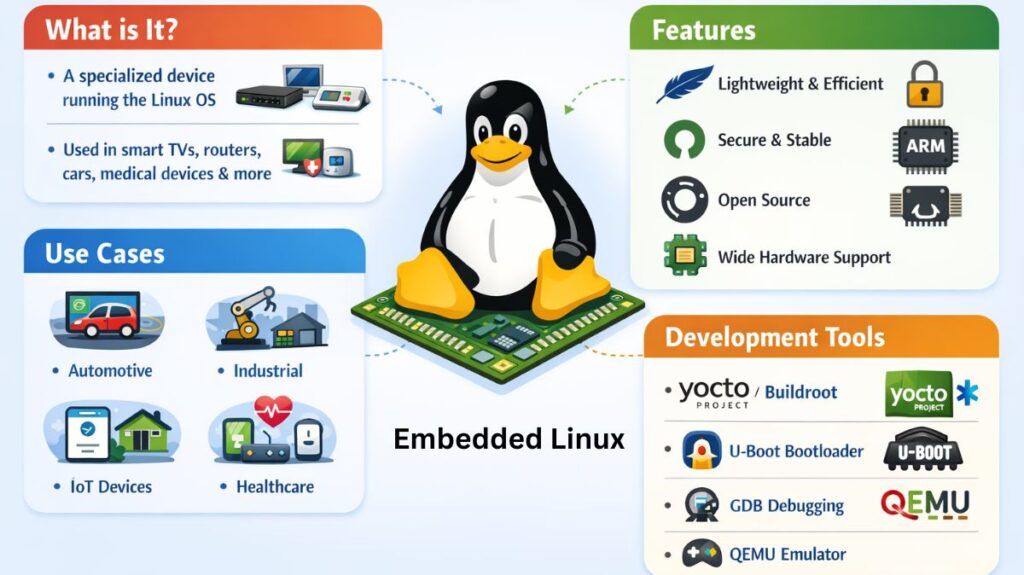
“Embedded Linux” in the context of 2026 hardware isn’t a single downloadable product. It is more of a method. You take the regular Linux kernel, remove the “fat” like office suites, printer drivers, and desktop wallpapers, and rebuild it to do only one thing: dependably run a particular piece of hardware.
Embedded Linux applications
- Consumer electronics include digital cameras, gaming consoles, set-top boxes, and smart TVs.
- Automobile: Advanced Driver Assistance Systems (ADAS), instrument clusters, and infotainment systems.
- Robotic controllers, PLCs, and edge computing gateways are examples of industrial automation (IIoT).
- Wireless routers, access points, and VPN gateways are examples of networking equipment.
- Healthcare devices include diagnostic instruments, sophisticated patient monitoring systems, and portable ultrasound equipment.
- IoT/smart home: automated appliances, security cameras, and smart thermostats.
- Aerospace & Defense: UAVs, satellite parts, and contemporary avionics systems.
Embedded Linux examples
| Example Device | Hardware Chip | Linux Distribution Style | Key Requirement |
| Tesla Model 3 | AMD Ryzen / Intel | Custom Yocto Project | Multimedia + Safety |
| Home Router | MediaTek / Broadcom | OpenWrt / BusyBox | Networking Speed |
| Smart Watch | Low-power ARM | AsteroidOS / Tizen | Battery Life |
| Mars Drone | Qualcomm Snapdragon | Customized Linux Kernel | Real-time stability |
Also read about Linux File System Structure Explained: Root And Directories
Tools for Embedded Linux Development
These chips do not require a USB stick to “install” Linux. You transfer the operating system to the device (the “Target”) after building it on your powerful PC (the “Host”).
Yocto Project: The robust industry benchmark. You can alter any aspect of the operating system, despite its complexity.
Buildroot: Much easier and faster. Ideal if you simply need a fast system that doesn’t require the Yocto learning curve.
QEMU: An emulator is called QEMU. It enables you to test your code on a laptop much like you would on a specialist ARM chip.
GDB: When the hardware isn’t reacting as you would anticipate, you’ll spend most of your time in GDB, the debugger.
Why Is It Different?
Lean and Fast: A well-optimized embedded Linux system, such as that found in a car backup camera, must be up and operating in less than two seconds, but a laptop may take thirty seconds to boot.
Hardened Stability: Without a reboot, these systems frequently function for years. In order to prevent data corruption in the event of an unexpected power outage, they employ “read-only” file systems.
Deterministic Behavior: Linux can do “Real-Time” operations, where a few milliseconds of delay could result in a mechanical failure to the PREEMPT_RT patches.
Architecture of embedded Linux
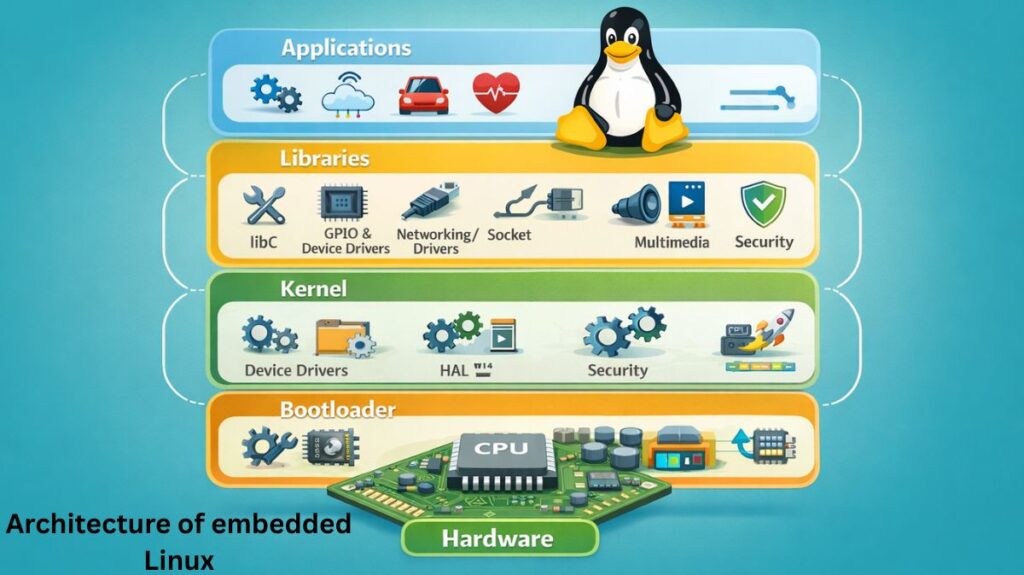
- Hardware Layer: The hardware is located at the bottom and is often an ARM or RISC-V chip.
- Bootloader: The Bootloader (such as U-Boot) is located above that and is essentially the “alarm clock” that alerts the hardware to awaken.
- Linux Kernel: Next is the Kernel, the brain that communicates with sensors and controls memory.
- CPU usage
- Memory allocation
- Device drivers
- Input/output operations
- Root File System: The Root File System, a small collection of files and your particular application that actually causes the device to function, is located at the top.
Also read about Linux File System Structure Explained: Root And Directories
Types of Embedded Linux
| Type | Best For | Examples |
| Custom (Roll-Your-Own) | Fully optimized, production-grade products. | Yocto Project, Buildroot |
| Enterprise/Generic | Quick prototyping or managed device fleets. | Ubuntu Core, Fedora IoT |
| Community/Development | Learning and hobbyist projects. | Raspberry Pi OS, DietPi |
| Real-Time | Safety-critical or deterministic tasks. | Linux with PREEMPT_RT |
Commands & Practical Examples
Checking System Footprint
On an embedded system, resources are tight. Monitoring is the first step:
bash

# Check available memory in Kilobytes
free -k

# Check disk space on the root partition
df -h /
Interfacing with Hardware (GPIO)
In 2026, most embedded systems use the /sys/class/gpio or libgpiod to control hardware pins:
bash

# Turn on an LED connected to GPIO pin 18 (using gpioset)
gpioset gpiochip4 18=1

# Read a button state
gpioget gpiochip4 17
Viewing Kernel Logs (Debugging)
If a sensor isn’t working, check the kernel buffer:
bash

# View the last 20 lines of hardware-related messages
dmesg | tail -n 20
Desktop vs Embedded
| Feature | Desktop Linux | Embedded Linux |
| User Interface | Full Desktop Environment (GNOME/KDE) | Often Headless or Single App GUI |
| Update Method | Package Managers (apt/dnf) | Read-only images or OTA updates |
| Boot Time | 15–40 Seconds | 1–5 Seconds |
| Storage | SSD/HDD (Large) | Flash/SD Card (Small) |
| User Access | Keyboard and Monitor | Usually SSH or Serial |
| Update Style | Individual package updates | Usually, SSH or Serial |
| Customization | Pre-configured | Built from source |
| Primary Goal | General Multi-tasking | Dedicated Specific Task |
Also read about What Is GRUB Bootloader? Linux Boot Process And Commands