

What are device drivers in Linux?
Linux Device Drivers are software components that provide communication between the operating system and hardware, enabling the kernel to interface with a variety of computer-connected devices, including printers, network adapters, and storage devices.
Device drivers for Linux continue to be the essential “translators” of the operating system in 2026. To make sure they can communicate with each other, they are positioned between the low-level hardware components (like a Wi-Fi chip or a GPU) and the high-level software you use (like a browser or a media player).
How do Linux device drivers work?
The driver serves as a go-between. When a user-space program, such as a video player, requires hardware, such as a sound card, it does not communicate with the hardware directly.
System Call: The application calls a system function (like write()).
Kernel Handling: After receiving the call, the kernel determines which driver is in charge of that particular piece of hardware.
Driver Action: The write() command is converted by the driver into particular register-level instructions that the hardware chip can comprehend.
Hardware Response: When the data is ready, the hardware completes the task and interrupts the driver.
Also read about Understand the Architecture of Embedded Linux for Beginners
Types of device drivers in Linux
Linux categorizes drivers based on how they handle data:
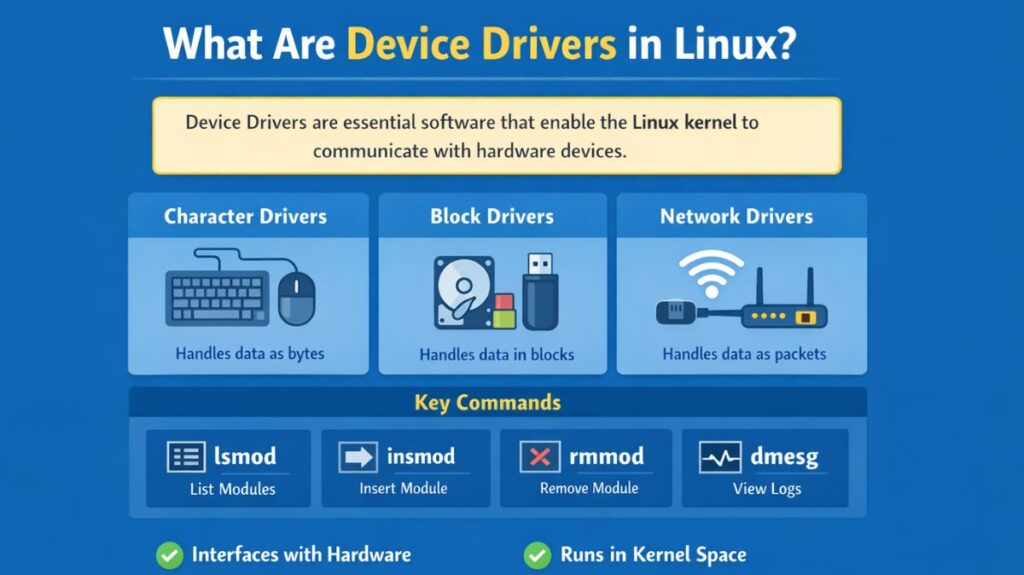
Character Device Drivers (/dev): Data is handled sequentially, one byte at a time, by Character Device Drivers (/dev). For devices that don’t need buffering, they are the most prevalent kind.
- Keyboards, mice, sound cards, serial ports, and cameras are a few examples.
- Identification: Designated with a “c” in the /dev directory’s first column of the ls -l output.
Block Device Drivers (/dev): These can read or write any block on the device in any order since they handle data in big chunks (blocks) and provide random access. They allow file systems to be mounted.
- Examples include CD-ROMs, USB flash drives, and hard drives (HDD/SSD).
- Identification: Indicated by a “b” in the ls -l output’s first column.
Network Device Drivers: They control network interfaces and send packets of data instead of blocks or bytes. They use the BSD socket interface instead of /dev entries.
- Wi-Fi adapters and Ethernet cards are two examples.
| Type | Data Handling | Examples |
| Character | Processes data as a stream of bytes (one by one). | Keyboards, Mice, Serial Ports (/dev/tty) |
| Block | Processes data in fixed-sized chunks (blocks). Supports random access. | SSDs, Hard Drives, USB Flash Drives |
| Network | Processes data as packets. Does not appear in /dev. | Ethernet (eth0), Wi-Fi (wlan0) |
Essential Tools & Commands
Tools for Development
- Kbuild: The Linux kernel build system.
- Linux Headers: Necessary files for compiling drivers against your specific kernel version.
- GDB/KGDB: For debugging kernel-level code.
Common Commands
lsmod: Lists all currently loaded kernel modules (drivers).insmod [driver.ko]: Manually inserts a driver into the running kernel.rmmod [driver_name]: Removes a driver from the kernel.modinfo [driver_name]: Shows details about a driver (author, license, parameters).dmesg | tail: Displays the kernel log, which is where drivers print status or error messages.
Advantages & Drawbacks
| Advantages | Drawbacks |
| Open Source: You can fix bugs or add features yourself. | Kernel Panics: A bug in a driver can crash the entire OS (Blue Screen equivalent). |
| Modular: No need to reboot when adding new hardware. | Steep Learning Curve: Requires deep knowledge of C and memory management. |
| High Performance: Runs in kernel space with direct hardware access. | Version Sensitivity: Drivers often need to be recompiled when the kernel updates. |
Also read about What is Docker in Linux? Installation, Commands & Use Cases
Linux device driver example
Example: A Simple “Hello World” Driver
In Linux, even a simple driver follows a specific structure:
C

#include <linux/init.h>
#include <linux/module.h>

static int __init my_driver_init(void) {
    printk(KERN_INFO "Driver Loaded Successfully!\n");
    return 0;
}

static void __exit my_driver_exit(void) {
    printk(KERN_INFO "Driver Unloaded.\n");
}

module_init(my_driver_init);
module_exit(my_driver_exit);
How to find drivers on Linux?
Identify Your Hardware
Before checking drivers, you need to know what hardware is present.
For PCI devices (GPU, network cards, etc.)
bash

lspci
For USB devices
bash

lsusb
For all hardware details
bash

sudo lshw
Check Which Driver Is in Use
Using lspci with driver info
bash

lspci -k
This shows:
- Device name
- Kernel driver in use
- Available kernel modules
Also read about What Is Kubernetes On Linux? Tools, Features, And Commands
Check Loaded Drivers (Kernel Modules)
Linux drivers are usually loaded as kernel modules.
bash

lsmod
To search for a specific driver:
bash

lsmod | grep <driver_name>
Get Detailed Hardware and Driver Info
bash

sudo lshw -c network
or for graphics:
bash

sudo lshw -c display
This shows:
- Driver name
- Configuration
- Status
Check Driver Messages (Logs)
You can see what drivers are loaded during boot:
bash

dmesg | grep -i driver
For specific hardware:
bash

dmesg | grep -i usb
dmesg | grep -i gpu
Also read about Backup And Restore In Linux Explained With Rsync, Tar & DD
Find Missing Drivers
If a device is not working:
bash

sudo lshw -c network
Look for:
bash

configuration: driver=...
If it shows:
bash

UNCLAIMED
→ Driver is missing.
Use Ubuntu Driver Tool (GUI & CLI)
Command line:
bash

ubuntu-drivers devices
To install recommended drivers:
bash

sudo ubuntu-drivers autoinstall
Check Graphics Drivers (NVIDIA/AMD)
NVIDIA:
bash

nvidia-smi
General GPU info:
bash

glxinfo | grep "OpenGL renderer"
Search Drivers in Package Manager
bash

apt search <driver-name>
Example:
bash

apt search nvidia-driver
Summary
- Linux already includes most drivers
- Use
lspci -kto check driver usage - Use
lsmodto see loaded drivers - Use
lshwfor detailed info - Use
dmesgfor troubleshooting - Use
ubuntu-driversfor automatic installation
Simple Example Workflow
bash

lspci
lspci -k
lsmod | grep driver_name
Also read about Linux for Edge Computing: Features, Benefits, and Examples