

Arch Linux distros list
The Arch ecosystem has grown into distinct “sub-types.” These distributions (distros) take the Arch core and modify it for particular users, such as security specialists or gamers, but pure Arch still serves as the foundation.
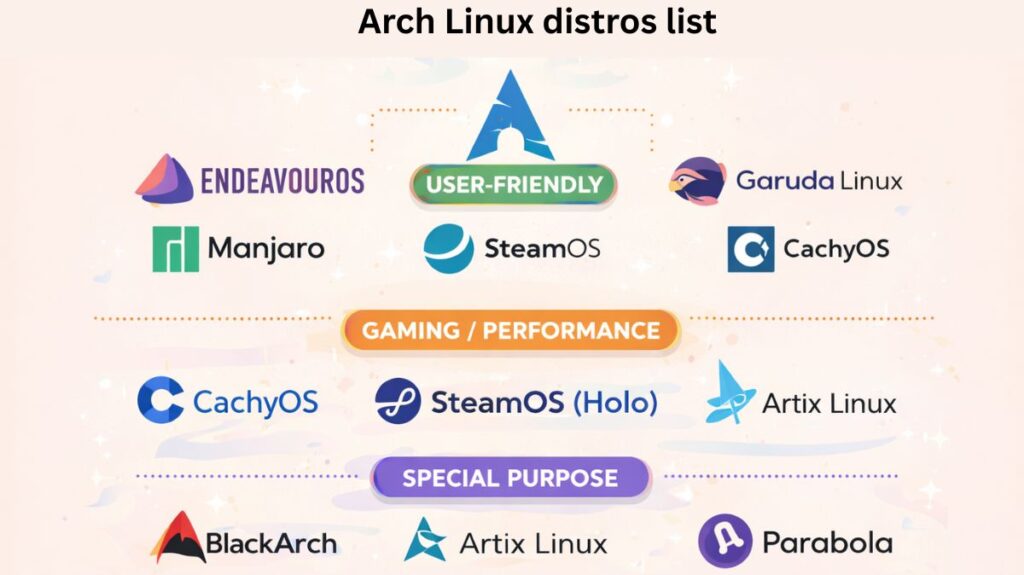
Arch Linux distros categorized by their purpose:
The “User-Friendly” Entry Points
By offering pre-configured desktops and a graphical installer (Calamares), these distributions alleviate the “pain” associated with Arch.
EndeavourOS
Antergos’ spiritual heir is EndeavourOS. “Pure Arch” is extremely similar to it, except it has a welcoming app and an easy setup. Although terminal-centric, it is beneficial.
Manjaro
The most “corporate” Arch distro is Manjaro. It contains unique hardware detection techniques and its own software repositories, which were delayed for two weeks for stability.
Garuda Linux
Renowned for its performance enhancements and “Dragonized” neon looks. You can rollback an update from the boot menu if it causes problems with your system because it uses the Btrfs file system with automated snapshots.
The Gaming & Performance Experts
For customers who demand every extra frame per second (FPS) from their hardware, these are quite popular in 2026.
CachyOS
A 2026 rising star. It compiles applications especially for contemporary CPUs (x86-64-v3/v4) and uses kernels that have been optimized. On fresh hardware, it is notably quicker than conventional Arch.
SteamOS (Holo)
The Steam Deck’s operating system. It is based on Arch and is fully tuned for mobile and controller-based gaming, despite being immutable (closed down).
Also read about What Are The Arch Linux Advantages And Disadvantages?
The Aesthetics & Minimalists
Archcraft
It is well-known that Archcraft is “purely aesthetic.” It comes with lovely, pre-configured Window Managers like Openbox and Bspwm and is remarkably light (it can run on less than 500MB of RAM).
ArcoLinux
An extensive educational initiative. It provides several levels (L, D, and B) with hundreds of video tutorials to teach you how to gradually create your own unique ISO.
Particular Use Cases
BlackArch
A formidable “Penetration Testing” tool. More than 2,800 cybersecurity technologies are pre-installed on it. It is Kali Linux’s arch-based competitor.
Artix Linux
For those who like Arch without systemd, there is Artix Linux. It enables you to utilize other init systems, such as S6, runit, or OpenRC.
Parabola GNU/Linux-libre
A completely “Free Software” variant of Arch is Parabola GNU/Linux-libre. Because it eliminates all proprietary drivers and “bloat,” it is favored by those who value freedom and privacy.
Which one should you install?
- Adobe or Microsoft Office are required for Windows 11 games with robust anti-cheat software.
- Tinkerers and developers seeking a lightweight, completely customized machine use Arch Linux.
- EndeavourOS: You need Arch’s power and software in 15 minutes.
- Fedora: You’re looking for a sleek, contemporary workstation that “just works” while yet offering new capabilities.
| If you want… | Choose this Distro |
| Simple Arch + Stability | Manjaro |
| Pure Arch with an Installer | EndeavourOS |
| Maximum Gaming Speed | CachyOS or Garuda |
| To Learn how Linux works | ArcoLinux |
| To Revive a very weak PC | Archcraft |
Arch Linux install commands
Check Internet
bash

ping google.com
Set Keyboard Layout (optional)
bash

loadkeys us
Update System Clock
bash

timedatectl set-ntp true
Check Disk
bash

lsblk
Partition Disk (example using fdisk)
bash

 /dev/sda
Example layout:
- /dev/sda1 → EFI (512M)
- /dev/sda2 → Root
- /dev/sda3 → Home (optional)
Also read about What Is Linux Distributions (Distros)? Types And Features
Format Partitions
bash

mkfs.fat -F32 /dev/sda1
mkfs.ext4 /dev/sda2
mkfs.ext4 /dev/sda3
Mount Partitions
bash

mount /dev/sda2 /mnt
mkdir /mnt/boot
mount /dev/sda1 /mnt/boot
mkdir /mnt/home
mount /dev/sda3 /mnt/home
Install Base System
bash

pacstrap /mnt base linux linux-firmware nano networkmanager
Generate fstab
bash

genfstab -U /mnt >> /mnt/etc/fstab
Change Root
bash

arch-chroot /mnt
Set Timezone
bash

ln -sf /usr/share/zoneinfo/Asia/Kolkata /etc/localtime
hwclock --systohc
Set Locale
bash

nano /etc/locale.gen
Uncomment:
en_US.UTF-8 UTF-8Then:
bash

locale-gen
echo "LANG=en_US.UTF-8" > /etc/locale.conf
Set Hostname
bash

echo "archlinux" > /etc/hostname
Set Root Password
bash

passwd
Install Bootloader (GRUB for UEFI)
bash

pacman -S grub efibootmgr
grub-install --target=x86_64-efi --efi-directory=/boot --bootloader-id=ARCH
grub-mkconfig -o /boot/grub/grub.cfg
Enable Network
bash

systemctl enable NetworkManager
Create User
bash

useradd -m -G wheel hema
passwd hema
EDITOR=nano visudo
Uncomment:
sql

%wheel ALL=(ALL) ALL
Also read about What Is The GNOME Terminal In Linux? GNOME-Terminal Uses
Exit & Reboot
bash

exit
umount -R /mnt
reboot
Install Desktop (GNOME example)
bash

pacman -S gnome gdm
systemctl enable gdm
reboot
Beginner Friendly Method
Arch also provides a guided installer:
bash

archinstall
This gives you a menu-based setup (much easier).
| Task | Command |
|---|---|
| Install system | pacstrap |
| Update system | pacman -Syu |
| Install software | pacman -S |
| AUR helper | yay |
| Chroot | arch-chroot |
Arch Linux vs Windows 11 (2026 Edition)
| Feature | Windows 11 | Arch Linux |
| Philosophy | “The OS knows best.” Focuses on AI (Copilot), services, and ease of use. | “User knows best.” Focuses on minimalism, transparency, and manual control. |
| Performance | High background usage (telemetry, indexing, AI). Idle RAM: ~4-5GB. | Lean and lightning-fast. Idle RAM: ~500MB – 1GB (depending on desktop). |
| Updates | Major yearly versions + frequent forced reboots. | Rolling Release: Install once, update forever. No forced reboots. |
| Gaming | 100% compatibility. Home of Game Pass and Anti-Cheat. | ~90% compatibility via Steam/Proton. Fails on games with kernel-level Anti-Cheat. |
| Privacy | High data collection and targeted ads in Start Menu. | Zero telemetry. No data is sent anywhere without your permission. |
| Price | ~$139 (or included with hardware). | Free. |
If you don’t mind learning how the system operates and wish to recover your gear from corporate tracking, switch to Arch. If you play competitive shooters like Valorant or want specialized tools (Adobe Suite, CAD), stick with Windows.
Also read about Explain File Permissions In Linux & Ownership With Examples