

How linux works
Linux operates as a unified ecosystem of user interfaces, system services, and hardware management. A thorough explanation of the operating system’s functions, from the time it turns on to how it manages daily duties, may be found below.
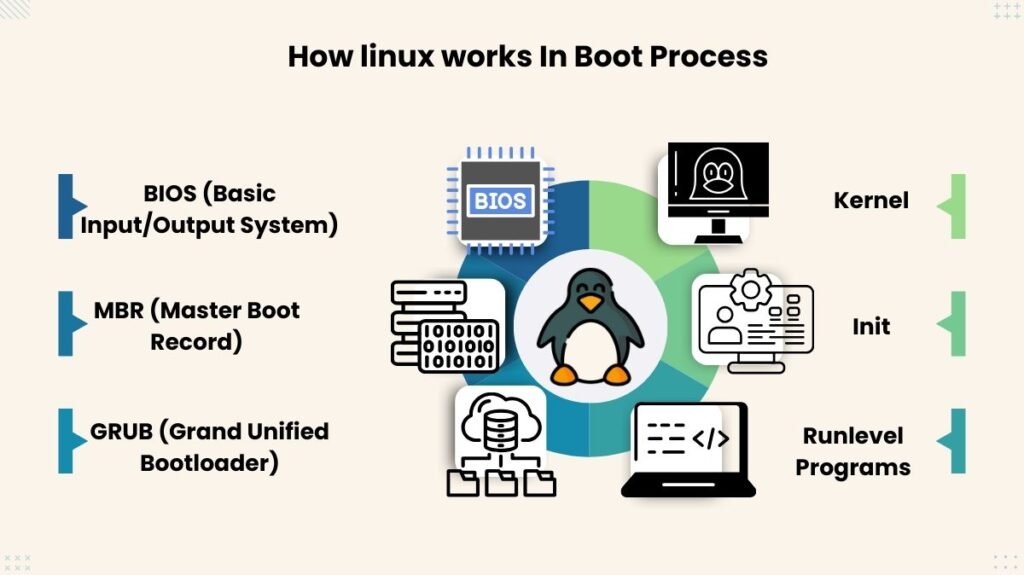
The Linux Boot Process (6 Key Stages)
An organized six-step boot process transfers control from the hardware to the software at the start of a Linux system’s operation:
- BIOS (Basic Input/Output System): The BIOS looks for a boot loader on storage media, such as a CD-ROM or hard drive, and examines the integrity of the system. After detection, it grants control and loads the software into memory.
- MBR (Master Boot Record): This file, which is less than 512 bytes in size and is found on the bootable disk’s first sector, includes details about the GRUB bootloader.
- GRUB (Grand Unified Bootloader): This lets the user select the kernel image to run. It loads the chosen kernel and initrd (Initial RAM Disc) images and is aware of the file system.
- Kernel: Often referred to as the “heart” of the operating system, the kernel runs the /sbin/init program and mounts the root file system. Until the actual root file system is mounted, the initrd acts as a stand-in.
- Init: To determine the Linux runlevel (such as single-user mode, multiuser mode, or GUI mode), this software examines the /etc/inittab file.
- Runlevel Programs: Depending on the selected runlevel, the system launches required background processes, such as networking or email daemons, by executing particular services from preset directories (such as /etc/rc.d/rc3.d/).
Also Read About What Is Linux? A Brief History And Evolution Of Linux
The Core Engine: The Linux Kernel
The main element in charge of overseeing all system operations and hardware resources is the kernel. It serves as a conduit between hardware and programs, managing the following vital tasks:
- The creation, scheduling, and termination of processes are handled by process management.
- Memory management is the process of monitoring and allocating system memory (RAM) to different programs.
- Device drivers: These provide the interface needed to manage hardware elements such as network adapters, discs, and graphics cards.
- File Systems: Controls the storage and retrieval of data from several file system types, such as btrfs, xfs, and ext4.
System Segregation: User Space vs. Kernel Space
Linux divides memory into two different regions to guarantee stability and security:
- Kernel Space: The kernel runs in this secure and confined space. By executing the kernel here, you can stop underdeveloped apps from manipulating important resources and causing the system to crash.
- User Space: This is where system daemons, tools, and user programs operate. An application in user space must “system call” the kernel in order to access memory or hardware.
User Interaction: The Shell and CLI
The main interface for interacting with the Linux operating system is the shell. It functions as a command-line interpreter, receiving user commands and forwarding them to the kernel for processing.
- Popular Shells: Popular environments include Fish (easy to use with autosuggestions), Zsh (quite customisable with themes), and Bash (the default for most distros).
- Everything is a File: According to the Linux concept, almost everything is regarded as a file, including process information (found in /proc) and hardware devices (found in /dev).
Background Services: System Daemons
A daemon is an ongoing background activity that responds to sporadic service requests without requiring direct user input. Usually, they wait for certain conditions and begin at boot time. To accept authorised inbound remote login requests, for instance, the sshd daemon operates in the background.
Data Organization: The Hierarchical File System
Linux’s file system is organised like a hierarchical tree, with the root directory (/) at the top. The Filesystem Hierarchy Standard (FHS) defines the following important directories:
- /bin and /sbin: Essential binaries and system tools.
- /etc: System configuration files.
- /home: Individual user directories.
- /var: Variable files like system logs (often found in
/var/log).
Why Linux Is Important
The main reason Linux is significant now is that, although we may not always be aware of it, a large portion of the digital world depends on it. It’s highly likely that a Linux system is operating in the background when you access a website, stream a video, use online banking, or store data on the cloud. It does the task without being ostentatious or attempting to be.
Linux’s open source nature is a major factor in its continued relevance. One business does not own it. The code can be reviewed, improved, and edited by developers. A vast worldwide community contributes features, improves security, and patches errors due to this openness. Closed, proprietary systems can’t collaborate like that.
Another factor is reliability. Long periods without crashes or restarts are typical of Linux systems. Server rooms and data centres require stability. Businesses can’t afford crash-prone systems, yet Linux is known for staying up when it counts.
Another factor is security. Linux makes wrongdoing difficult. By default, permissions are strict and updates frequent. The many code reviews identify and fix security vulnerabilities quickly. Governments, researchers, and cybersecurity experts trust Linux more than other systems.
Modern technologies use Linux. The Linux kernel powers Android. Linux underpins most cloud platforms. AI research systems, supercomputers, and experimental technologies need it. Linux quietly advances with technology.
Linux matters because it works, not because it wants to be famous. It promotes industry-wide innovation, system stability, and individual empowerment. Linux is essential due of its quiet dependability.
Also Read About Linux Architecture Layers: Kernel, Shell, And Hardware