

Difference between user and group management in linux
While User and Group management are two sides of the same administrative coin, they serve fundamentally different objectives in a Linux system. Think of a User as an individual identity and a Group as a permission-sharing bucket.
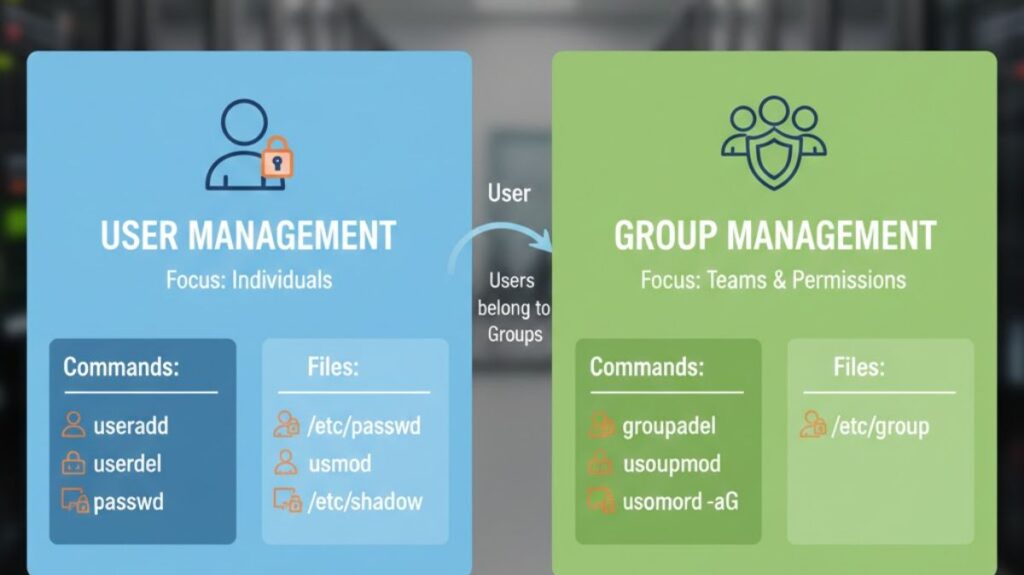
Core Definitions
- User Management: User management is centered on the individual. It defines login users, their passwords, home directories, and environment settings (like shell).
- Group Management: Roles are the main emphasis of group management. It is used to bundle numerous users together so that an administrator can apply the same set of rights to everyone in that bundle simultaneously.
Also read about Explain User And Group Management In Linux With Examples
User Vs Group management in linux
| Feature | User Management | Group Management |
| Primary Goal | Authentication (Who are you?) | Authorization (What can your team do?) |
| Identification | Unique UID (User ID) | Unique GID (Group ID) |
| Home Directory | Usually has /home/username | Does not have a directory |
| Filesystem | Owns files/folders | Grants access to files/folders |
| Storage File | /etc/passwd | /etc/group |
| Primary Command | useradd, usermod, userdel | groupadd, groupmod, groupdel |
How They Communicate
In Linux, every User must belong to at least one group (their Primary Group, commonly named the same as the username). A user may, nevertheless, also belong to numerous Secondary Groups.
The Workflow Example:
- You create 5 Users (Alice, Bob, Charlie, etc.).
- You establish a single group named
accounting. - The
accountinggroup is expanded to include all five users. - Instead of altering permissions on a folder 5 times, you modify it once for the
accountinggroup.
Why Use Both?
Efficiency: If a new person joins the marketing team, you don’t need to manually give them access to 100 separate folders. You simply create their User account and add them to the marketing Group.
Security: If a person departs the organization, their access is immediately terminated by deleting their account, but the group is still accessible to the other team members.
Organization: User management handles personal settings (such a custom desktop wallpaper), while Group management manages shared resources (like access to a printer or a shared database).
Security Context
- User-level “My documents” are separated from “Your documents.”
- Group level: Shields “The Finance Department’s files” from “The Engineering Department’s files.”
Also read about Explain File Permissions In Linux & Ownership With Examples
User and group management in linux interview questions
How do you create a user in Linux?
Using the useradd command:
nginx

useradd john
This creates a user but does not set a password.
To set a password:
nginx

passwd john
How do you delete a user?
nginx

userdel john
To remove the user and home directory:
css

userdel -r john
How do you modify a user?
The usermod command is used.
Change username:
nginx

usermod -l newname oldname
Change home directory:
arduino

usermod -d /home/newdir -m john
Add user to a group:
nginx

usermod -aG developers john
Also read about How To Create A Startup Service In Linux Using Systemd
How do you create and manage groups?
Create a group:
nginx

groupadd testers
Delete a group:
nginx

groupdel testers
Modify a group name:
nginx

groupmod -n qa testers
What is primary and secondary group?
Primary group
This is the main group assigned to a user when the account is created.
Secondary group
Additional groups a user belongs to.
Check groups:
bash

groups john
How do you check current logged-in user?
bash

whoami
Or:
bash

who
How do you list all users in Linux?
bash

cat /etc/passwd
Or:
nginx

getent passwd
What is UID and GID?
- UID (User ID): A unique number assigned to each user.
- GID (Group ID): A unique number assigned to each group.
Linux internally identifies users and groups using IDs, not names.
What is the su command?
The su command allows switching to another user.
nginx

su root
This switches to the root user.
What is the sudo command?
sudo allows a normal user to execute commands with root privileges.
Example:
bash

sudo apt update
Only users listed in /etc/sudoers can use this.
Also read about What Is The Difference Between Systemd And Systemctl?
What is the id command?
Displays user identity.
bash

id john
Shows UID, GID, and groups.
How do file permissions relate to users and groups?
Every file in Linux has:
- An owner (user)
- A group
- Permissions for others
Example output:
csharp

-rwxr-xr-- 1 john developers file.txt
Meaning:
- Owner: john
- Group: developers
- Others: rest of users
What is the purpose of /etc/login.defs?
It controls default settings for user accounts, such as:
- Password expiry
- Minimum UID
- Home directory settings
What is newgrp?
newgrp allows a user to switch their primary group temporarily.
nginx

newgrp developers
What is the difference between useradd and adduser?
useradd: Low-level command, minimal setup.adduser: High-level interactive command (available in Debian-based systems).
Common interview scenario questions
Q: How do you give a user access to a shared folder?
Answer:
Create a group, add users to the group, and assign folder permissions to the group.
Q: How do you lock a user account?
nginx

passwd -l john
Q: How do you unlock a user account?
nginx

passwd -u john
Also read about Basic Linux Commands For Beginners With Easy Examples