

What is Red Hat Enterprise Linux?
Red Hat Enterprise Linux (RHEL) is a commercially supported, open-source Linux operating system designed for businesses, providing a stable, secure, and flexible platform for workloads across physical, virtual, cloud, and edge environments, known for its reliability, performance, and extensive management tools, serving as a foundation for enterprise applications with support from Red Hat. It’s built on Fedora Linux and CentOS Stream, offering features like strong security (SELinux), automation, and consistent deployment across hybrid infrastructures, with versions for servers, workstations, and edge computing.
History of RHEL
Red Hat Enterprise Linux’s beginnings can be seen in the early 1990s Linux adoption period. Red Hat Linux was first made available as a free distribution by Red Hat. Red Hat saw the need for a dependable, well maintained operating system designed for businesses as Linux started to gain traction in commercial settings. As a result, Red Hat Enterprise Linux was released in 2002.
Many community distributions lacked the long support lifespan and predictable release cycle that RHEL brought. Red Hat eventually completely turned its attention to enterprise solutions, while community innovation persisted through initiatives like Fedora. RHEL is now tightly linked with contemporary technologies including cloud-native platforms, virtualization, containers, and DevOps tools.
Also Read About What Is Linux Distributions (Distros)? Types And Features
Red hat enterprise linux features
Dnf is the main command-line tool used by RHEL, which is based on the RPM (Red Hat Package Manager) system. However, its special qualities are what give it true power:
- Security-Enhanced Linux, or SELinux, is a required access control system that was created in collaboration with the NSA. SELinux can prevent hackers from accessing sensitive files even if they gain “root” access.
- System Roles: Instead of spending hours manually configuring a server, install a web server or database in seconds with pre-written Ansible scripts.
- You may administer servers using the Web Console (Cockpit), a stunning dashboard that runs in your browser, without ever having to touch the terminal.
- Live Patching: The Linux kernel can be updated while the computer is still operating. No downtime, no reboots.
| Feature | RHEL | Community Linux (Ubuntu/Debian) |
| Cost | Paid (Subscription) | Free ($0) |
| Support | 24/7 Phone/Ticket Support | Community Forums/Google |
| Security | Hardened (SELinux default) | Standard (AppArmor/Custom) |
| Updates | Slow, ultra-stable | Frequent, modern |
Advantages of RHEL
- Legendary Stability: RHEL has “hardened.” The packages, which are often older than Fedora or Ubuntu, are tested to ensure they won’t crash under 100% CPU load for months.
- Every major release has a 10-year lifespan. You can build a system now and get security updates until 2036.
- Military-Grade Security (SELinux): RHEL is famous for its Security-Enhanced Linux system, developed with the NSA. Every process has “sandboxes” to prevent a hacked program from influencing the system.
- Dell, HP, and IBM servers are “Certified for RHEL.” Red Hat and the manufacturer work together to fix broken hardware.
- No-Restart Patching: Kpatch updates the Linux kernel, the operating system’s brain, without restarting the server. For hospitals and banks, this is essential.
- Your membership includes RHEL Insights, an AI-powered tool that checks your servers for possible crashes or security flaws before they occur.
Disadvantages of RHEL
- The Subscription “Tax”: RHEL requires a paid subscription for production use, in contrast to Debian or Ubuntu. This can cost thousands of dollars annually for a big business.
- The “Bleeding Edge” Gap: The official RHEL repos won’t have the most recent versions of Python, Node.js, or a particular gaming driver. “Old and stable” is given precedence above “new and flashy.”
- RHEL is not for novices because to its steep learning curve. Compared to user-friendly distributions, commands like nmcli (for networking) and configuring SELinux policies can be annoyingly complicated.
- Rigid Ecosystem: Red Hat strongly promotes the use of their proprietary tools, such as Ansible or Podman rather than Docker. Leaving the “Red Hat way” might be challenging.
- Registration Difficulty: Without initially registering the system to a Red Hat account, you are unable to perform dnf update. This makes every deployment an irksome extra step.
- Hardware Lock-in: It is overkill for a simple home laptop because its best capabilities are tailored for costly enterprise-grade hardware, even if it works on all devices.
Use Cases: Who actually uses this?
Financial Services: Managing sub-millisecond latency while processing millions of transactions per second.
The Public Sector: SELinux locks are necessary for high-security government databases.
Hybrid Cloud: Businesses that use OpenShift (Red Hat’s Kubernetes platform) to move apps between their own data centers and the cloud.
Critical Infrastructure: Critical infrastructure includes telecommunications networks and power grids where a “Blue Screen of Death” is not an option.
Also Read About Ubuntu Use Cases And Ubuntu Install From USB Step By Step
RHEL Installation
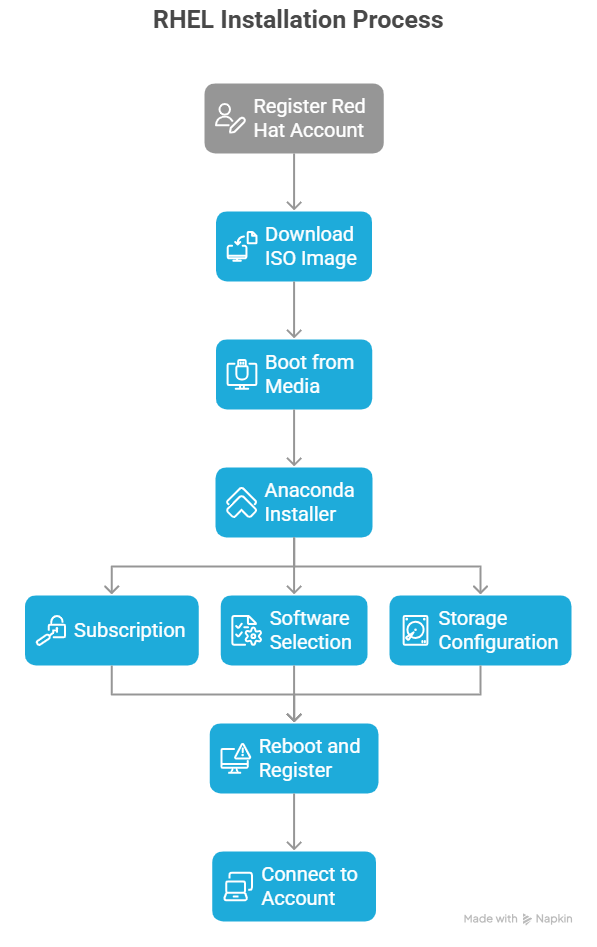
Because a Red Hat Account is required, installing RHEL is different.
Register: Red Hat provides a free “Developer Subscription”. To register, visit the Red Hat Customer Portal.
Download the ISO: Get the Binary DVD ISO for your architecture (often x86_64) and download it.
Boot the Media: Flash the media to a USB drive and start it up.
The Installer of Anaconda:
- Subscription: In order to receive updates throughout the installation, you must sign in using your Red Hat ID.
- Software Selection: Select “Minimal Install” if you’re an expert, or “Server with GUI” if you’re a novice.
- Storage: Allow it to utilize Red Hat’s recommended high-performance XFS file system.
Reboot & Register: To connect the computer to your account after installation, launch subscription-manager register.
2026 Outlook
As artificial intelligence (AI) has grown, RHEL has incorporated RHEL AI, a platform for executing large language models (LLMs) in a secure, private setting. Without transferring their data to the public cloud, it enables businesses to train their own AI.
The conclusion: The best thing about RHEL is that it’s dull. It is made to never let you down, never surprise you, and never collapse.
Also Read About Linux Shell Scripting Best Practices For Writing Scripts