What is CentOS?
The Linux distribution CentOS, which stands for Community ENTerprise Operating System, was created to offer a free, reliable, and enterprise-class computer platform. Because it is based on the same source code as Red Hat Enterprise Linux, it is both binary-compatible and publicly available. CentOS has long been a favorite among system administrators and businesses seeking enterprise-level dependability without the expense of a commercial subscription due to this compatibility.
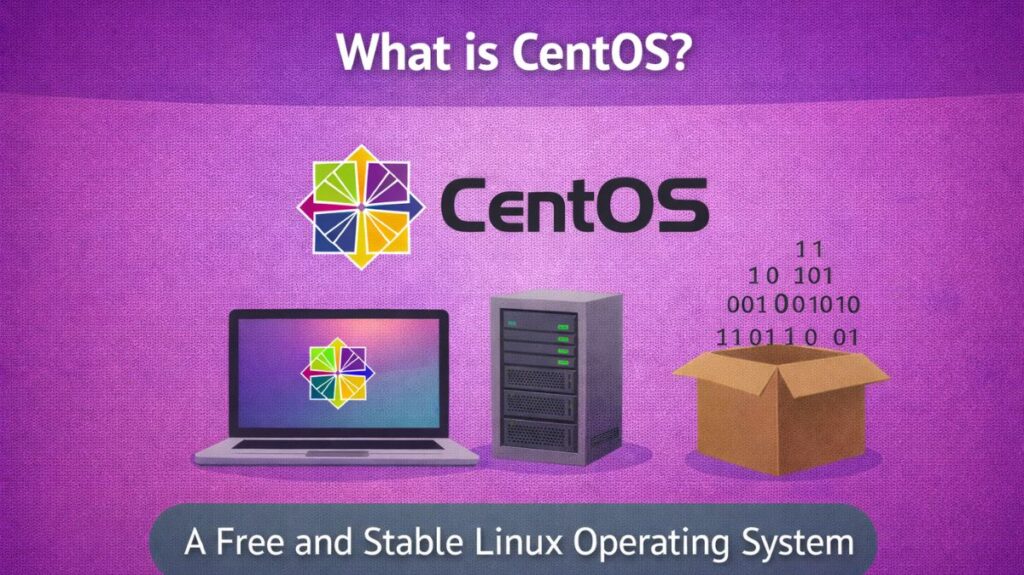
There are now two different versions as of 2026:
- CentOS Linux (Legacy): The previous “stable” version that was an exact replica of RHEL. This is no longer alive (EOL).
- The most recent “upstream” version is CentOS Stream (Modern). Stream serves as a sneak peek of the upcoming edition of RHEL rather than a replica of the original.
Also Read About XFS File System Commands And Ext4 Vs XFS File System
History
- 2004: CentOS, a free substitute for RHEL, is created.
- 2014: Red Hat and CentOS formally collaborate.
- 2020: The year of the “Great Disruption.” Red Hat declares that it is discontinuing “CentOS Linux” in order to concentrate on “CentOS Stream.”
- 2024: June 30 marks the End of Life of CentOS 7. Suddenly, millions of servers are left without updates.
- 2026: While developers use CentOS Stream 10 for testing, the majority of users have switched to Rocky Linux or AlmaLinux.
How CentOS works in linux
To comprehend CentOS’s operation, you must examine its “DNA.” It is a component in Red Hat’s three-step production line and does not exist in a vacuum.
CentOS functions as a “Midstream” distribution in 2026. It is situated precisely in the center of a development pipeline that creates corporate software of the highest caliber from experimental code.
The Production Line (Where CentOS Fits)
CentOS does not create its own software from the ground up. Rather, it executes code that passes through these three phases:
- New concepts and “bleeding edge” software are initially presented at Fedora (The Lab). It is thrilling and quick, but it can also be erratic.
- Code that makes it past the Fedora stage goes to CentOS Stream, often known as “The Gateway.” The community collaborates with Red Hat engineers to improve it. This serves as a “Rolling Preview” of the upcoming events.
- Red Hat Enterprise Linux (RHEL) is the finished product once the CentOS Stream code has been refined and shown to be incredibly reliable.
The Mechanics: Its Software Management System
Three fundamental technical elements that characterize the “Enterprise Linux” experience are used by CentOS to function:
The Package Manager: DNF & RPM
- Consider RPM (Red Hat Package Manager) to be the equivalent of
.deb. The developed software, its metadata, and file placement guidelines are all contained in this file format.
- DNF (Dandified YUM) is the installation command-line tool. When you run
sudo dnf install httpd, DNF searches CentOS servers for the right RPM, looks for missing “dependencies” (helper files), and installs everything in order.
Security: SELinux (The Bouncer)
- By default, CentOS uses Security-Enhanced Linux (SELinux), in contrast to previous Linux versions that only rely on “user permissions.”
- It functions by assigning a “label” to each file and process. SELinux will detect that the label does not match the “Database” files and prevent the hacker from accessing them even if they manage to take over your Web Server (the
httpdprocess).
The Kernel: Stability over Speed
A “Stable” Linux kernel powers CentOS.CentOS often uses a kernel that has been “backported” with security updates, however other versions may use version 6.x. This ensures the system won’t crash after 500 days without rebooting.
Tiers of Architecture (2026 Standards)
- The way CentOS (more especially, Stream 10) communicates with hardware has changed as of 2026. The target is now x86-64-v3.
- This implies that it no longer “just works” on all outdated computers from fifteen years ago. To operate, it needs contemporary CPU characteristics (such as AVX2), which makes the software much faster and safer on contemporary servers.
The Workflow
- Repository Check: The “AppStream” and “BaseOS” repositories are examined by the system when you request an update.
- Dependency Resolution: DNF precisely determines needed libraries to prevent system failure.
- Before installation, CentOS verifies the file’s digital “signature” with GPG to ensure no third parties have altered it.
- Installing the software in /usr/bin/ for programs and /etc/ for configurations is usual in enterprise environments.
Also Read About Explain Different Types Of Linux Shells In Operating System
CentOS pros and cons
Pros
- RHEL “Inside Track”: CentOS Stream provides you with an early look at the upcoming Red Hat Enterprise Linux release. Before new features are released to the corporate world, you get to try them out.
- Unlike CentOS, which had to “clone” changes after Red Hat released them, CentOS Stream may deploy fixes immediately.
- Community Contribution: Users can now directly contribute code and ideas to RHEL, influencing its future.
- Total Cost ($0): You can obtain a high-performance kernel and enterprise-grade software engineering without having to pay for a per-server license.
- Extensive Documentation: Nearly every tutorial, patch, or manual created for Red Hat runs flawlessly on CentOS because to its binary compatibility with RHEL.
- Proven Tech Stack: It continues to employ the same reliable tools that control international banks, such as Firewall for network security and SELinux for security.
Cons
- Not “Production Stable”: There is a slight chance that a weekly update could bring a bug because it is a rolling-release (continuous updating). Hospital databases and other mission-critical servers are at risk.
- Shorter Support Lifecycle: CentOS Stream supports five years, RHEL 10.
- No “1:1” Mirroring: Your RHEL is no longer accurate. Third-party software that needs a specific version may have problems since you are using a version that is just a little bit ahead of it.
- No Commercial Support: There is no phone number to call in the event that your server goes down. You rely on your own knowledge and community forums.
- Strict Hardware Requirements: Newer CPUs (x86-64-v3) are needed for modern versions (CentOS Stream 10). Many small business “legacy” servers are no longer able to operate the most recent version.
- Regular Updates: The “Stream” model needs ongoing upkeep. You will ultimately have to deal with update-related modifications if you “set it and forget it” for three years.
Also Read About Ubuntu Operating System: History, Features And Advantages
CentOS Stream vs CentOS Linux