

Types of Services in linux
Linux classifies services according to their purpose, place of origin, and manner of interacting with system resources. Administrators can identify their configuration files and monitor them more effectively if they are aware of these types.
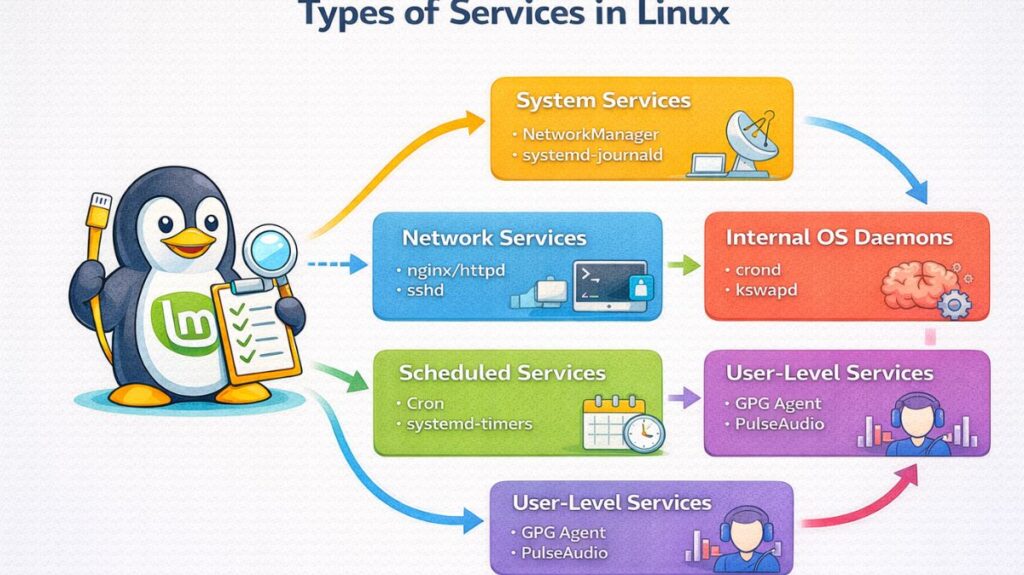
System Services
These are the fundamental services needed for the hardware to communicate with software or for the operating system to operate. Typically, systemd is in charge of them.
- NetworkManager: Controls Ethernet and Wi-Fi network connections.
- Systemd-journald: Manages log data collecting and storage.
- Device events, like as when a USB drive is plugged in, are managed by udev.
Network Services (Daemons)
Through a network, these services keep an ear out for requests coming in from other computers. The foundation of server infrastructure is made up of these.
- Web services:
nginxorhttpd(Apache). - Secure Shell (
sshd) is used for remote access. - File sharing can be done via nfs for Linux or
smbd(Samba) for Windows. - Database services include
postgresqlandmysqld(MySQL/MariaDB).
Scheduled Services (Automated)
These services don’t operate continuously; instead, they wake up to do tasks at predetermined intervals before falling back to sleep.
- The typical time-based work scheduler is called Cron.
- Anacron: For systems that aren’t always in use, it makes sure that tasks are completed even if the machine wasn’t there when they were supposed to.
- Cron’s contemporary substitute, systemd-timers, enables more intricate scheduling logic and improved logging.
Internal OS Daemons
Often invisible to the typical user, they are specialized background programs that control low-level system states.
- Crond: The daemon in charge of carrying out planned cron tasks.
- When RAM is low, Kswapd is responsible for managing virtual memory and “swapping” data between the disk and RAM.
- Syslogd: The classic system message logging daemon, which is frequently included into
journaldin contemporary distributions.
Also read about Process Management In Shell Scripting: Commands & Examples
User-Level Services
These services only operate for the logged-in user and only while they are active, in contrast to system services that run for all users (often as root).
- GPG Agent: Controls a user’s encryption keys.
- The user’s desktop session’s sound is controlled by PulseAudio/PipeWire.
- User-defined Services:
~/.config/systemd/user/contains user-defined services, which let users run their own background scripts without needing administrator (sudo) access.
How to create service in linux
Let’s create a service that runs a simple shell script.
Step 1: Create a Script
Create a script file:
bash

sudo nano /usr/local/bin/myscript.sh
Add the following content:
bash

#!/bin/bash
while true
do
    echo "Service is running at $(date)" >> /var/log/myscript.log
    sleep 10
done
Save and exit.
Make it executable:
bash

sudo chmod +x /usr/local/bin/myscript.sh
Step 2: Create a systemd Service File
Create a service file:
bash

sudo nano /etc/systemd/system/myservice.service
Add this configuration:
bash

[Unit]
Description=My Custom Background Service
After=network.target[Service]
ExecStart=/usr/local/bin/myscript.sh
Restart=always
User=root[Install]
WantedBy=multi-user.target
Also read about Shell Scripting Advanced Examples & Optimizing Shell Scripts
Step 3: Manage the Service
Reload systemd
After creating the service file, reload systemd:
bash

sudo systemctl daemon-reload
Start the Service
bash

sudo systemctl start myservice
Check status:
bash

systemctl status myservice
Enable Service at Boot
bash

sudo systemctl enable myservice
Disable if needed:
sudo systemctl disable myservice
Stop or Restart the Service
Stop:
bash

sudo systemctl stop myservice
Restart:
bash

sudo systemctl restart myservice
Check Logs
To see logs:
bash

journalctl -u myservice
Or check custom log file:
bash

cat /var/log/myscript.log
Understanding the Service File
[Unit] Section
Description– Brief explanation of the service.After=network.target– Starts service after networking is ready.
[Service] Section
ExecStart– Command or script to execute.Restart=always– Automatically restarts if it fails.User– Specifies which user runs the service.
[Install] Section
WantedBy=multi-user.target– Enables service in normal multi-user mode.
Popular linux services
Services are the foundation of server operation and system stability in the Linux environment. Even while there are dozens of services accessible, the business is dominated by a small number of “heavy hitters” that run everything from local file shares to the worldwide internet.
These are the most widely used Linux services, arranged according to their main purpose.
Remote Access Services
- Users and administrators can connect to a terminal from a different place to these services.
- Secure Shell, or SSH, is often the sshd daemon. When it comes to safe, encrypted remote login, it is the norm. Cloud computing as we know it would not be possible without it.
- VNC/RDP: Services that offer a remote graphical desktop interface, such as TigerVNC or XRDP.
Web and Proxy Services
These are the engines that control internet traffic and serve webpages.
- The seasoned web server Apache (httpd) is renowned for its extensive module library and adaptability.
- High-performance web server and reverse proxy Nginx (nginx) is well-known for its quickness and minimal memory consumption.
- Squid is a well-known caching proxy service that workplace networks use to filter content and speed up web browsing.
Database Services
For applications, these services manage, store, and retrieve structured data.
- The most widely used open-source relational databases are MySQL and MariaDB (mysqld), which are utilized by websites like Facebook and WordPress.
- The most sophisticated open-source database, PostgreSQL (postgresql), is preferred for complicated data collections.
- Redis: An “in-memory” data service for real-time analytics and blazingly quick caching.
Network Infrastructure Services
These services manage the “behind-the-scenes” naming and routing that enable communication between devices.
- The most popular Domain Name System (DNS) program is called BIND. Google.com is converted to an IP address.
- Devices that join a network are automatically assigned IP addresses via DHCP (dhcpd).
- The Common Unix Printing System is known as CUPS. For Linux computers, it controls print tasks and printer connections.
File Sharing and Storage Services
As if they were on a local drive, they let computers exchange files and directories.
- Samba (smbd): Enables Linux to use the SMB protocol to share files and printers with Windows machines.
- Network File System, or NFS, is the industry standard for file sharing among Linux and Unix computers.
- Nextcloud: A collection of client-server programs for setting up and utilizing a private “Dropbox” for file hosting.
Security and Monitoring Services
These safeguard the system and monitor its condition.
- Services that oversee the system’s firewall rules and prevent unwanted traffic are known as firewalld or UFW.
- Fail2Ban: Automatically bans the offending IP addresses after monitoring logs for unsuccessful login attempts.
- Grafana and Prometheus are services for real-time data visualization and system performance monitoring.
Also read about Linux File System Structure Explained: Root And Directories