

Linux for Edge
Edge Computing will shift computing power from cloud data centers to sensors, autonomous vehicles, and industrial robots by 2026. Linux is the foundation of this movement due to its hardware compatibility, security, and adaptability.
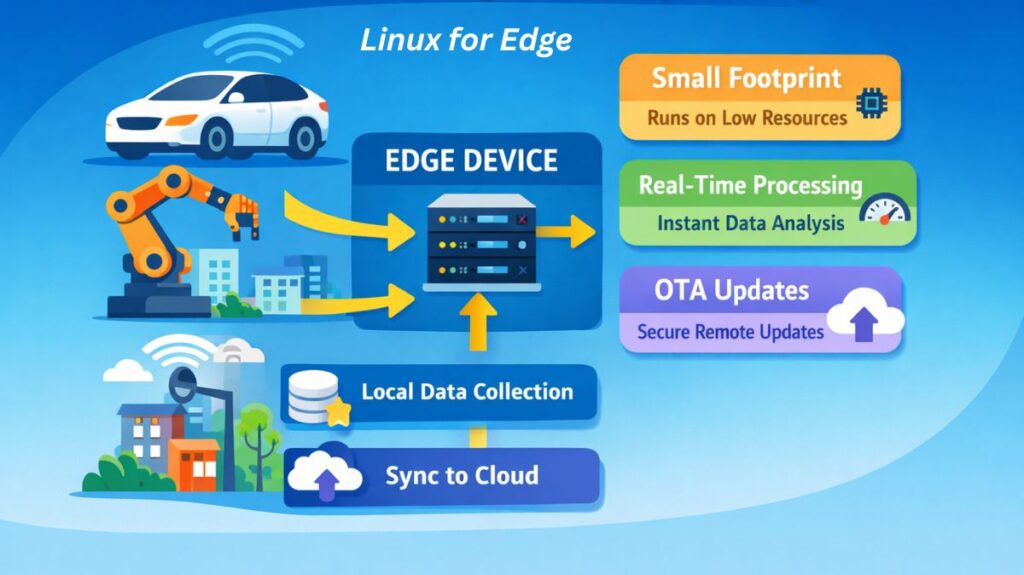
What is Linux Edge Computing?
Edge computing uses local hardware for real-time data processing. Linux for Edge is a tailored, “hardened,” and frequently “stripped-down” version of Linux meant to work safely and quickly on low-resource devices like ARM processors.
How it Works
The “Local Intelligence” layer is Edge Linux.
- Data collection: Linux-powered Edge devices consume sensor data.
- Linux filters, assesses, and combines gigabytes of raw data locally instead of transmitting it to the cloud.
- Cloud Sync: Only critical “metadata” is stored in the cloud for long-term storage or rigorous AI training.
Also read about What is Docker in Linux? Installation, Commands & Use Cases
Key Features
- Small Footprint: Highly efficient kernels can operate with as little as 256MB of RAM.
- The ability to safely and simultaneously update thousands of remote devices is known as over-the-air (OTA) updates.
- Real-Time Capabilities: “Real-Time Linux” (PREEMPT_RT) patches are supported to ensure that tasks are completed in predictable micro-milliseconds.
- Containerization: Delivering apps in lightweight, isolated environments by heavily utilizing Docker and WebAssembly (Wasm).
- Security: Integrated hardware root-of-trust and encrypted storage are utilized to protect devices in physically dangerous locations.
Uses
- Smart Cities: Linux-based Edge nodes are used to handle traffic lights and security cameras in real time.
- Industrial IoT (IIoT) refers to predictive maintenance on factory floors, where Linux monitors vibration sensors to stop a machine before it malfunctions.
- Autonomous Drones: Localized pathfinding and obstacle avoidance are handled by an embedded Linux chip.
- Retail: Instant inventory tracking at the “Edge” of the store and computer vision-based automated checkout systems.
Essential Tools
K3s: An extremely compact (less than 100 MB) Kubernetes version designed for Edge clusters.
Eclipse ioFog: A platform for managing and deploying edge microservices.
BalenaCloud: A complete set of tools for building, setting up, and managing networks of linked Linux devices is called BalenaCloud.
MQTT (Mosquitto): It is a popular messaging protocol for Edge-to-Cloud communication.
Also read about What Is Kubernetes On Linux? Tools, Features, And Commands
Types of Edge Linux Distributions
Standard distributions like Ubuntu are often too heavy for the Edge. Instead, developers use:
| Type | Examples | Best For |
| Lightweight/Minimal | Alpine Linux, Yocto Project | Custom hardware with extremely limited RAM/Storage. |
| Enterprise Edge | Red Hat Device Edge, Ubuntu Core | Managed fleets requiring long-term security updates. |
| Orchestration-Focused | K3s, MicroK8s | Running Kubernetes-style workloads on small devices. |
| OS-for-IoT | Fedora IoT, Flatcar Container Linux | Secure, immutable operating systems for containers. |
Commands & Examples
Checking Resource Usage (Critical for Edge)
Since Edge devices have limited power, monitoring is vital:
bash

# Check memory usage in megabytes
free -m

# View real-time CPU and process load
top -n 1
Managing Containerized Edge Apps (Docker/Podman)
Edge apps are almost always containers for easy deployment:
bash

# Pull and run a lightweight temperature sensor app
docker run -d --name temp-sensor-app alpine-sensor:latest
Testing Latency and Connectivity
Edge computing is all about speed. You must ensure the local network is responsive:
bash

# Measure network latency to the local gateway
ping -c 4 192.168.1.1
Can you run Edge on Linux?
You can run Edge on Linux in 2026, although that might mean the Microsoft Edge Web Browser or Edge Computing environments.
Both are Linux-supported and widely used.
Also read about What Is Linux AI? Best Distros, Commands, and Applications
Microsoft Edge (The Web Browser)
Microsoft endorses Linux Edge. Since it uses the open-source Chromium engine like Google Chrome, it supports contemporary web standards and extensions.
How to Install (Ubuntu/Debian)
Microsoft provides a dedicated repository for Linux users. You can install it via the terminal:
Download the GPG key:
curl https://packages.microsoft.com/keys/microsoft.asc | gpg --dearmor > microsoft.gpg
Install the key:
sudo install -o root -g root -m 644 microsoft.gpg /usr/share/keyrings/
Add the repository:
sudo sh -c 'echo "deb [arch=amd64 signed-by=/usr/share/keyrings/microsoft.gpg]
https://packages.microsoft.com/repos/edge stable main" >
/etc/apt/sources.list.d/microsoft-edge.list'
Install:
sudo apt update && sudo apt install microsoft-edge-stable
Edge Computing (The Infrastructure)
The most popular operating system for “Edge Computing” (localized servers for IoT or AI) is Linux. Linux is lightweight and modular, making it ideal for low-resource hardware.
Ways to Run Edge Computing on Linux:
- K3s is a 100MB Kubernetes version for Raspberry Pis and industrial gateways.
- Azure IoT Edge: A Linux-based service that lets you execute AI or Azure Functions locally on Linux hardware.
- For connected Linux devices, AWS IoT Greengrass runs local compute, communications, and data caching.
Why Linux is the Standard for “Edge”
Linux benefits network builders and browser users:
- Hardware Diversity: X86 (Intel/AMD) and ARM (Mobile/IoT) CPUs work equally well.
- Resource management: Remove the GUI to free RAM for processing.
- Security: SELinux and AppArmor can “lock down” public-accessible devices.
Edge computing vs Cloud computing
| Feature | Cloud Computing | Edge Computing (Linux) |
| Latency | High (50ms – 200ms) | Very Low (<10ms) |
| Bandwidth | High usage (sending raw data) | Low usage (sending insights) |
| Hardware | Giant Servers (x86) | Small Chips (ARM/RISC-V) |
| Connectivity | Requires constant Internet | Can work offline/intermittently |
Also read about Red Hat Enterprise Linux Advantages And Disadvantages