

Types of Process Management
Linux groups processes according to their function and interaction:
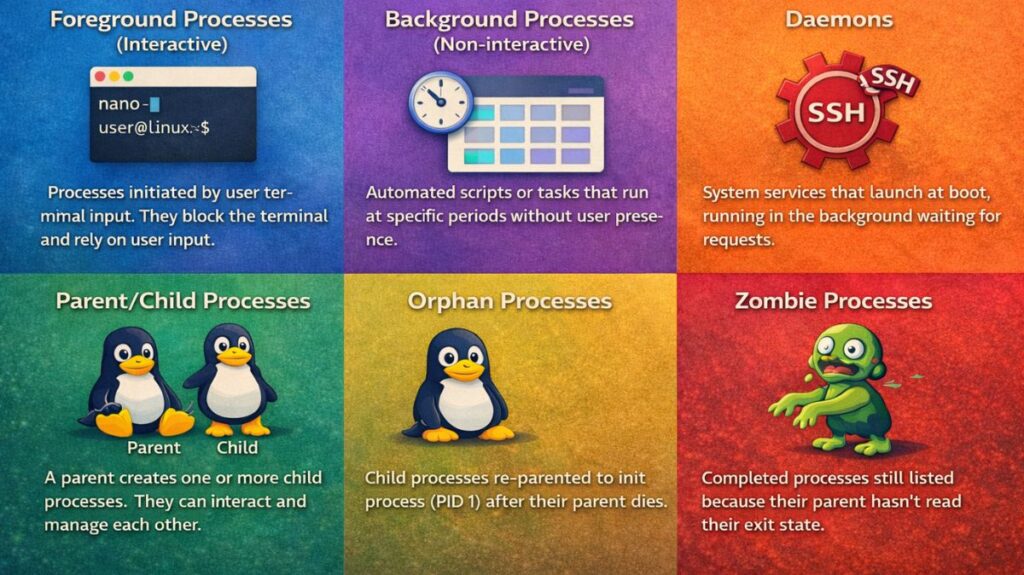
Foreground Processes (Interactive): These are initiated by the user on a terminal (for example, by entering nano). They block the terminal till they’re done and rely on user input.
Background Processes (Non-interactive): Batch processes are automated scripts or tasks that are set up to execute at certain periods using at or cron. They don’t need the user to be there.
Daemons: System services (e.g., httpd, sshd) that launch at boot and operate in the background. Without interacting with the user, they wait for certain requests.
Parent/Child Processes: In parent/child processes, the parent is the process that creates the kid, and the child is the process that creates the parent.
Orphan Processes: Orphan processes are child processes that are re-parented to the init process (PID 1) after one of their parents has passed away.
Zombie Processes: Because their parent hasn’t read their exit state, zombie processes are completed but still show up in the process table.
Also read about Process Management In Linux Commands With Examples
How to create a process in Linux terminal?
There are two main ways to create a process.
Method 1: Run a command
Every command creates a new process.
bash

firefox
Method 2: Background process
Run process without blocking terminal.
bash

firefox &
Method 3: Using shell script
Create script:
bash

nano test.sh
Add:
bash

#!/bin/bash
echo "Hello Linux"
sleep 10
Run:
bash

bash test.sh
This creates a process lasting 10 seconds.
4 Stages of the Linux Process (Boot/Lifecycle)
Despite having numerous “states” (such as running, sleeping, etc.), a process’s main life cycles can be divided into these four phases:
- System Startup (BIOS/UEFI): The hardware initializes and looks for a bootable device during system startup (BIOS/UEFI).
- Bootloader Stage (GRUB/Limine): The Linux kernel is loaded into memory and given control by the bootloader stage (GRUB/Limine).
- Kernel Initialization: The kernel configures system controls, hardware drivers, and memory management.
- Init Process (systemd): All other background services and user applications are launched by the first process (PID 1).
5 Steps of Process Management
Effective process management adheres to a particular workflow:
- Creation: Using a command or a system call, such as
fork(), to launch a process.
- Monitoring: Using programs like
toporhtopto examine the process’s status, CPU, and RAM use.
- Prioritization: Using
niceorreniceto modify the amount of CPU time allotted to a process.
- Signaling: Using the
killcommand to give a process instructions (such as “Reload your config” or “Save and exit”).
- Termination: Putting an end to the process with force (SIGKILL) or grace (SIGTERM).
How to Check Running Processes
Various “views” are available in the terminal based on the level of detail you require:
- Static Snapshot:
ps aux(x = terminal-free processes, u = user-oriented format, and a = all users) - Real-time Monitor:
top - Interactive Modern View:
htop - Search for a Specific PID:
pgrep [process_name]
Also read about How To Open Terminal In Linux? And Linux Terminal Command
Process management in linux interview questions
Simple Questions (Level 1 or Junior)
Q: What is the difference between a process and a thread?
Answer: An autonomous execution unit with a designated memory space (PID) is called a process. As a subset of a process, a thread is “lightweight” in comparison to a process since it shares memory and resources with other threads in the same process.
| Process | Thread |
|---|---|
| Own memory | Shared memory |
| Heavy | Lightweight |
| Independent | Dependent |
Q: What is a “Zombie” process?
Answer: The process that has finished executing but still has an entry in the process table is known as a zombie process (State Z). This occurs because the wait() system call has not yet been used by the parent process to read its exit status. Although they don’t use RAM, zombies do use a PID slot.
Q: How do you find the PID of a running service (e.g., Nginx)?
Answer: You can use pgrep nginx, pidof nginx, or ps aux | grep nginx.
Intermediate (Mid-Level/Admin) Questions
Q: Explain the difference between SIGTERM (15) and SIGKILL (9)?
Answer: The default “polite” signal is SIGTERM. In order to save data and free up resources, it requests that a process terminate. The kernel forces an immediate termination known as SIGKILL, which the process cannot detect or ignore and cannot recover from.
Q: What does a high “Load Average” mean if CPU usage is low?
Answer: In most cases, this means I/O Wait. Many of the system’s processes are in the “Uninterruptible Sleep” (D) state, which means they are unable to do anything but wait for disk or network answers. The “queue” of tasks is backed up, but the CPU isn’t actively working.
Q: How do you change the priority of a process that is already running?
Answer: Use the renice command.
Example: sudo renice -n -10 -p 1234 (This makes PID 1234 a higher priority).
Also read about Manjaro Linux: Features, Download And Installation Process
Advanced Questions (Senior / DevOps)
Q: What is the OOM Killer and how does it decide which process to kill?
Answer: When the system’s RAM is critically low, a kernel mechanism called the Out Of Memory Killer kicks in. Processes are given an oom_score according to their importance and memory usage. To avoid a system-wide kernel panic, high-memory user processes such as databases or Chrome are often terminated first.
Q: Explain the fork() and exec() system calls?
Answer: That exec() replaces the current process image with a new program after fork() produces a nearly identical copy of the calling process (the child). The majority of Linux processes are launched by combining the (fork-and-exec) commands.
Q: What are Linux Control Groups (cgroups)?
Answer: A kernel feature called cgroups is used to isolate, limit, and account for a group of processes’ utilization of CPU, memory, and disk input/output. Docker and Kubernetes may limit container resources to this underlying technology.
Practical Command Questions
How to find process by name?
bash

ps -ef | grep nginx
How to kill all processes of a user?
bash

killall -u username
How to see process tree?
bash

pstree
How to run process in background?
bash

command &
How to bring background process to foreground?
bash

fg
Also read about What Is SteamOS Holo? Features, Download & PC Install Guide