

Lightweight Extensible Authentication Protocol
Cisco Systems created the proprietary security standard known as the Lightweight Extensible Authentication Protocol (LEAP), mostly for wireless networks. LEAP was first presented in 2000, at the beginning of the wireless era, as an early attempt to fix the flaws in Wired Equivalent Privacy (WEP).
Lightweight Extensible Authentication Protocol was created as an Extensible Authentication Protocol (EAP) technique that uses the 802.1X port access control standard to offer secure access control for enterprise Wi-Fi settings. It was notably utilized in enterprise Wi-Fi networks that employed Cisco Aironet systems, and it mostly functions with Cisco wireless infrastructure and client applications.
You can also read What is Single Sign On SSO, How it Works and Purpose
Key Features
Lightweight Extensible Authentication Protocol relies on username and password credentials for authentication and offers several key features:
- Proprietary Nature: Cisco created this private wireless LAN authentication technique.
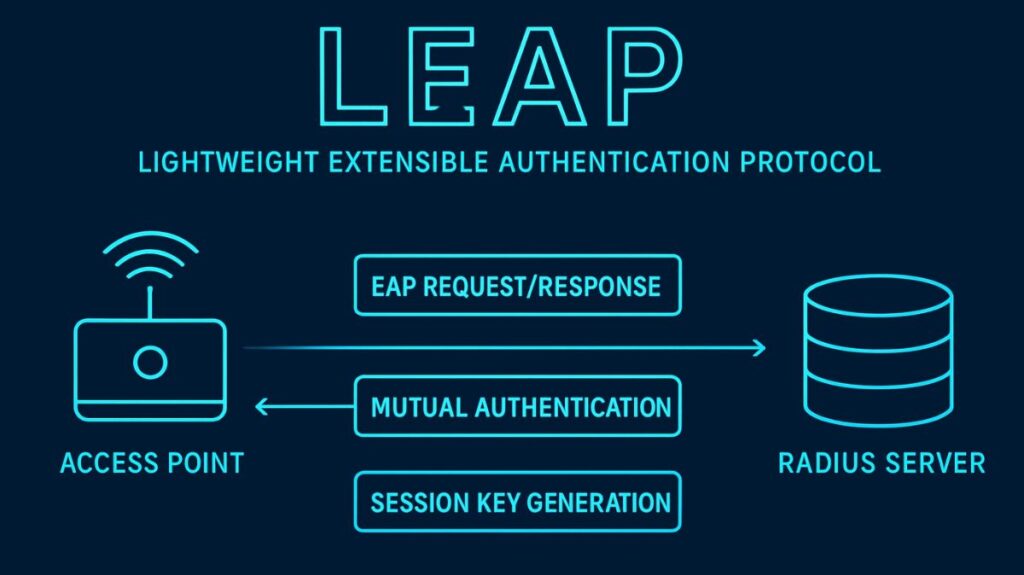
- Mutual Authentication: The Lightweight Extensible Authentication Protocol employs mutual authentication between the authentication server (RADIUS server) and the client (supplicant). This feature protects businesses from unauthorized access points (APs) by ensuring that the user/client and the AP authenticate one another.
- Dynamic WEP Keys: Using dynamic WEP keys is a critical component of LEAP. By regularly changing these per-session WEP keys, the main objective was to address static WEP vulnerabilities. Customers can obtain a new WEP key by regularly re-authenticating. Additionally, LEAP can be set up to use TKIP rather than dynamic WEP.
How Does Leap Work
The general steps of the LEAP authentication procedure are as follows:
- To establish basic connectivity, the client connects to the Access Point (AP).
- During an EAP Request/Response exchange, the AP relays authentication messages from the client to the RADIUS server.
- The server uses a challenge-response technique to verify the user’s credentials.
- A modified or variant of the Microsoft Challenge Handshake Authentication Protocol (MS-CHAP) serves as the foundation for LEAP. Challenge messages are exchanged, encrypted, and returned between the client and server.
- The pairwise master key (PMK), which is produced after successful authentication, is utilized to generate the actual encryption keys for data transfer through a four-way handshake. After that, data transmission starts.
- LEAP does not need digital certificates for authentication; instead, it uses a RADIUS server. Additionally, it can help with Windows single sign-on in Active Directory/NT Domain settings. Another Cisco proprietary technology that employs a RADIUS server for user authentication is WPA2-LEAP.
You can also read What is MSCHAPv2, How it Works & MSCHAPv2 Key Features
Security Vulnerabilities and Status
Due to serious security flaws found since 2003, LEAP is now regarded as insecure and has been mostly deprecated.
- Reliance on MS-CHAP: Its dependence on or alteration of MS-CHAPv1, which lacks robust user credential protection, is the source of the vulnerability.
- Dictionary Attacks: Due to this vulnerability, LEAP is extremely vulnerable to offline dictionary attacks that target user credentials. It was discovered that the challenge message encryption technique was poor, making it simple for password-guessing attacks to crack weak user passwords.
- Exploitation Tools: Automated tools like ASLEAP were created to show how easy it is to gain unauthorized access in networks protected by LEAP by cracking weak passwords.
It is highly advised that network managers avoid using LEAP because of these flaws. Cisco advises administrators to switch to more secure authentication protocols or mandate stronger, more complex passwords.
Recommended modern secure methods include:
- EAP-FAST (Flexible Authentication by Secure Tunneling), which is also a Cisco protocol developed as a more secure alternative.
- PEAP (Protected Extensible Authentication Protocol).
- EAP-TLS (Extensible Authentication Protocol – Transport Layer Security).
You can also read Network Authentication Protocols and Types of Protocols