

What is linux security?
Linux security is described as a modular, multi-layered protection architecture based on the Principle of Least Privilege (PoLP). It makes use of kernel-level isolation, Mandatory Access Control (MAC), and Discretionary Access Control (DAC) to make sure that users, processes, and apps have the bare minimum of permissions required to operate.
In its most technical form, Linux security refers to the Linux kernel’s implementation of rules to mediate access between hardware and software, guaranteeing availability, confidentiality, and system integrity.
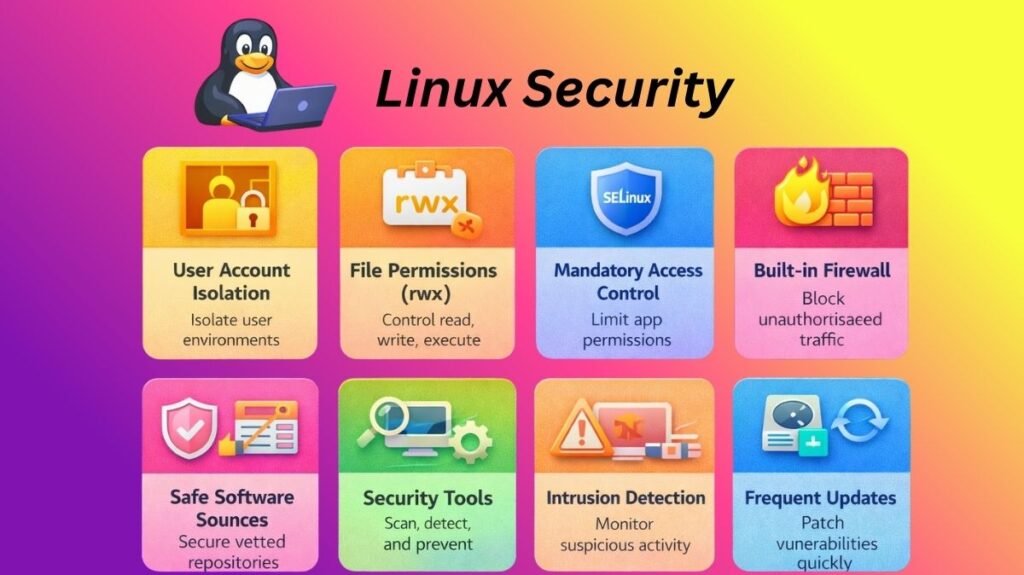
What are the key security features of Linux?
User Account Isolation
Users of Linux remain in their own “rooms.” For everyday chores, the majority of people utilize a basic account. System files cannot be changed by this account. You must use sudo to make significant modifications. This utility requires a password before it can provide you temporary power. This keeps the system from collapsing due to a single error.
File Permissions (rwx)
The system continuously examines three distinct “locks” in each file:
- Read (r): Is the file visible?
- Write (w): Is it possible to modify the file?
- Execute (x): Is it possible to launch the file as an application?
These guidelines are intended to protect the privacy of the Owner, the Group, and others.
Also read about Explain File Permissions In Linux & Ownership With Examples
Mandatory Access Control (MAC)
Sometimes, standard permissions are insufficient. Linux makes use of “bodyguards” such as SELinux or AppArmor. These apps keep an eye on your apps. These safeguards prevent your web browser from accessing your passwords or private folders, even if a hacker manages to take control of it.
The Built-in Firewall
Netfilter is a potent gatekeeper in Linux. It regulates every bit of internet traffic. Close “doors” (ports) that you are not utilizing with ease because of tools like UFW (Uncomplicated Firewall). Because of this, hackers have a considerably harder time breaking in.
Safe Software Sources
Apps are rarely downloaded from random websites by Linux users. They make use of repositories instead. These are authorized online retailers run by professionals. Before you install any software, it is scanned for malware and signed using a digital key.
Linux based security tools
Linux security tools let you find vulnerabilities, stop attackers, and monitor unusual activity. These tools will prioritize automation and speed for system security by 2026.
Finding Weakspots (Scanners)
- Lynis: This program looks for weak settings throughout your entire system. It provides you with a “security score” and fixes issues.
- Nmap: Also referred to as the “Network Mapper,” it locates all of your system’s open ports that a hacker could attempt to access.
- Trivy: A quick scanner for contemporary containers and apps. It searches for outdated software with known security flaws.
Guarding the Gates (Firewalls & Banning)
- UFW (Uncomplicated Firewall): The simplest method of firewall management is UFW (Uncomplicated Firewall). With very basic commands, you may either allow or prohibit traffic.
- Fail2Ban: This program keeps an eye on your logs. The IP address of the person who attempts to guess your password too frequently is immediately blocked by Fail2Ban.
- CrowdSec: An updated Fail2Ban that allows users to exchange information. An IP address that targets one individual is blocked for the entire community.
Watching for Intruders (Detection)
- Advanced Intrusion Detection Environment, or AIDE, is a program that creates a “snapshot” of your most crucial files. AIDE will notify you if a hacker alters even a single letter in a file.
- Osquery: This enables you to communicate with your operating system as though it were a database. Simple queries like “Which programs are running as root?” can be posed to it.
- Auditd: Linux’s integrated “black box” recorder. Every significant action that takes place on the system is recorded for later review.
Cleaning and Protection
- ClamAV: A Linux-specific open-source antivirus program. It is mostly used to check files and emails for Linux or Windows infections.
- A specialist tool called Chkrootkit searches for “rootkits” deeply concealed infections that attempt to take over your computer completely.
Also read about What Is The Difference Between Linux And Windows? Explain
Why Linux Is Considered Secure
Due to its design philosophy, integrated security features, and robust administrative control mechanisms, Linux is considered secure. Here are several unique and clear reasons Linux is secure.
- Strong Permission-Based System: Linux strictly enforces file permissions. Each file and directory has owner, group, and others access permissions. Critical system files cannot be viewed or changed by unauthorized parties.
- Privileges are separated: Ordinary users in Linux are not granted administrative control. For administrative operations, regular users must use restricted techniques like sudo, whereas the superuser (root) account has complete access. System harm from purposeful or unintentional causes is decreased.
- Multi-User Design: Multi-user Linux was designed from the start. Each user’s separated workspace protects data and system reliability.
- Separation of Processes: Under Linux, programs operate autonomously in memory areas that are safe. The entire system is not readily impacted if one application malfunctions or is compromised.
- Open-Source Development Model: Open-source Linux source code is available. Security professionals and developers worldwide monitor it to find and fix issues quickly.
- Inbuilt Security Structures: Advanced security programs like SELinux and AppArmor are supported by Linux. By limiting what apps can access, even when user rights permit it, these frameworks strengthen security.
- Effective Tools for Networking and Firewalls: In order to limit vulnerability to external dangers, Linux offers robust firewall administration tools that let administrators regulate both inbound and outbound network traffic.
- Frequent Upgrades to Security: Linux distributions correct vulnerabilities and increase system stability by releasing updates often. These changes are simple for administrators to implement to keep the system safe.
- Less Malware Intended: Even while any system can be attacked, Linux computers are typically less commonly the target of common malware than some other operating systems.
- Thorough Recording and Observation: Linux logs system actions, which enables administrators to identify questionable activity and efficiently look into security concerns.
Also read about What Is Linux System Administration? How It Works & Types