

This article gives an overview of Advantages And Disadvantages Of Terraform, principles, artichectures and so on.
Terraform CCNA
Terraform is an open-source Infrastructure as Code (IaC) software application developed by HashiCorp (now part of IBM). Its main purpose is to create, manage, and delete IT infrastructure components such virtual machines, storage, networks, and Kubernetes clusters. It facilitates disaster recovery, lowers error rates, helps teams automate provisioning, and supports CI/CD workflows for creating scalable and dependable infrastructure.
Unlike some other IaC tools, Terraform was deliberately intended to address the complexity of using several tools, delivering a single solution that works across different settings.
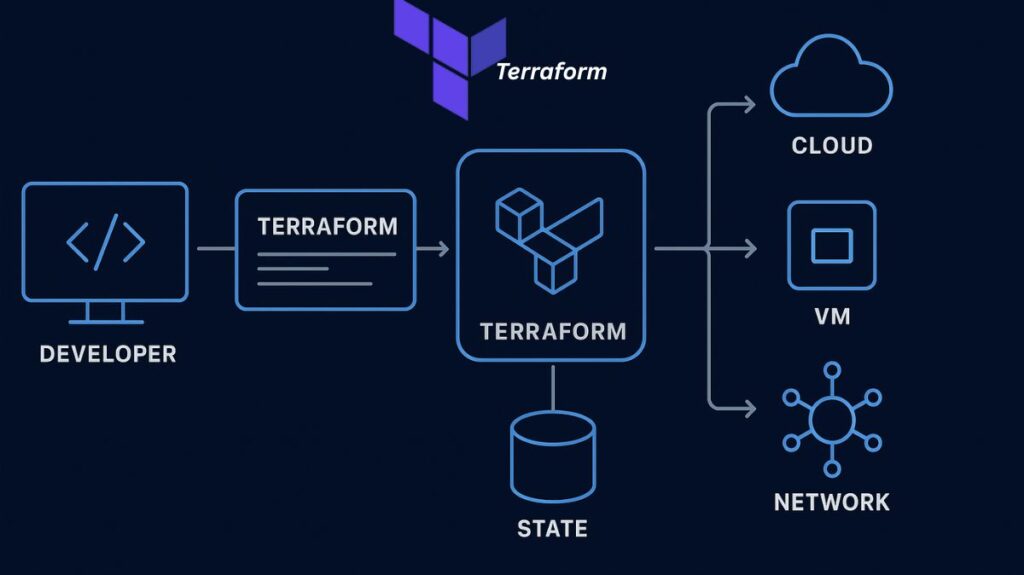
Core Principles and Features
Infrastructure as Code (IaC): Terraform maintains and provisions IT infrastructure (such servers, networks, and databases) using code rather than human operations. This approach allows infrastructure specifications to be versioned, reused, and monitored using version control systems like Git, much like traditional software development. IaC ensures consistency, repeatability, and better reliability, which is crucial in DevOps situations.
Declarative Language (HCL): The HashiCorp Configuration Language (HCL), a straightforward, legible, and declarative language, is used by Terraform. In a declarative paradigm, users declare the intended end state of their infrastructure, and Terraform figures out the particular steps (the execution plan) required to achieve that state. In contrast, users of procedural languages have to write detailed instructions. Configuration files can also optionally be written in JSON.
Multi-Cloud and Cloud-Agnostic: One of Terraform’s primary advantages is its ability to handle and manage resources across all major cloud providers such as AWS, Azure, and Google Cloud Platform (GCP) as well as on-premises and open-source settings. It functions as a single tool that simplifies complex multi-cloud or hybrid cloud systems.
Idempotency: Running the same Terraform configuration numerous times will result in the same desired infrastructure state, preventing unwanted modifications or resource duplication.
Key Components of Terraform Architecture
The functionality of Terraform relies on three main components:
Terraform Configuration Files: These files, written in HCL, contain the definition of the infrastructure resources that Terraform will manage. The providers, resources, variables, and modules that are required are specified.
Providers: A software piece called as a Terraform provider enables Terraform to interface with a particular infrastructure platform. The resource kinds and data sources that Terraform can manage for that platform must be implemented by providers. Cloud platforms, data centers, network devices, databases, and other resources inside the target infrastructure or service can all be defined, configured, and controlled by Terraform providers.
Resources: These are the infrastructure items (e.g., VMs, S3 buckets, VPCs, databases) defined within the configuration files.
Terraform State File (terraform.tfstate): This essential file (typically JSON) stores the current state and metadata of the infrastructure resources handled by Terraform. Terraform identifies what needs to be generated, modified, or deleted by comparing the desired state in the configuration files with the present state recorded here. For team cooperation, the state file is often stored remotely.
Modules: A module in Terraform is a container for a collection of connected resources that work together to accomplish a certain purpose. Managing complicated infrastructure deployments is made simpler by modules, which enable users to arrange and reuse their infrastructure code.
- Modules are defined using the ‘ module ‘ block in Terraform setup. A module block takes the following arguments: source
- source: The source location of the module. This can be a local path or a URL.
- name: The name of the module. This is used to reference the module in other areas of the setup.
- version: The version of the module to use. This is optional and can be used to define a specific version of the module.
- Inside a module block, users can declare the resources that make up the module, as well as any input and output variables that the module exposes. Input variables allow users to send values into the module when it is called, and output variables allow the module to return values to the caller configuration. Modules can be nested, allowing users to design sophisticated infrastructure systems utilizing a hierarchical framework. Modules can also be published and shared on the Terraform Registry, enabling users to reuse and expand the infrastructure code of others.
Terraform CLI: The command-line interface tool used to execute fundamental tasks, such as init, validate, plan, apply, and destruct.
Terraform Workflow
The management of infrastructure using Terraform follows a consistent three-step process:
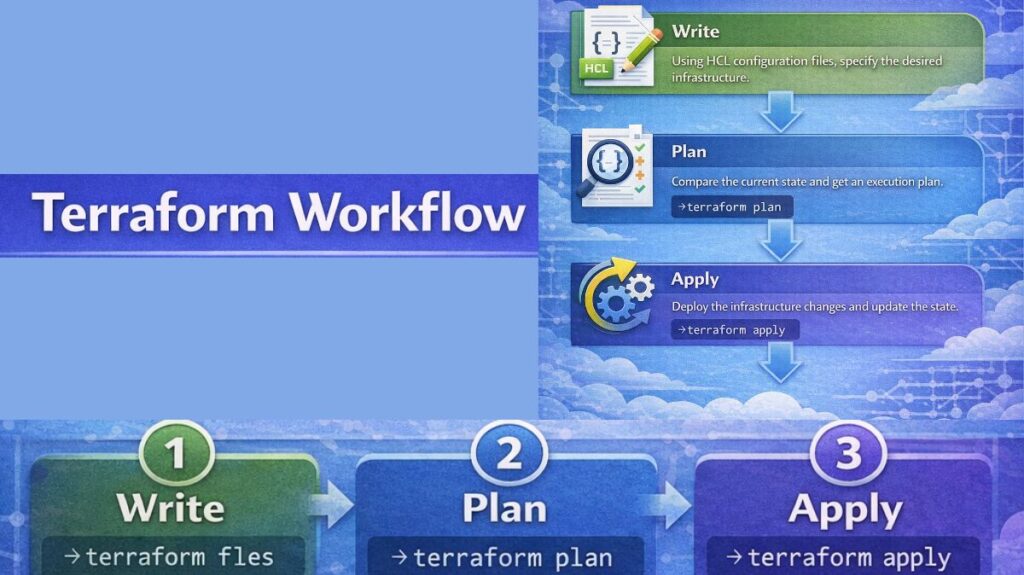
Write: Using HCL configuration files, the developer specifies the infrastructure that is intended.
Plan: (Executed via terraform plan) Terraform compares the written configuration with the status of the infrastructure as of right now (read from the state file and real-world APIs). It then provides a thorough execution plan that explains exactly what actions (add, update, or destroy) Terraform intends to undertake, allowing developers to examine the changes before implementation.
Apply: (Executed via terraform apply) Once the plan is approved, Terraform executes the suggested actions, making the appropriate API calls to supply the resources and updating the state file to reflect the new reality. Terraform automatically respects resource dependencies, ensuring resources are built in the correct order (e.g., a VPC is constructed before a VM that relies on it).
Use Cases and Comparisons
Organizations use Terraform widely for managing infrastructure throughout its lifecycle.
| Use Case | Detail |
|---|---|
| Multi-Cloud/Hybrid Deployment | Managing resources across different cloud platforms (AWS, Azure, GCP) or combining public cloud with on-premises resources using a single workflow and language. |
| Rapid Environment Provisioning | Quickly creating or tearing down development, testing, staging, or production environments using the same reusable code, aiding in disaster recovery. |
| Application Infrastructure | Deploying and managing complex N-Tier applications (e.g., web servers, databases, load balancers) while ensuring all resource dependencies are correctly implemented. |
| Kubernetes Management | Automating the provisioning of Kubernetes clusters on cloud platforms. Terraform can also manage resources inside the cluster (like pods and volumes). |
Terraform Commands
Terraform init
Terraform init command initializes a Terraform working directory by downloading and installing any essential plugins and dependencies. It ought to be executed prior to any further Terraform instructions.
$ terraform initTerraform validate
The validate command performs precisely what its name says. It verifies that the code is internally consistent and examines it for syntactic problems. Only the configuration files (*.tf) in the active working directory are inspected. You must use the -a recursive flag if you want to validate files inside of folders (for example, if you have a module/ directory).
$ terraform validateTerraform apply
Terraform apply command applies the changes described in the configuration to your infrastructure. It produces or updates the resources according to the settings, and it also prompts you to validate the changes before applying them.
$ terraform applyTerraform destroy
Terraform destroy command will destroy all the resources created by Terraform in the current working directory. It is a handy command for taking down your infrastructure when you no longer need it.
$ terraform destroy
Terraform import
Imports an existing resource into the Terraform state, allowing it to be handled by Terraform.
$ terraform importTerraform console
Opens an interactive terminal for analyzing expressions in the Terraform configuration.
$ terraform consoleTerraform refresh
This command modifies the status of your infrastructure to reflect the real state of your resources. It is useful when you want to confirm that your Terraform state is in sync with the actual status of your infrastructure.
$ terraform refreshAdvantages of Terraform
The following are the advantages of employing terraform:
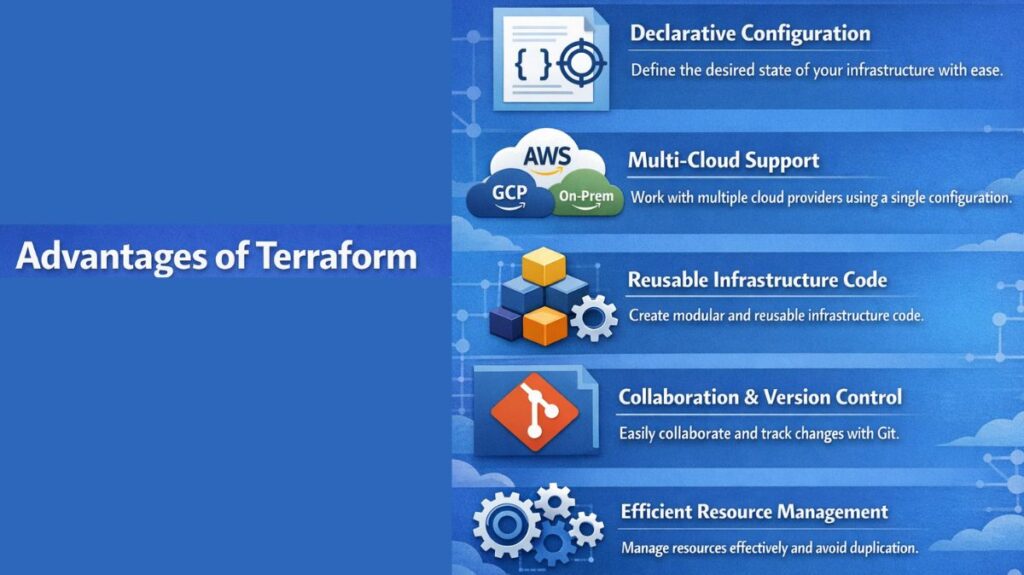
Declarative Configuration: Because Terraform employs a declarative configuration language, users specify the desired state of their infrastructure resources rather than the precise actions needed to get there. This simplifies the process of comprehending and overseeing complicated infrastructure implementations.
Support for Multiple Cloud Providers: Terraform supports numerous cloud providers, as well as on-premises and open-source tools, which means that customers can design and manage their infrastructure resources using a single configuration.
Reusable Infrastructure Code: Terraform helps users to specify their infrastructure resources in a reusable and modular approach, using features like as modules and variables. This makes it easier to manage and sustain complicated infrastructure deployments.
Collaboration and Version Control: Terraform configuration files can be stored in version control systems such as Git, which makes it easier for teams to collaborate and track changes to their infrastructure.
Efficient Resource Management: Terraform provides tools such as resource dependencies and provisioners that enable users to manage their infrastructure resources efficiently, minimizing duplication and guaranteeing that resources are created and deleted in the correct order.
Disadvantages of Terraform
As we have already covered about the positives of terraform let’s address some of it’s disadvantages:
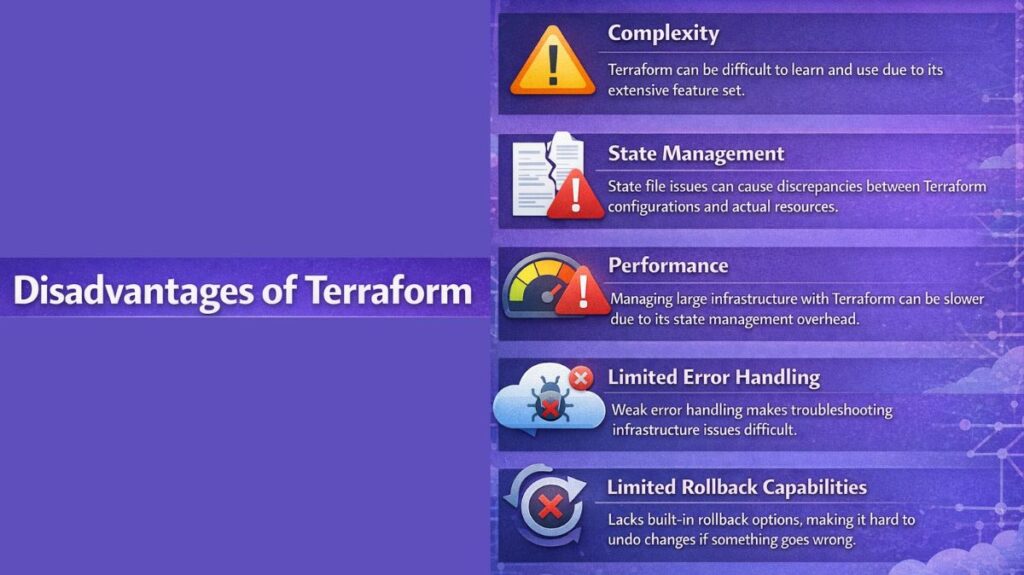
Complexity: Terraform can be challenging to learn and use, especially for those who are new to infrastructure automation. It has a great number of features and can be difficult to understand the entire breadth of its capabilities.
State Management: Terraform employs a state file to track the resources it controls, which might cause issues if the state file falls out of sync with the actual infrastructure. This may occur if the state file is lost or corrupted or if the infrastructure is altered outside of Terraform.
Performance: Terraform can be slower than some other IaC technologies, especially when managing massive infrastructure deployments. The overhead of managing the state file and the requirement to interact with several APIs may be the cause of this.
Limited Error Handling: Terraform lacks strong error handling, and problems might be challenging to identify and resolve when they occur. This can make it harder to troubleshoot problems with infrastructure deployments.
Limited Rollback Capabilities: Terraform does not have a built-in rollback option, so it can be difficult to undo changes to infrastructure if something goes wrong. Users can use the ‘ terraform destroy ‘ command to destroy all resources defined in the configuration, although this can be time-consuming and may not be practical in all instances.
Terraform’s state management capabilities and support for different clouds address typical difficulties in infrastructure automation, making it a strong and flexible solution for defining and maintaining resources in a reusable and automated fashion.