

In this Article, we will explain what Microsoft Configuration Manager, its historical evolution, Core Functionalities and Capabilities, Components and Supported Systems, Modern Hybrid Management and how to Install Microsoft Configuration Manager.
Microsoft created Microsoft Configuration Manager (ConfigMgr), a potent enterprise-grade systems management software program, to improve the administration of numerous computers and devices. It enables IT managers centrally manage their endpoints at scale, acting as an all-in-one IT command center for various administration duties, automating routine procedures, and assuring security compliance across the environment.
You can also read What is Data Format for Automation and Data Formats Types
Branding and Historical Evolution
To eliminate confusion and harmonize with Microsoft’s systems management portfolio, Configuration Manager has had many major name changes:
- Systems Management Server (SMS): SMS appeared in 1994 with Windows NT Server 3.5.
- System Center Configuration Manager (SCCM): Renamed in 2007 to avoid SMS confusion and incorporate with System Centre.
- Microsoft Endpoint Configuration Manager (MECM or MEMCM): MECM or MEMCM was rebranded in 2019 to match Microsoft Intune and the suite.
- Microsoft Configuration Manager (ConfigMgr): After “endpoint” was removed from Microsoft Configuration Manager in 2023, it became ConfigMgr.
Microsoft formally calls it Configuration Manager, ConfigMgr, or Microsoft Configuration Manager.
Core Functionalities and Capabilities
ConfigMgr provides a console that serves as a single pane of glass where administrators may carry out many administrative activities. Key aspects include:
- Software Distribution and Application Management: Key strengths include software distribution and application management. Application creation, deployment, management, monitoring, and installation, updating, and uninstallation across devices are possible with it. MSI, EXE, APPX, and script formats are supported. It maintains dependencies and uninstalls old apps.
- Operating System Deployment (OSD): OSD automates bare-metal and in-place OS installs on new or used PCs, enabling task sequences and PXE boot.
- Software Updates (Patch Management): Management, deployment, and monitoring of enterprise software updates and security fixes, often combined with Windows Server Update Services.
- Inventory and Asset Management: Inventorying all managed devices’ hardware and software for IT teams.
- Compliance Settings: To audit, track, and fix endpoint configuration compliance, enforce configuration baselines, security settings, and Windows Firewall rules.
- Endpoint Protection: Management of endpoint security policies using Microsoft Defender Antivirus.
- Remote operate: Administrators can remotely inspect and operate client devices from the console for troubleshooting.
- Reporting: Hardware, users, apps, and deployment success or failure rates are all covered by an integrated set of reports.
- MECM Software Center: Reduces the need for IT support requests by acting as a self-service portal where end users can peruse and install approved apps from a library.
Components and Supported Systems
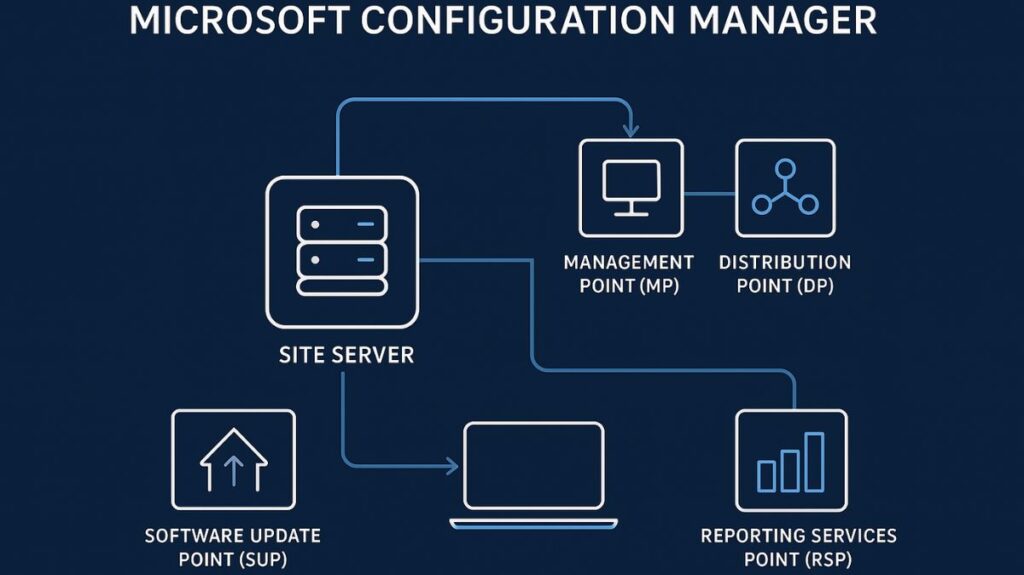
The infrastructure of Configuration Manager depends on a number of essential elements:
- Site Server: The central brain of the infrastructure.
- Management Point (MP): Serves as the client communication hub. An Advanced Client communicates with the MP to get policy.
- Distribution Point (DP): Stores content such as OS images, applications, and fixes.
- Software Update Point (SUP): Integrates with WSUS for patching functionality.
- Reporting Services Point (RSP): Provides analytics and dashboards.
Configuration Manager supports Windows/Embedded. It works with Windows 8.1, 10, 11, Azure Virtual Desktop, Windows Server 2012–2022, and Embedded. Before, it supported MacOS, Linux, UNIX, Windows Phone, Symbian, iOS, and Android.
You can also read Advantages Of Domain Controller And Domain Controller Basics
Modern Hybrid Management
Configuration Manager has evolved to allow contemporary, cloud-attached management, even though it was first created as an on-premises solution providing detailed, granular control over PCs and servers that were joined to a domain.
- Microsoft Endpoint Manager: Microsoft Endpoint Manager combines Intune and ConfigMgr.
- Cloud Management Gateway (CMG): ConfigMgr is more resilient when remote endpoints are controlled without VPNs.
- Co-management: This modern technique combines Configuration Manager and Microsoft Intune to control Windows devices simultaneously. Intune is not replacing Configuration Manager, which is essential for stringent compliance and robust on-premises control.
How to Install Microsoft Configuration Manager (SCCM)
Microsoft Configuration Manager (SCCM), also called MECM, is used to manage computers, deploy software, install updates, and monitor devices in an organization.
Requirements
Before installation, ensure you have:
- Windows Server 2019/2022 (domain joined)
- SQL Server 2017 or later
- .NET Framework 4.8
- Minimum 16 GB RAM and 200 GB disk space
- Windows ADK and WinPE add-on
Installation Steps
- Prepare the Server
Install required roles like IIS, BITS, and WAS using Server Manager. - Install SQL Server
Enable Database Engine Services and set collation toSQL_Latin1_General_CP1_CI_AS. - Install Windows ADK
Install Deployment Tools and WinPE. - Install SCCM
Download SCCM, runsplash.hta, and select Primary Site Installation. - Configure Site
Enter product key, site code, SQL details, and choose HTTP/HTTPS. - Finish Setup
Run prerequisite check and complete installation.
Post-Installation
- Enable discovery methods
- Create device collections
- Configure boundaries
- Deploy client agents
Conclusion
SCCM installation is straightforward if prerequisites are met. Once installed, it provides powerful centralized management for enterprise systems.
You can also read Types of Hubs, Features, Advantages And Disadvantages Of Hub