

In the evolution of Linux, the transition from SysVinit to systemd represents a shift from simple, sequential scripts to a complex, parallelized system manager. Below is a detailed breakdown what is an Init System? and what is Systemd?, how these systems work, SysVinit vs Systemd, Runlevels vs Targets, Systemd and Systemctl a comprehensive command cheatsheet, their differences.
What is an Init System?
After the bootloader transfers control, the Linux kernel launches the Init system as the first process. Process ID 1 (PID 1) has been allocated to it. Initializing the system, launching background services (daemons), and maintaining system state until shutdown are its main responsibilities.
SysVinit: The Legacy Standard
The conventional approach, which was based on Unix System V, was called SysVinit (System V Init).
How it works: It makes use of several shell scripts included in /etc/init.d/. Runlevels (0–6) determine how these scripts are executed sequentially, or one after the other.
Uses: Ideal for legacy or minimalist systems where speed is less significant than transparency and ease of use.
Benefits: Very minimal memory footprint; scripts are just plain text; easy to understand.
Drawbacks: Sequential execution causes slow boot times; complicated service dependencies are challenging to manage; “zombie” processes sometimes occur when a parent process collapses.
Systemd: The Modern Manager
Besides being an init system, systemd is a “system and service manager.” Beginning about 2010, it took the place of SysVinit in practically all of the major distributions (Ubuntu, Fedora, Debian, etc.).
How systemd Works
The “declarative” technique is used by the contemporary init system systemd (system daemon). Unit files (ending in .service, .target, or .mount) are examined rather than a lengthy list of scripts.
It operates via the idea of parallelization. In contrast to prior init systems, which launched service A and waited for it to finish before starting service B, systemd launches as many services as feasible simultaneously. It makes use of “sockets” to enable communication between services even when they have not yet finished starting.
Systemd’s Architecture
Systemd employs a declarative method based on Units, in contrast to previous systems that started services one at a time using basic shell scripts.
Unit Documents
A unit file, typically ending in .service, .target, or .mount), contains the definitions of everything systemd controls.
- Services (
.service): Specifies how to launch, halt, and resume a particular program (for example,apache2.service).
- Targets (
.target): Unit groups. Rather of “Runlevels,” systemd makes use of targets likegraphical.targetto specify the state of the system.
- Mounts (
.mount): Controls mount points and filesystems.
Advantages of systemd
- Faster Boot Times: Your computer reaches the desktop more quickly since it doesn’t wait for one service to complete before launching the next.
- Service Recovery: Systemd can be set up to immediately restart a background service (such as your web server) in the event that it crashes.
- Control Groups (cgroups) are used in clean shutdowns to make sure that all of the subprocesses that a service generates are terminated when it is halted.
- On-Demand Loading: It can save RAM by keeping a service “dormant” and only activating it when a user tries to use it.
Also Read About XFS File System Commands And Ext4 Vs XFS File System
Disadvantages of systemd
- Intricacy: It isn’t “just” an init system anymore. Some users find it bloated now that it manages time, networks, and logs.
- Binary Logs: The
journalctlcommand is required to read systemd logs; a basic text editor cannot do this. It is more difficult to recover a corrupted log file than a text file. - Monolithic Design: Differs from the “Unix Philosophy” of “Do one thing and do it well.” The entire system is at risk if systemd has a serious issue because it handles everything.
Uses of systemd
Almost all Linux administrative tasks are handled by Systemd:
- System State: Changing between the desktop and the command line (Targets).
- Scheduling: For recurring jobs, systemd timers should be used instead of “Cron”.
- Mounting: Hard disks that are connected in automatically mount.
- Logging: Consolidating all system events and errors into a single, searchable database.
SysVinit vs systemd
| Feature | SysVinit (Legacy) | systemd (Modern) |
| Execution | Sequential (one-by-one) | Parallel (Simultaneous) |
| Configuration | Shell Scripts (/etc/init.d/) | Unit Files (/lib/systemd/system/) |
| State Management | Runlevels (0, 3, 5, etc.) | Targets (graphical.target, etc.) |
| Logging | Plain Text (/var/log/messages) | Binary Journal (journalctl) |
| Dependency | Manual/Hardcoded | Automatic/Dynamic |
Init system and systemd commands
The command systemctl is the primary tool used to interact with systemd.
Service Management
| Action | SysVinit Command | systemd Command |
| Start Service | service apache2 start | systemctl start apache2 |
| Stop Service | service apache2 stop | systemctl stop apache2 |
| Restart Service | service apache2 restart | systemctl restart apache2 |
| Check Status | service apache2 status | systemctl status apache2 |
| Enable at Boot | chkconfig apache2 on | systemctl enable apache2 |
| Disable at Boot | chkconfig apache2 off | systemctl disable apache2 |
| Check if Enabled | chkconfig apache2 | systemctl is-enabled apache2 |
Runlevels vs Targets
| System State | SysVinit Runlevel | systemd Target |
| Power Off | 0 | poweroff.target |
| Rescue Mode | 1 | rescue.target |
| Multi-user (CLI) | 3 | multi-user.target |
| Graphical (GUI) | 5 | graphical.target |
| Reboot | 6 | reboot.target |
Also Read About Linux Boot Process Step By Step And Interview Questions
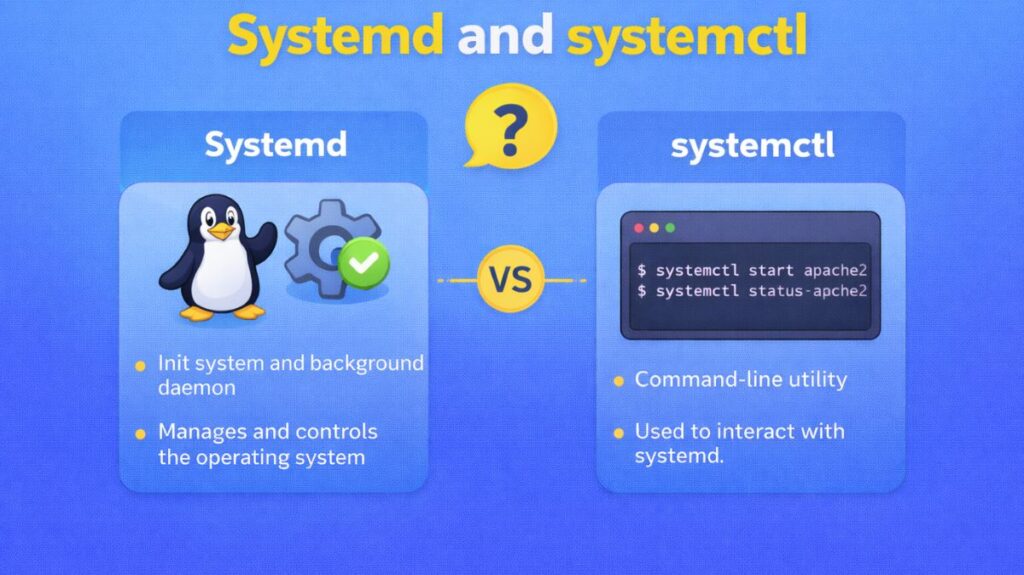
What is systemd vs systemctl?
These two terms are frequently confused by users:
Systemd: The engine, or background daemon, that powers the system. The command “systemd” is never executed by you.
Systemctl: The command-line tool (the steering wheel) that you use to instruct systemd to start, halt, and reboot is called systemctl.
Common Commands
Since you’ll likely spend 99% of your time interacting with systemctl, here are the essentials:
- Check status:
systemctl status <service> - Start/Stop:
systemctl start <service>/systemctl stop <service> - Enable at boot:
systemctl enable <service> - List all services:
systemctl list-units --type=service
What is the difference between systemd and systemctl?
Systemctl is the command-line interface for systemd, the background manager.
Systemd (The “System Daemon”)
- Systemd manages your OS. This is the last process to exit and the first to start during boot (PID 1).
- Its role includes managing system resources, monitoring processes, and initiating services in the proper order.
- Scope: Logging (journald), network management (networkd), and login management (logind) are all included in this software package.
- Design: By launching services concurrently, it replaced the outdated “SysVinit” system to enable quicker boot times.
Systemctl (also known as “System Control”)
- If systemd is the office boss, systemctl is the intercom for boss directives.
- Function: The systemd system and service manager’s status can be examined and managed via the command-line interface (CLI).
- Its function includes starting, stopping, restarting, enabling, and checking the status of services.
Also Read About Difference Between MBR Vs GPT Partition in Operating Systems
Systemd vs systemctl
| Feature | systemd | systemctl |
| Type | Init System / Daemon | Command-line Utility |
| Purpose | Manages the system state | Executes user commands |
| Visibility | Runs silently in the background | Runs when you type a command |
| Example | Decides that “Database” must start before “Web Server” | You typing systemctl start apache2 |
Advanced systemd Diagnostics
- Analyze Boot Speed:
systemd-analyze blame(Shows which service is slowing down your boot). - View Logs:
journalctl -u [service_name](Shows logs for a specific service). - Reboot to Firmware:
systemctl reboot --firmware-setup(Reboots directly into BIOS/UEFI).