

Password Authentication Protocol
To verify people or devices gaining access to network services, the Password Authentication Protocol (PAP), a fundamental password-based authentication protocol, is primarily utilized in tandem with the Point-to-Point Protocol (PPP). RFC 1334 defines PAP. It functions by transmitting a login and password in plain text, which makes the information unencrypted and vulnerable to theft. It is usually mainly utilized in outdated or less secure contexts because of this security flaw, and more secure protocols like CHAP or EAP have mostly taken its place.
You can also read What is Frame Relay Explained, Components and Configuration
How does it work?
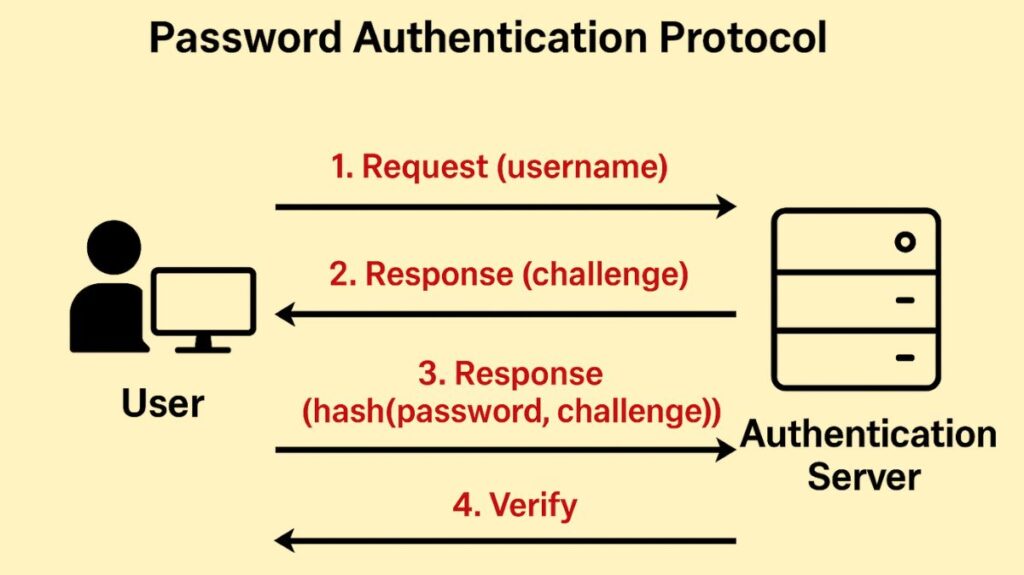
Through a short exchange known as a two-way handshake, PAP offers an easy method for a peer (client) to verify its identity.
The process occurs only once, upon the initial link establishment (after the Link Control Protocol (LCP) negotiation phase is complete):
- Request Transmission: When the client tries to connect, it continually sends the authenticator (server) a PAP authentication-request packet with an ID (username) and password combination. Until a response is obtained, this request is normally issued every two seconds.
- Verification: After receiving the credentials, the server compares them to its stored data.
- Response: A response packet is sent by the server:
- The PPP link advances to the following state, the network phase, when the server sends an Authentication-Ack (acknowledgement packet) if the credentials match.
- An LCP terminate request is made, the server sends an Authentication-Nak (nonacknowledgment packet), and the PPP link returns to the link establishment phase if the credentials don’t match.
- Retry Handling: A new request is issued if no response is received, and an optional retry counter is specified; if the retry counter expires, the PPP connection moves on to the LCP negotiate phase.
- The code (1 for request, 2 for ack, and 3 for nak), ID, Length, Username length, Username, Password length, and Password (in a request packet) are all part of the PAP packet structure. C023 (hex) is the protocol field used in the PPP frame for PAP.
Security Concerns: The Major Flaw
PAP’s primary flaw is that it sends the username and password over the link in plaintext, which is its most important feature. The login credentials are not concealed or encrypted.
Because PAP lacks encryption, it is regarded as a weak authentication method and is extremely susceptible to various kinds of attacks.
- Eavesdropping/Packet Sniffing: An attacker keeping an eye on network traffic can quickly intercept and read the credentials.
- Replay Attacks: An attacker can obtain unauthorized access by capturing the authentication packets and “replaying” them later due to the lack of a challenge-response mechanism.
- Brute Force Attacks: Certain implementations might permit several unsuccessful tries, which could expose them to brute force assaults.
Alternatives such as the Challenge Handshake Authentication Protocol (CHAP) are preferred for PPP authentication in contemporary, security-conscious organizations due to PAP’s low security.
Advantages and Usage Context
Because of its simplicity, PAP is nevertheless useful in some situations despite its insecurity:
- Ease of Implementation: PAP requires less computing power and resources than more complicated cryptographic protocols like CHAP, making it easier to set up and execute.
- Compatibility: Because of its simplicity, PAP is widely compatible with legacy systems, older devices, and some embedded systems that might not be able to provide the cryptographic features needed by CHAP or EAP.
- Legacy Systems and PPP: PAP is still utilized in older network topologies and was widely utilized in early dial-up connections. Additionally, PPPoE uses it to authenticate DSL subscribers.
- Fallback Mechanism: In the event that CHAP is inoperable or unavailable, PAP may be set up as a backup authentication technique.
- Secured Transport: PAP can be used to secure the transport channel when encryption is managed by a different layer, such as TLS/SSL or IPsec.
Note on Password Storage: PAP allows the authentication server to receive the clear-text password even though it transmits credentials insecurely over the link. This enables the server to compare the password with a highly secure stored version (e.g., using strong hashing), potentially resulting in more secure password storage “at rest” than techniques like CHAP.
You can also read Cisco HTTPS Web Communication And Management Protocol
Configuration Example (PPP Interface)
Assigning an access profile (used to search up the password upon receiving an authentication request) is frequently one of the procedures required when establishing a PPP interface to use PAP.
Additionally, an interface can be set up to function in passive mode:
- Default Mode: The interface anticipates an authentication request from the peer when PAP is enabled by default.
- Passive Mode: When the interface is set up in passive mode, it is prepared to send the peer an authentication request; however, it will only do so if the peer provides the PAP option to the interface during LCP negotiation. The interface itself does not authenticate the peer when it is in passive mode.
Usage in PPPoE and Configuration
Although PAP can be used to secure Point-to-Point Protocol over Ethernet (PPPoE) connections, the transfer of credentials in plain text makes this method intrinsically unsafe
On Cisco routers, you can configure PAP authentication using the following commands:
- Enabling Authentication: The command to enable PPP authentication on a serial interface is
ppp authentication [method1] [method2].
- Fallback Mechanism: If you configure both CHAP and PAP using
ppp authentication chap pap, only the first method (CHAP) is initially used during link negotiation. The second method, PAP, acts as a backup just in case the first method fails.
- Outbound PAP: The command
ppp pap sent-username <username> password <password>enables outbound PAP authentication, where the local router uses the specified username and password to authenticate itself to a remote device.
After identifying the remote end, the router uses either its internal configuration or an external AAA server to decide whether the user is permitted access when utilizing PAP. The username and the clear-text password are included in the first setup notification packet that is delivered to the corporate gateway in a virtual dial-up service that uses PAP.
Using PAP to secure your WAN link is similar to mailing a postcard with your home key pasted to the back; anyone who happens to pass by could read your credentials and possibly obtain access. On the other hand, employing CHAP ensures that the key is never directly revealed during transmission by giving a sealed letter with a temporary, uniquely generated digital code that must match a code created by the recipient based on a pre-shared secret.
You can also read Hypertext Transfer Protocol HTTP and Evolution of HTTP