

Post Office Protocol POP
An application-layer Internet standard protocol called the Post Office Protocol (POP), or more precisely POP3, is used by email clients to obtain messages from a distant mail server. Multiple standards, most notably RFC 1939, specify it. It is a “pull” protocol that retrieves mail from the server and sends it to a local device.
Core Design and Purpose
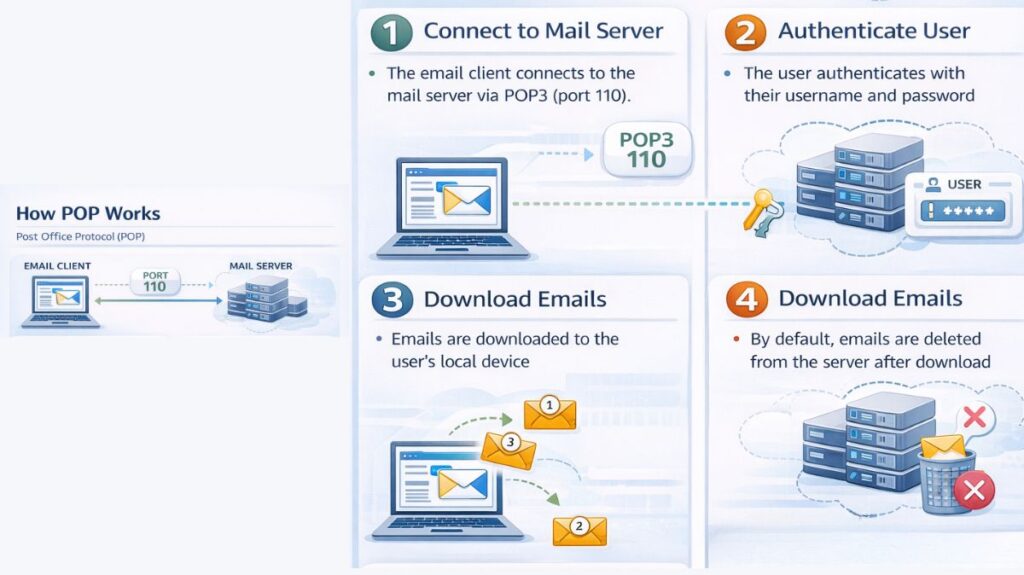
What makes POP3 unique is its “Download and Delete” process. Initially, it was made for users with sluggish or transient internet connections (dial-up), enabling them to connect for a short time, download all of their messages to their local hard drive, and then read or work with them offline. Modern clients frequently offer the ability to leave mail on the server, but the protocol does not support server-side folder management or real-time synchronization across many devices and instead considers the mailbox as a single storage.
You can also read What A Network Is And What Are Benefits Of Networking
Stages of a POP3 Session
POP3 sessions use the Transmission Control Protocol (TCP) and pass through three different states in a strict linear fashion:
- Authorization State: After connecting, the client authenticates itself to the server. This usually entails transmitting a password (PASS) and user ID (USER), but more secure techniques, such as challenge-response protocol (APOP), can be employed to prevent sending secrets in cleartext.
- Transaction State: After authenticating, the client retrieves messages and information from the mailbox. Among the primary commands are:
- STAT: Returns the total number of messages and their total size.
- LIST: Displays message numbers and sizes.
- RETR: Downloads the full content of a specific message.
- TOP: Peeks at the message header and a specified number of body lines.
- UIDL: Retrieves a unique identifier for messages, allowing a client to identify which emails have already been downloaded if they are being left on the server.
- DELE: Marks a message for deletion.
- Update State: The server automatically deletes all messages that have been marked for deletion and terminates the connection when the client sends the QUIT signal.
Connectivity and Security
- Port Numbers: POP3 services usually run on TCP port 110, which is not encrypted. For POP3S (POP3 over SSL/TLS), port 995 is utilized for safe, secured communication.
- Encryption Extensions: Rather than use a different port, a client can negotiate a secure TLS/SSL connection on the normal Port 110 by using the STLS (STARTTLS) command.
- Security Vulnerabilities: Due to its cleartext transmission of data, including credentials, the original POP3 protocol has security flaws that allow for network eavesdropping. By employing alternate protocols like IMAP or encrypted variants like POP3S, modern settings lessen this.
You can also read How Data Flows Through The OSI Model And It’s Importance
POP3 vs IMAP
| Feature | POP3 (Post Office Protocol 3) | IMAP (Internet Message Access Protocol) |
|---|---|---|
| Purpose | Downloads emails from server to local device | Accesses emails directly on the server |
| Email storage | Emails are stored locally after download | Emails remain stored on the server |
| Multiple device access | Not suitable; emails downloaded to one device | Ideal for multiple devices |
| Synchronization | No synchronization across devices | Full synchronization across devices |
| Offline access | Available after emails are downloaded | Limited (cached emails available offline) |
| Server space usage | Frees server space after download | Uses server storage |
| Internet requirement | Needed only to download emails | Required for real-time access and syncing |
| Folder management | Limited or none | Supports folders and labels |
| Email status (read, unread, deleted) | Not synced across devices | Synced across all devices |
| Speed | Faster for single-device use | Slightly slower due to server interaction |
| Security | Basic security support | Better security and access control |
| Best suited for | Single user, single device | Multiple devices and modern email usage |
Advantages and Disadvantages
| Advantages | Disadvantages |
|---|---|
| Supports offline reading and management. | No synchronization across multiple devices. |
| Reduces server storage requirements as mail is moved locally. | Messages may be lost if the local device fails. |
| Fast download speeds and simple configuration. | No native support for server-side folders. |
| Ideal for single-device access with limited connectivity. | Cleartext transmission is insecure without TLS/SSL. |