

What is Open System Authentication?
One of the first and most basic wireless authentication techniques described in the IEEE 802.11 standard for Wireless Local Area Networks (WLANs) is Open System Authentication (OSA), sometimes just called Open Authentication. It is described as a way of null authentication.
A thorough description of Open System Authentication, including its mechanism and security context, can be found here:
How it Works?
As its name suggests, Open System Authentication operates at the MAC layer (Layer 2) to provide unrestricted access to a WLAN.
- No Credentials Required: Open Authentication is an 802.11 authentication technique that asks clients to connect to an Access Point (AP) without supplying any credentials, including keys, passwords, or certificates. The proper Service Set Identifier (SSID) is the only stated requirement.
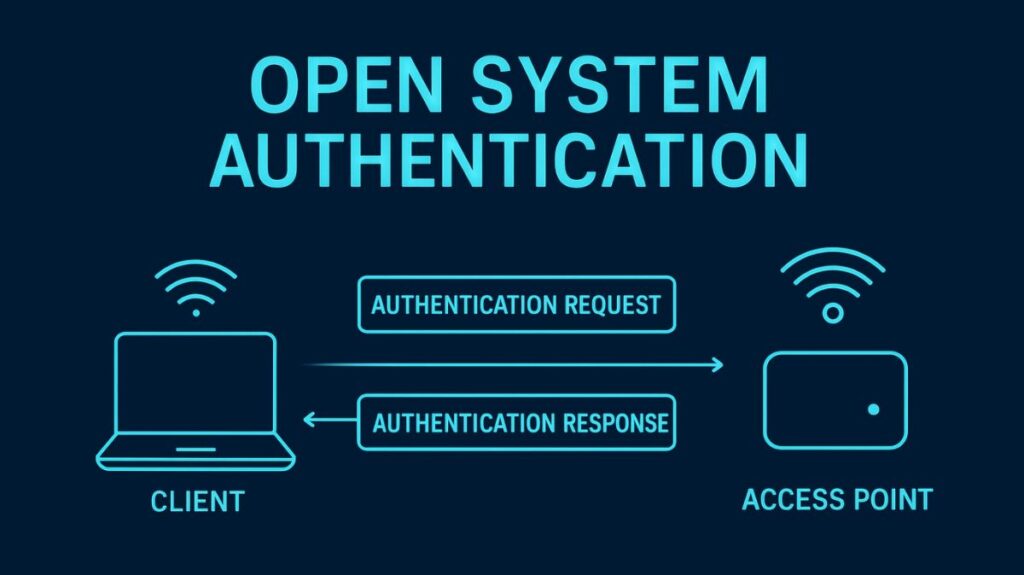
- Two-Step Process: The authentication involves a two-frame exchange between the client and the AP:
- An Authentication Request frame is sent to the AP by the client.
- The AP merely provides the client with instant access by responding with an Authentication Response frame or success message.
- Core Purpose: By verifying the wireless hardware and the protocol itself, OSA aims to confirm that the connecting client is a legitimate 802.11 device. It is almost a given that the authentication request won’t be rejected when it is used.
You can also read What is Kerberos, Limitations of Kerberos and Components
Security Implications and Usage
According to the 802.11 standard, open authentication is the least secure and most straightforward technique.
- Lack of Security: OSA offers little to no security since it allows access without confirming identification. Only in circumstances where security is not an issue should it be used.
- Vulnerability: OSA doesn’t offer encryption by itself. This technique leaves networks open to packet sniffing, eavesdropping, and phoney AP assaults (evil twins). When users join such a network, client operating systems usually alert them that their wireless data will not be secure.
- Client Responsibility: If OSA is used, the wireless client is in charge of ensuring security via other channels, like establishing a secure connection via a Virtual Private Network (VPN).
Common Usage Contexts:
- Public Networks: In public places like cafes, airports, and hotels, OSA is frequently seen on WLANs.
- Captive Portals: Web authentication or a Captive Portal are frequently used for client screening in public hotspots. OSA is used for the first link-layer connection, but security is enforced at a higher layer (L3/L7), forcing the user to use a web browser in order to accept terms or enter credentials following association.
- Default Configuration: To facilitate initial use, all Wi-Fi Certified wireless LAN equipment is typically provided in “open-access” mode with security measures disabled. This is typically insufficient for private home networks or business networks, though.
You can also read What is Diameter protocol Explained, Applications & Commands
Role in Modern Security Systems
Ironically, even in contemporary, strong security systems, Open System Authentication is a fundamental step.
- Preliminary Step: Before higher-layer security and key exchange take place, OSA is frequently the first step carried out to establish the fundamental 802.11 link.
- 802.1X/EAP: The client first associates with the AP using Open Authentication when the 802.1X standard is utilized for strong network access control. Using the Extensible Authentication Protocol (EAP) framework, the crucial client authentication, which verifies the user’s identity, then takes place independently at a specialized Authentication Server (AS), usually a RADIUS server.
- WPA3 Enhanced Open (OWE): Opportunistic Wireless Encryption (OWE) was introduced in WPA3 to improve support for open networks. OWE encrypts all wireless traffic and assigns a unique key to each device on the network, even if these networks still don’t require authentication. Compared to WPA2 open networks, which sent user traffic in unauthenticated plaintext, this is a major improvement.
Comparison with Legacy Shared Key Authentication
OSA and Shared Key Authentication (SKA) were the two initial authentication techniques included in the IEEE 802.11 Wi-Fi standard.
- SKA tried to employ a challenge/response system with the static WEP key. Nevertheless, this procedure made it simple for attackers to gather sufficient data to decipher the static WEP key.
- Despite the fact that both are now utterly outdated and extremely vulnerable, Open System Authentication with WEP was therefore thought to be more secure than Shared Key Authentication with WEP.
Analogy
When your device says, “I am a Wi-Fi device trying to connect” (Authentication Request), the network instantly responds, “Okay, come on in” (Authentication Response). This illustrates how easy Open System Authentication is to grasp. The gate verifies that you are a person who can open a gate, but it doesn’t look at your ID or confirm your identity.
You can also read What is EAP AKA, How it Works, Advantages and Disadvantages