

Service in Kubernetes
Similar to how a Pod or ConfigMap are objects, a service is also an object. The Kubernetes API allows you to create, examine, or change service definitions. To perform those API calls, you often use a program like Kubectl.
A Kubernetes service is a basic networking abstraction that offers a logical collection of Pods a reliable network endpoint and routing strategy. Applications are rarely static in a Kubernetes cluster’s highly distributed architecture; instead, they are deployed as Pods, which can have thousands of replicas spread across hundreds of physical compute nodes.
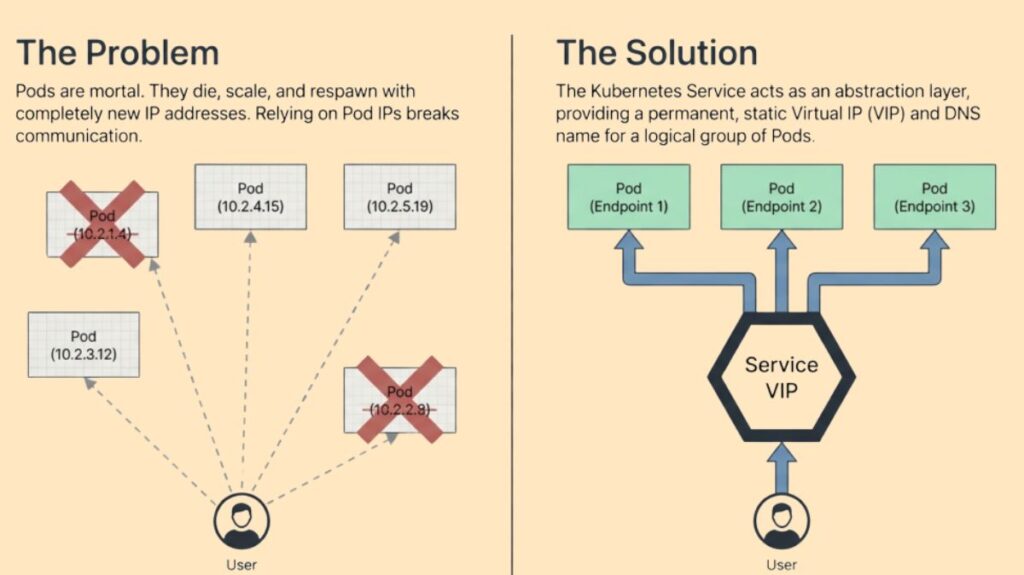
Despite being Kubernetes’ smallest deployable units, pods are by their very nature transient and fatal. A controller like a Deployment or ReplicaSet often recreates a Pod with a dynamically assigned IP address when a worker node fails or is erased. Transience is a serious issue because a frontend application cannot use the internal IP addresses of backend Pods to connect with them because they change every time a Pod is swapped out.
The Service object handles IP address shifting by giving Pods a stable DNS name and a long-term virtual IP address. Clients can interact dependably even when individual backend Pods are formed, deleted, or relocated since this virtual IP, referred to as a ClusterIP, stays consistent throughout the Service object’s lifetime. The Service serves as a decoupling layer by sitting in front of the Pods, enabling the underlying infrastructure to grow or recover without affecting the communication between various application components.
You can also read How to manually run a Kubernetes Cronjob?
Core Mechanisms: Labels and Selectors
Labels and selectors specified in each Service’s configuration control the relationship between the Service and the Pods it represents. A Service utilizes a label selector to find and target all Pods that share those particular qualities. A label is a key-value pair associated to a Pod. The Service and the Pods have a loose coupling with this technique. A Service with a selector like app: nginx will automatically route and load-balance traffic to any Pod with that label and stop sending traffic to any Pod with that label removed or terminated.
Each Kubernetes Node executes kube-proxy to route internal traffic. Kube-proxy uses network rules, commonly iptables or IPVS, to intercept traffic for a Service’s virtual IP and reroute it to a healthy backend Pod while monitoring the Kubernetes API server for Service and Pod object changes. Kubernetes uses EndpointSlices (or earlier Endpoints objects) to track traffic-available Pods. The Service’s EndpointSlice receives a Pod’s IP address if it passes its readiness check and is erased if it fails or is terminated. Only active, healthy backends receive traffic.
YAML manifest service specifications typically have several elements:
- metadata:name: The logical name of the Service, which also becomes its DNS name.
- spec:selector: The label selector used to locate the target Pods.
- spec:ports: A list of port configurations defining the network protocol (TCP, UDP, or SCTP) and port numbers where the Service listens.
- targetPort: The specific port on the Pod where the traffic should be delivered.
- spec:type: The type of Service being defined, which determines its visibility and accessibility.
Principal Service Types
Kubernetes provides a variety of services to meet various networking and accessibility needs:
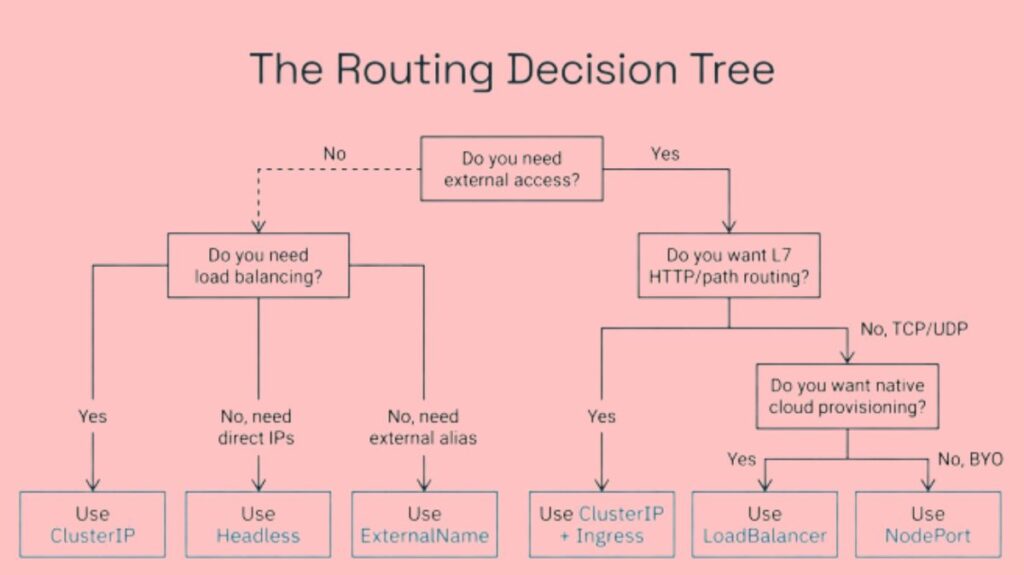
- ClusterIP (Default) When no service type is specified, ClusterIP is the most common. It exposes the service on a cluster-internal IP address, making it exclusively accessible within Kubernetes. This benefits backend services, database connections, caches, and internal system pieces without outward access. The service is protected from the public internet while allowing basic internal networking for workloads.
- NodePort The Service is exposed on a static port on each Node’s IP address by NodePort. Access the Service from outside the cluster by connecting to any node’s port using
<NodeIP>:<NodePort>are 30000–32767 in Kubernetes. NodePorts are handy for development, short-term debugging, and after cloud load balancers fail, but they have drawbacks. Firstly, they can cause security problems because the Service is accessible to anyone who can connect to the Node’s port, and each Node in the cluster is required to listen on that port by default. - LoadBalancer In cloud-provided systems (like AWS, Azure, or GCP), the LoadBalancer type is the typical method for exposing services externally. By automatically providing the native load balancer of a cloud provider, it expands upon both NodePort and ClusterIP capability. After being given a fixed, external IP address or DNS name, this load balancer uses the underlying NodePorts to route traffic to the appropriate Pods. For publicly accessible production applications, this kind offers enterprise-grade scalability and dependability.
- ExternalName In contrast to other kinds, an ExternalName Service does not employ selectors or forward traffic to cluster Pods. A CNAME record bridges the internal Service name to an external DNS name. Kubernetes’
my-databaseservice refers todatabase.example.comfor cluster applications. Workloads are no longer directly dependent on external service URLs, thus you can change the external address without reconfiguring them. - Headless Services Services with No Head You can construct a “headless” service by setting
clusterIP: Nonein the configuration. Since kube-proxy does not manage these services and no stable virtual IP is assigned, neither automatic load balancing nor proxying is carried out. Instead, each healthy backing Pod’s unique IP address is returned by the cluster’s DNS server. For stateful applications, like databases, where clients must connect directly to a particular Pod replica or when replicas must communicate with one another to synchronize data, headless services are essential.
You can also read What is a Kubernetes Job? & Use Cases For Kubernetes Jobs
Service Discovery Mechanisms
Kubernetes offers two main ways for apps operating within the cluster to locate and establish a connection to Services:
- DNS Discovery: DNS discovery is the most popular and suggested approach. DNS records are supplied to new Kubernetes API services by cluster-aware DNS servers, such as CoreDNS. Services are assigned a Fully Qualified Domain Name (FQDN) in the format
<service-name>.<namespace-name>.svc.cluster.local. This allows Pods within the same namespace to reach a Service using just its name, such asmy-service. - Namespaces: Services are scoped to Namespaces, a cluster’s logical border. A short name can help an application in the same Namespace find a service, but the FQDN is needed to access a service in another Namespace. Because of this, developers can run the same service names (such
database) in differentdevandprodNamespaces without seeing any conflicts. - Environment Variables: When a Node runs a Pod, the kubelet adds environment variables for each cluster service. These variables contain the service host’s IP address and port (e.g.,
{SVCNAME}_SERVICE_HOSTand{SVCNAME}_SERVICE_PORT). This method only works if the Service was built before client Pod formation; else, environment variables will not be prepopulated.
Layer 7 Routing and Ingress
Traffic content is not examined by Layer 4 (TCP/UDP) services. Ingress resources are used with Services to reroute traffic depending on HTTP hostnames, URL routes, or HTTPS certificates. By directing requests to various internal services according to specified HTTP properties, an ingress controller serves as a single point of entry for external traffic. Since cloud providers usually charge for each load balancer resource, this method is frequently more economical than developing a separate LoadBalancer Service for each application. A more recent development of Ingress, the Gateway API offers further separation of concerns and sophisticated traffic routing features.
Management and Troubleshooting
Services are managed using the kubectl command-line tool. Common operations include kubectl get services to list active endpoints, kubectl describe service <name> for detailed status including assigned IPs and ports, and kubectl apply -f <file>.yaml to create or update resource definitions. Debugging usually involves checking the target Pods’ health and readiness sensors, making sure the Service manifest’s targetPort matches the containers’ port, and matching the Service manifest’s label selectors to the target Pods’ labels.
You can also read How to Get Started Kubernetes? Explained Briefly