

The Kubernetes Cloud Controller Manager (CCM) is a cloud-specific control plane component. One of its main functions is to include cloud-specific control logic and connect your Kubernetes cluster to a CSP API like AWS, GCP, or Azure.
Core Purpose and Design
The Kubernetes project separates its core code from the underlying cloud infrastructure by abstracting provider-specific code into the CCM binary. Because of this division, cloud providers can create and release new features or integrations at their own speed without interfering with the core Kubernetes project’s release schedule. Because the CCM is designed with a plugin mechanism, several providers can use the cloud provider to link their cloudprovider.Interface.
You can also read What is a Kubernetes Controller Manager?
Key Controller Functions
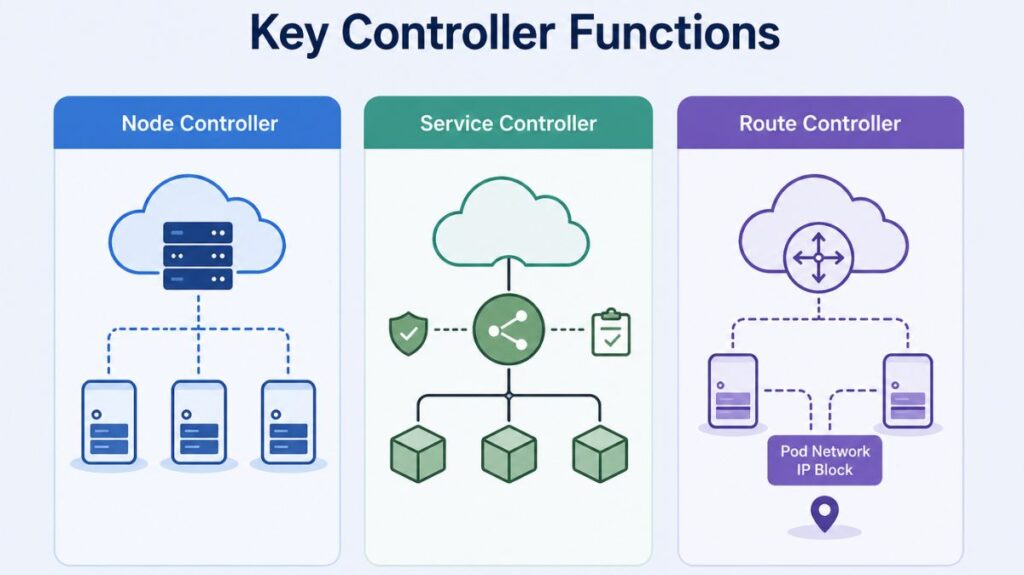
Usually, the CCM unifies multiple cloud-dependent control loops into one procedure:
- Node Controller: Initializes Node objects with cloud-specific server identities, region/zone labels, and instance types (e.g., high CPU or GPU). The controller also checks the cloud API for deleted or inactive nodes and removes them from the cluster.
- Service Controller: Services interface with IP addresses, network packet filtering, managed load balancers, and target health checks, among other cloud infrastructure components. When you declare a service resource that needs load balancers and other infrastructure components, the service controller communicates with the APIs of your cloud provider.
- Route Controller: The route controller is in charge of setting up cloud routes correctly so that containers on various Kubernetes cluster nodes can connect with one another.
- The route controller may also assign IP address blocks for the Pod network, depending on the cloud provider.
You can also read Kind: A Practical Guide to Local Kubernetes Clusters
Authorization
The access that the cloud controller manager needs on different API objects to carry out its functions is broken down in this section.
Node controller
The Node controller only works with Node objects. It requires full access to read and modify Node objects.
v1/Node:
- get
- list
- create
- update
- patch
- watch
- delete
Route controller
The route controller listens to Node object creation and configures routes appropriately. It requires Get access to Node objects.
v1/Node:
- get
Service controller
The service controller watches for Service object create, update and delete events and then configures load balancers for those Services appropriately.
To access Services, it requires list, and watch access. To update Services, it requires patch and update access to the status subresource.
v1/Service:
- list
- get
- watch
- patch
- update
Others
The implementation of the core of the cloud controller manager requires access to create Event objects, and to ensure secure operation, it requires access to create ServiceAccounts.
v1/Event:
- create
- patch
- update
v1/ServiceAccount:
- create
You can also read How to Get Started Kubernetes? Explained Briefly
The “Chicken and Egg” Problem
Adopting the CCM introduces a specific bootstrapping challenge known as the “Chicken and Egg” problem. When a kubelet starts with the --cloud-provider=external flag, it registers the node with a taint: node.cloudprovider.kubernetes.io/uninitialized: NoSchedule.
A stalemate may arise because the CCM (if operating as a Pod) may not be able to schedule on an uninitialized node, but the node cannot be initialized until the CCM runs, as the CCM is in charge of eliminating this taint when it initializes the node. In a similar vein, the kubelet might need those addresses to acquire the TLS certificates required to communicate with the API server in the first place, while the CCM might need to contact with the cloud API to set node addresses.
You can also read What is the Importance of Kubernetes & Why Kubernetes?
Operational Recommendations
The following procedures to guarantee a reliable manufacturing environment:
- High Availability: To avoid controller collisions, run the CCM as a duplicated group of processes and allow leader election.
- Network Configuration: To guarantee that the CCM may connect to cloud provider endpoints independently of the Pod network plugin, set
hostNetwork: true. - Scheduling: Use node selectors or affinity to direct CCM containers to the control plane nodes, and make sure they include tolerances for
uninitializedandnot-readytaints so they can schedule during cluster bootstrapping. - Scalability: Since the CCM is in charge of nearly all API requests made from within the cluster to the cloud provider, keep an eye out for API rate limits in large clusters.
You can also read What is Container Orchestration in Kubernetes?