

Kubernetes Scheduler
Kube-scheduler chooses the best worker node for a new or unscheduled Pod. Strategic pod placement lets developers write code instead of infrastructure upkeep. Pods are sent from the scheduler to nodes, but kubelets execute them.
You can also read Kind: A Practical Guide to Local Kubernetes Clusters
Kubernetes Scheduling Process
To choose the best node for a pod, the scheduler does two steps, filtering and scoring.
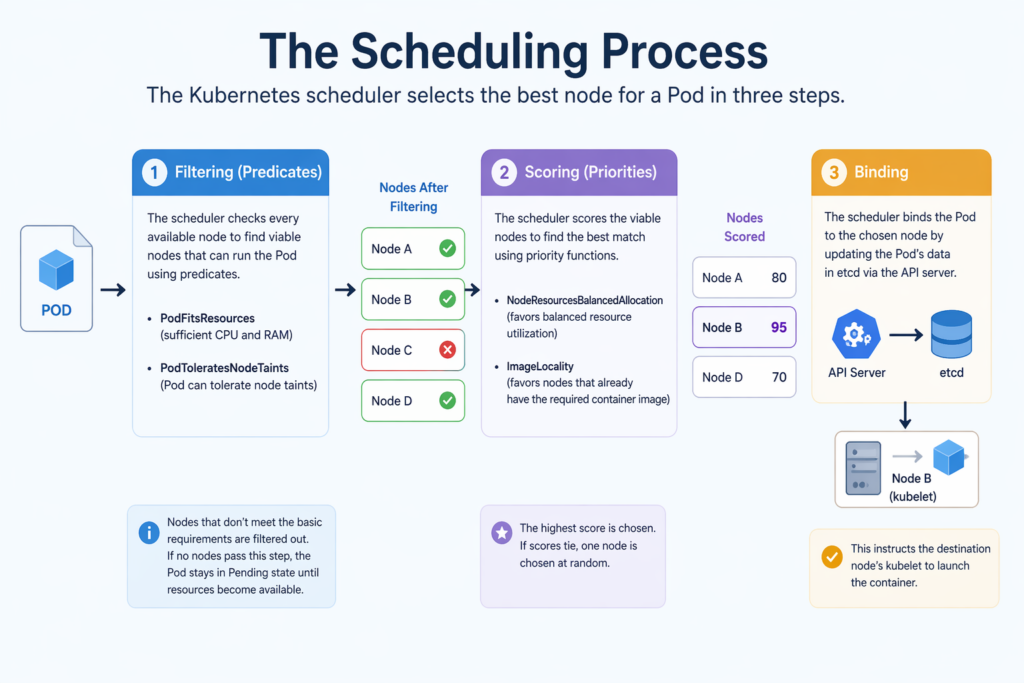
- Filtering (Predicates): To find viable nodes that can run the Pod, the scheduler assesses every node that is available. It uses “predicates” like PodFitsResources (testing for sufficient CPU and RAM) and PodToleratesNodeTaints (ensuring the Pod can withstand certain node taints) to exclude nodes that don’t satisfy basic requirements. The Pod stays in a Pending state until resources become available if no nodes make it past this point.
- Scoring (Priorities): In order to determine the optimal match, the scheduler rates the viable nodes that made it through filtering. It assigns scores using “priority functions” depending on variables such as NodeResourcesBalancedAllocation (which favors nodes with balanced resource utilization) and ImageLocality (which favors nodes that already hold the necessary container image). If scores tie, one node is chosen at random; otherwise, the highest scorer is chosen.
- Binding: After scoring, the scheduler binds to the API server of its choosing. By updating the Pod’s data in etcd, this instructs the destination node’s kubelet to launch the container.
You can also read How to Get Started Kubernetes? Explained Briefly
Internal Mechanics and Performance
As a controller, the scheduler keeps an eye out for new tasks on the API server. It employs a pod queue to handle outstanding jobs and informers to get alerts about resource changes for efficiency. The scheduler can be set up to halt the filtering process after it discovers a specific percentage of feasible nodes (e.g., discovering 300 matching nodes out of 1,000) in order to save performance in big clusters.
Influencing Scheduling Decisions
Pod placement can be controlled by users through a number of sophisticated features:
- Node Selector: The most basic technique, which limits Pods to particular nodes using key-value labels.
- Node Affinity and Anti-Affinity: More adaptable rules that might be preferred (soft constraints) or necessary (hard constraints) to draw Pods away from nodes according to labels.
- Pod Affinity and Anti-Affinity: These rules enable co-locate dependent services or distribute copies for robustness by based on the labels of other Pods on a node.
- Taints and Tolerations: Pods can be scheduled on tainted nodes with tolerances, whereas taints resist them.
- Priority and Preemption: If resources are few, the scheduler may preempt lower-priority Pods to make room for higher-priority ones. Pods of higher priority may be scheduled first.
You can also read What is the Importance of Kubernetes & Why Kubernetes?
Special Cases and Limitations
- Manual Scheduling: By including a nodeName in the Pod manifest, which instructs the system to run the Pod on that precise node, users can completely avoid the scheduler.
- Immutability: A Pod’s location is set once it is attached to a node. A controller like a Deployment or StatefulSet must delete and recreate any Pods to move them for the scheduler to execute its logic for the new instance.
- Custom Schedulers: In addition to kube-scheduler, Kubernetes offers custom schedulers to manage complex workloads or logic.
- Challenges: The scheduler relies on precise resource requests and limits, which might lead to node overconsumption or unscheduled pods.
You can also read What is Container Orchestration in Kubernetes?
Special Cases and Exceptions
- Node Distribution: To avoid a single point of failure, the scheduler distributes programs over multiple machines.
- DaemonSets: In order to execute on every node, DaemonSets specify a nodeName directly in their specification, therefore their pods usually circumvent the scheduler.
- Control Plane Isolation: In production, the scheduler does not distribute user workloads to control plane nodes to prevent disrupting cluster operations.
- Pending State: If the scheduler cannot find a node, the Pod remains “Pending”. Cluster Autoscaler events may add nodes.
You can also read What is Kubernetes Architecture, Features of K8s