

In this article, we learn about YAML Yet Another Markup Language, Key Features and Syntax, Role in Network Automation, YAML Use Cases, and YAML vs JSON
YAML Yet Another Markup Language
Configuration files and data sharing between various systems are frequent uses for YAML (Yet Another Markup Language/YAML Ain’t Markup Language), a human-readable data serialization language. The recursive acronym in its name highlights that it is designed for data, not documents, setting it apart from markup languages such as XML.
YAML is designed to prioritize readability and ease of understanding for humans while remaining fully interpretable by machines. YAML files typically use the extension .yaml or .yml.
You can also read What is Message Switching & advantages of message switching
Key Features and Syntax
YAML is a simple, straightforward syntax that mostly depends on structure rather than symbolic delimiters.
Indentation and Structure
In YAML, indentation alone defines the hierarchy and organization.
- Spaces over Tabs: Like Python, YAML uses spaces to indicate indentation. In YAML files, tabs are prohibited and usually lead to mistakes.
- No Tabs: Only spaces must be used for indentation because YAML does not support tabs in the file. Usually, using tabs will cause a playbook to run incorrectly.
- Case Sensitivity: YAML takes into account the case.
- File Identifier: A YAML file often begins with three hyphens (
---), which denotes the start of a YAML document. Three periods (...) can optionally mark the end of a document.
Core Data Structures
YAML natively encodes fundamental data types, supporting complex hierarchical structures through nested collections.
| Structure Name | Definition | Syntax Key | Example |
|---|---|---|---|
| Mappings (Dictionaries/Objects) | Unordered collections of key-value pairs. | key: value (A colon followed by a space). | age: 30 |
| Sequences (Lists/Arrays) | Ordered collections of items. | Items are denoted by a hyphen followed by a space (-). | skills: - Python - Linux |
| Scalars | Simple data types like strings, numbers, floats, booleans, and null values. | Strings usually do not require quotes unless they contain special characters or could be misinterpreted. | is_employed: true |
Advanced Features
- Comments: YAML supports single-line comments using the hash symbol (
#). Comments are crucial for adding context and explanation within automation files. - Multi-line Strings: YAML supports multi-line strings using the pipe symbol (
|) for a literal block (which preserves newlines) or the greater-than symbol (>) for a folded block (which converts newlines to spaces). - Anchors and Aliases: These features reduce redundancy. An anchor (
&) defines a reusable value, and an alias (*) references that anchored value later in the document, which is particularly useful in large configuration files.
You can also read Types of Broadband Networks, Definition, Uses, & Importance
Role in Network Automation
General data modelling is the main goal of YAML. The configuration management application Ansible makes extensive use of it.
- Ansible Playbooks: Ansible uses YAML files to create Playbooks, which contain the actions and logic about what the tool should perform. Playbooks define a set of instructions to be executed. YAML files for playbooks, like those used for Ansible, typically start with three dashes (
---) at the top.
- Variable Files: YAML is used by Ansible to define variable files. These files include a set of variables that Ansible replaces in configuration templates, which are often written in Jinja2. By using YAML variable files and templates, configuration management solutions may distinguish between the values specific to a particular device (the variables) and the standard configuration (the template).
Another data format besides JSON and XML is YAML. XML and JSON are more
YAML Use Cases
YAML is a common choice for specifying setups and workflows in software development and IT because of its readability.
- Configuration Files: It is common practice to define settings and configurations for servers, development tools, and software applications using configuration files.
- DevOps and Infrastructure as Code (IaC): Automation, orchestration, and configuration management are all made possible by YAML in DevOps and Infrastructure as Code (IaC).
- Ansible: Creates Playbooks to specify automation tasks and their sequences using YAML.
- Kubernetes: Makes significant use of YAML files (manifests) to specify the desired state of the cluster and identify resources such as Pods, Deployments, and Services.
- CI/CD Pipelines: Used to specify procedures and processes in programs like GitHub Actions and GitLab CI/CD.
- Docker Compose: YAML files are used by Docker Compose to configure apps that run in many containers.
- Data Serialization/Exchange: Because it can neatly represent structured data, data serialization/exchange is a good option for serializing complicated data structures for transmission or storage.
- API Documentation: Endpoints and data structures are defined using YAML in specifications such as OpenAPI and Swagger.
You can also read Advantages, Types, and Characteristics of Circuit Switching
YAML vs JSON
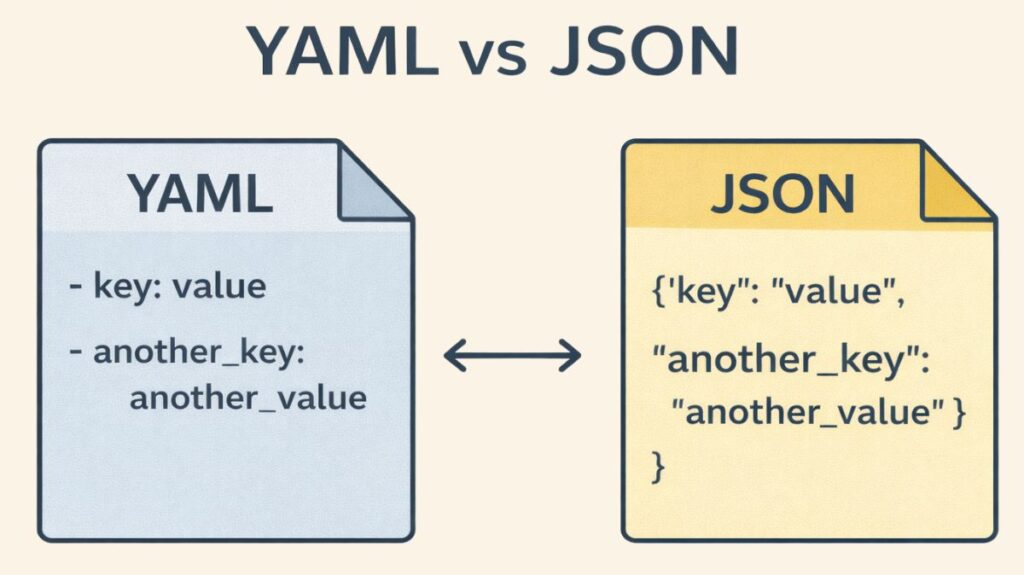
YAML is often compared to JSON (JavaScript Object Notation), another popular data serialization language.
| Feature | YAML | JSON |
|---|---|---|
| Full Form | YAML Ain’t Markup Language | JavaScript Object Notation |
| Readability | Highly human-readable, uses indentation | Moderately readable, uses brackets {} and [] |
| Syntax Style | Flexible, whitespace-based | Strict, structured |
| Supports Comments | Supported using the hash symbol (#) | Not natively supported (though workarounds exist, they break the standard). |
| Data Types | Supports complex data types like objects (mappings), arrays (sequences), and custom types (tags). | Primarily supports objects, arrays, strings, numbers, booleans, and null. |
| Use in Automation | Common in DevOps, Ansible, Kubernetes | Common in APIs, web apps, configuration files |
| File Extension | .yaml or .yml | .json |
| Strictness | Less strict, easier for humans | More strict, easier for machines |
| Best For | Configuration files, templates, CI/CD pipelines | Data exchange between applications/servers |
| Learning Curve | Easy to learn, but whitespace mistakes can cause issues | Very easy and predictable |
| Support for Multi-line Strings | Yes | Yes (but syntax is more verbose) |
| Hierarchical Data | Excellent, indentation-based | Excellent, bracket-based |
| Trailing Commas | Allowed in some implementations | Not allowed |
| Parsing Speed | Slightly slower | Faster due to strict structure |
Although YAML is better at complex setup scenarios and human readability, JSON is frequently preferred because to its speed, conciseness, and widespread use in online applications and APIs for data transmission.
Analogy: Consider YAML to be similar to a notebook’s bulleted outline. A person can quickly and easily scan and comprehend the topic hierarchy because the structure is solely determined by how much each bullet point is indented. JSON, on the other hand, is structured similarly to that outline, with clear brackets and commas around each dictionary and list. This makes it clear and inflexible for computers, but visually confusing for humans.
You can also read Advantages and Disadvantages of Mesh Topology Network