

Kubectl is the main tool for dealing with Kubernetes’ Control Plane. Known as “cube CTL,” “cube control,” or “cube cuddle”. It automates containerized application deployment, scaling, and maintenance for developers and administrators as the cluster “helmsman”.
The Bridge to the API Server
All Kubernetes resources are defined in the API, and all communication goes through the API Server. The API Server is sort of “Grand Central Station,” where administrators and clients control the cluster. That system’s client-side translator is Kubectl. It converts human commands into API-compatible HTTP REST requests like GET, POST, PUT, PATCH, and DELETE.
Kubectl streamlines REST API calls and serializes objects into JSON or YAML for network traversal, unlike curl.
You can also read What is Kube-Proxy in Kubernetes and it’s Lifecycle
Configuration and Authentication
To function, kubectl requires specific credentials and cluster information, which are stored in a configuration file known as kubeconfig. By default, kubectl looks for this file in the HOME/.kube/config directory. A kubeconfig file is divided into four main sections:
- Clusters: A list of clusters, including their API server endpoints and certificate authority data.
- Users: The credentials (tokens or certificates) used for authentication.
- Contexts: A friendly name that groups a specific user with a specific cluster.
- Current-context: The default context that kubectl will use for commands.
Administrators frequently use the command kubectl config use-context to switch between different clusters or environments. Additionally, kubectl features in-cluster authentication; if it determines it is running within a pod, it automatically looks for service account tokens and environment variables to authenticate without an external config file.
Core Management Commands
Commands from Kubectl manage Pods, Services, and Deployments. The interactions are imperative and declarative.
- Imperative Commands: These involve telling Kubernetes exactly what to do using verbs like
run,create, orscale. For example,kubectl runcan quickly launch a Pod, whilekubectl scalemanually adjusts the number of replicas. - Declarative Commands: This is the preferred method for production. Users describe the “desired state” in a YAML or JSON manifest file and use
kubectl apply -f <filename>to submit it. The system then works to reconcile the cluster’s observed state with this desired state.
Common introspection commands include kubectl get, which lists resources in a human-readable table, and kubectl describe, which provides a detailed multiline summary of an object’s state and recent events.
You can also read Kubernetes Controller Manager vs Cloud Controller Manager
Debugging and Maintenance
For developers, kubectl is an essential debugging tool. Several commands allow “under-the-hood” access to running containers:
kubectl logs <pod-name>: Downloads the stdout/stderr logs from a container, with an optional-fflag to stream logs in real-time.kubectl exec: Allows users to execute commands directly inside a running container, often used with-itto open an interactive bash shell for deep troubleshooting.kubectl port-forward: Forwards a local port to a port on a Pod, allowing users to access cluster-internal applications (like a database or web UI) vialocalhost.kubectl cp: Facilitates copying files between a local machine and a container.
To manage cluster nodes, administrators use commands like kubectl cordon to stop new Pods from being scheduled on a node, or kubectl drain to remove existing Pods safely for maintenance.
Syntax and Command Structure
The power of kubectl lies in its consistent syntax, which follows the pattern: kubectl [command] [TYPE] [NAME] [flags].
- Command: Specifies the operation to perform, such as
create,get,describe, ordelete. - TYPE: Specifies the resource type, such as
pods,nodes,services, ordeployments. These types are case-insensitive and can be specified in singular, plural, or abbreviated forms (e.g.,pofor pods,nsfor namespaces). - NAME: Specifies the unique name of the resource. Unlike the resource type, names are case-sensitive. If the name is omitted, the command typically applies to all resources of that type.
- Flags: Optional parameters that modify the command’s behaviour, such as
-sto specify a server address,-nfor a specific namespace, or-ofor output formatting.
You can also read What is Kubernetes Cloud Controller Manager?
Management and Troubleshooting Commands
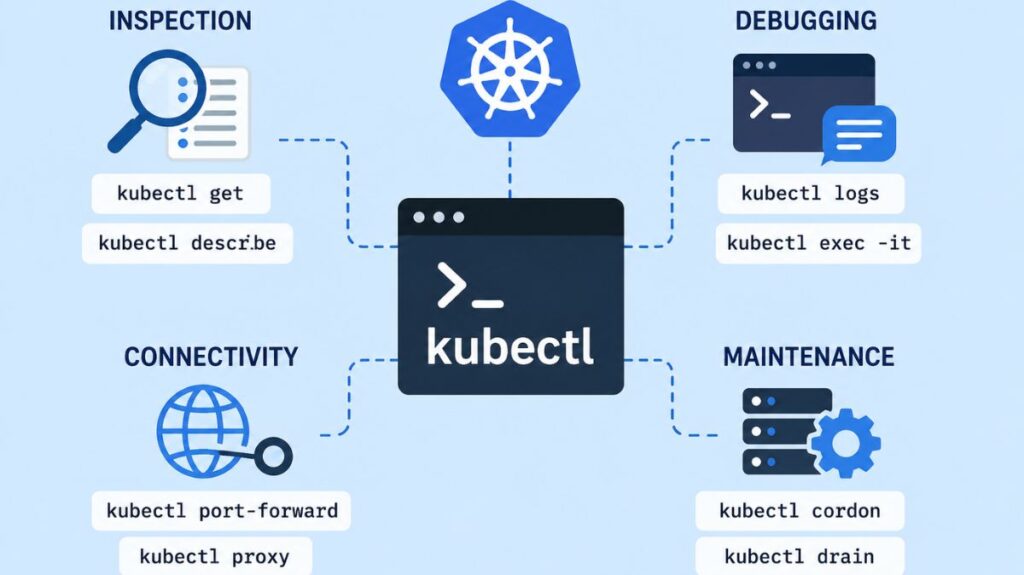
The Kubectl command set covers many daily tasks:
- Inspection:
kubectl getlists resources in a human-readable table, whilekubectl describeprovides a detailed summary of a resource’s state, including its configuration and recent events. - Debugging:
kubectl logsfetches the stdout/stderr streams from a container, which is vital for diagnosing application failures.kubectl execallows users to execute commands directly inside a running container, often used with the-itflag to open an interactive terminal. - Connectivity:
kubectl port-forwardallows users to access cluster-internal applications locally by forwarding a local port to a pod port.kubectl proxyruns a local proxy to the API server. - Maintenance: Administrators use
kubectl cordonto mark a node as unschedulable andkubectl drainto safely remove all pods from a node in preparation for maintenance.
Advanced Output and Customization
Default output is human-readable text, but kubectl provides automation and thorough analysis. By using the -o or --output flag, users can format results as yaml, json, or wide (which adds extra columns like node names for pods). Power users can even use JSONPath expressions or define custom-columns to extract specific data fields from API objects. Additionally, the --sort-by flag allows for sorting lists of objects based on numeric or string fields.
You can also read What is a Kubernetes Controller Manager?
Extensibility and Plugins
Plugins allow kubectl to perform unusual tasks. Krew plugin manager manages these executable files that increase tool capabilities. Kubens, kubectx, and Stern are popular plugins for switching contexts, namespaces, and container logs.
Installation and Versioning
Kubectl installs via Homebrew, Chocolatey, or apt on Linux, Windows, and macOS. The version skew policy requires the kubectl version to be within one minor version difference of the cluster’s control plane to ensure compatibility and reduce unexpected difficulties.
Summary of Importance
Mastering kubectl means mastering Kubernetes. With its extensive interface, programmers can focus on application code while automated platform controllers maintain infrastructure. This tool is essential for cloud-native navigation, whether for rapid imperative inspections or long-term declarative administration.
You can also read Kind: A Practical Guide to Local Kubernetes Clusters