

Namespaces In Kubernetes
Namespaces are used in Kubernetes to divide a physical cluster into virtual sub-clusters. This method, similar to a filesystem folder, helps administrators distribute cluster resources to individuals, teams, or projects. Kubernetes makes it possible for multiple apps to operate peacefully in a shared cooperative environment by establishing these logical boundaries.
Core Benefits and Use Cases
Namespaces are mostly meant for settings where a large number of users are dispersed over several teams or projects. Namespaces might not be required in small clusters with few users, but as an organization grows, they become essential.
Name disputes are avoided, a huge benefit. Pods, Services, and Deployments in a namespace must have unique names. However, numerous namespaces can reuse those names. For instance, a deployment called web-server can exist concurrently in both a development and a production namespace without colliding. This is especially helpful for parallel setups.
Namespaces also facilitate soft multi-tenancy, which permits many “tenants” such as software lifecycle stages or departments to share the same control plane and hardware. When compared to operating completely independent clusters for each team, this improves hardware usage and cost effectiveness. The performance of clusters can also be enhanced using namespaces. When actions are scoped to a particular namespace, the Kubernetes API can speed up application performance and lower latency because there are fewer objects to search.
You can also read Difference between Labels and Selectors in Kubernetes
The Default Namespaces in Kubernetes
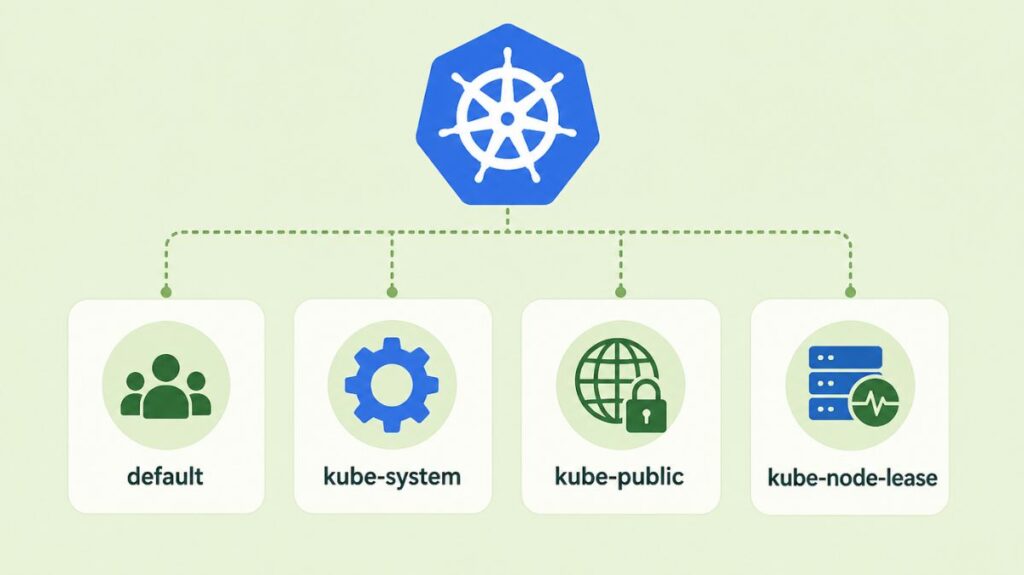
A collection of common, non-deletable Namespaces set aside for particular system operations are used to begin each Kubernetes cluster:
- Default: For objects without a namespace specified, this is the general-purpose bucket. This is where the entire cluster is located until additional namespaces are formed.
- Kube-system: This namespace is used for anything made by the Kubernetes system itself, like the internal DNS service, cluster add-ons, and control plane supervising processes. It is typically recommended that developers refrain from producing or altering resources in this area.
- Kube-public: Every user, even those without authentication, can read this namespace. It is commonly used for cluster data that must be publicly readable and visible throughout the cluster, such a configuration map that contains cluster data.
- Kube-node-lease: The namespace kube-node-lease, which was added to Kubernetes more recently, contains Lease objects for every node. The control plane to effectively identify node failures, these leases enable the kubelet to emit heartbeats.
Resource Governance and Constraints
Namespaces give Resource Policies the crucial scope they need to avoid “noisy neighbor” situations, in which a single program uses up all of the available hardware. ResourceQuotas are used by administrators to impose aggregate limitations on compute and storage consumption (e.g., total CPU or memory) for the entire namespace.
LimitRanges can be used to impose minimum and maximum resource restrictions on specific entities (such as a single Pod or container) within that namespace in addition to aggregate limits. To safeguard the remaining cluster resources, a LimitRange might, for example, guarantee that no container in the development namespace may request more than 2GB of RAM.
You can also read What is the Imperative in Kubernetes and it’s Commands
Security and Access Control
RBAC requires namespaces. Most workload objects are namespaced, but some are cluster-wide. Security administrators can use Roles and RoleBindings to “get” or “create” Pods within a namespace. This prevents developers in the testing namespace from accidentally changing or deleting production namespace resources.
The Linux-only experimental User Namespace is a smart security feature. This separates the host and container users. Map an unprivileged host node user to a container “root” process. A container vulnerability would not give the attacker root access on the host machine, lessening damage.
Networking and Service Discovery
The underlying pod network is usually flat, which means that pods can communicate with one another independent of their namespace, even if namespaces offer logical barriers. Administrators must use Network Policies to specifically permit or prohibit traffic between namespaces to restrict this.
Inherently, service discovery is aware of the namespace. After creating a service, Kubernetes generates a DNS record in the type <service-name>.<namespace-name>.svc.cluster.local. If a container uses the “short name” (like database), DNS will resolve to its own namespace service. Accessing a service in a different namespace requires a FQDN.
You can also read Kind: A Practical Guide to Local Kubernetes Clusters
How to create a namespace in Kubernetes
Generate Kubernetes namespaces declaratively using YAML configuration files or imperatively using the command-line interface. Namespaces can separate teams, projects, and environments as virtual clusters.
Imperative Method (Command Line)
The quickest way to create a namespace is by using the kubectl command-line tool. You can use either of the following commands:
kubectl create namespace <namespace-name>kubectl create ns <namespace-name>(using the shorthand version)
Declarative Method (YAML File)
Using a YAML configuration file is often considered a better practice because it allows you to maintain a history of resources in a repository.
Create a YAML file (e.g., my-namespace.yaml) with the following structure:
apiVersion: v1
kind: Namespace
metadata:
  name: <insert-namespace-name-here>
Then run:
kubectl create -f ./my-namespace.yaml
Alternatively, you can create namespace using below command:
kubectl create namespace <insert-namespace-name-here>
The name of your namespace must be a valid DNS label.
Deleting a namespace
Delete a namespace with
kubectl delete namespaces <insert-some-namespace-name>How to change the namespace in Kubernetes
You can change the active namespace in Kubernetes using kubectl commands. There are two primary methods: for a single command or for your entire current context/session.
For a Single Command
To specify a namespace for a specific kubectl command without changing your default setting, use the --namespace (or -n) flag.
For All Subsequent Commands (Set Default)
To change the default namespace for all future kubectl commands in your current terminal session, modify your kubeconfig file using the config set-context command:
kubectl config set-context --current --namespace=<desired-namespace-name>Resources must be removed and rebuilt in the target namespace after generation. Namespace deletion cascades. When a namespace is destroyed, Kubernetes deletes all Pods, Services, and Secrets. Because resource cleanup is asynchronous, a namespace will remain in “Terminating” mode.
Limitations and Boundaries
A namespace is not where all Kubernetes objects are located. Nodes, PersistentVolumes, and StorageClasses are examples of low-level, cluster-wide resources that are visible to all virtual clusters and exist independently of any namespace.
Lastly, namespaces offer a gentle form of isolation. They are not a hard security boundary; if they are not adequately secured with further layers, a compromised workload may still affect the host kernel or reach other workloads. The industry best practice is to execute hostile workloads or extremely sensitive data on completely different physical clusters in situations that call for hard multi-tenancy.
You can also read How to Get Started Kubernetes? Explained Briefly