

LoadBalancer Service in Kubernetes
An advanced networking abstraction called a Kubernetes LoadBalancer Service is intended to give apps operating in a cluster a reliable, externally accessible entry point. Services function as a persistent static endpoint in Kubernetes’ dynamic environment, where Pods are transient and often given new IP addresses upon regeneration. Although there are a number of service kinds, like NodePort for basic external access and ClusterIP for internal communication, the LoadBalancer type is specifically designed for cloud environments. By connecting directly with the infrastructure of a cloud provider, like AWS, GCP, or Azure, it provides the most efficient method of exposing apps to the public internet or a private network.
The Architecture and Hierarchy of LoadBalancer Services
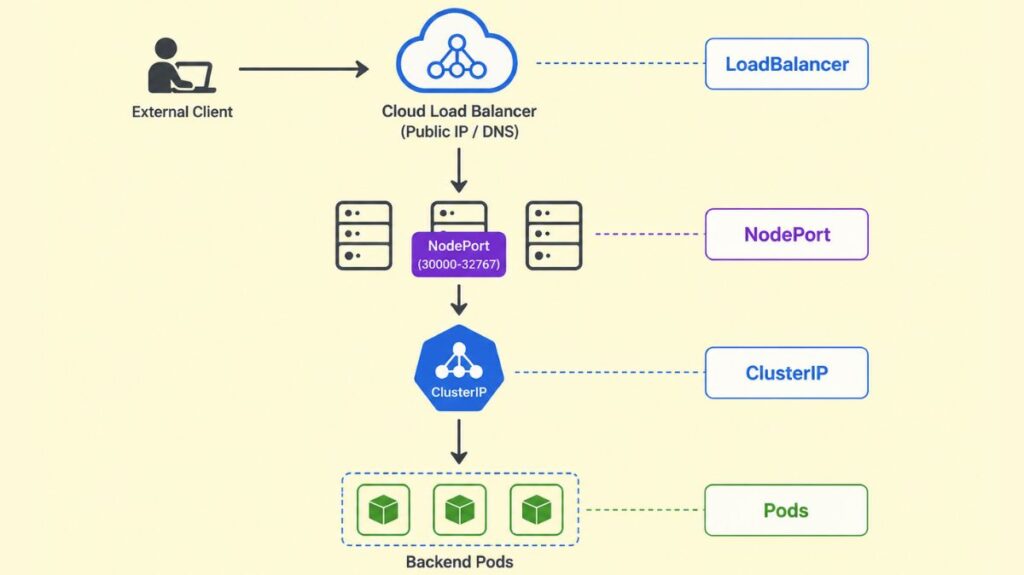
It is necessary to think of a LoadBalancer Service as a tiered “stack” of Kubernetes networking components to comprehend its operation. Not an independent resource, it builds on other services:
- ClusterIP: ClusterIPs, stable internal IP addresses that can only be routed within the cluster, are assigned to each LoadBalancer Service.
- NodePort: Automatically opens cluster worker node NodePort (30000-32767). This ensures the Service receives all node IP port-based traffic.
- Cloud Load Balancer: Finally, LoadBalancer informs the Cloud Controller Manager of Kubernetes’ control plane to connect with the cloud provider to provision a real or virtual load balancer. Clients request land on this external load balancer’s static public IP address or DNS name.
The traffic flow is as follows: after an external client sends a request to the LoadBalancer’s public IP, it passes through the cloud load balancer, a NodePort on one of the cluster’s nodes, the internal ClusterIP of the Service, and a healthy backend Pod.
You can also read What is a Kubernetes Controller Manager?
Core Mechanics: Labels, Selectors, and Health Tracking
Labels and selectors link LoadBalancer Services to Pods they manage. A label is a key-value pair linked with a Pod, and the Service uses a selector query to categorize Pods. Developers can scale Pods up or down without modifying the network because this strategy creates a loose connection. The Service will automatically route traffic to a new Pod if its labels match.
EndpointSlices keeps Kubernetes’ backend Pod list healthy for high availability. Pods are removed from the LoadBalancer’s rotation until they recover if they fail their readiness probe. This keeps unresponsive or dead containers from being encountered by external users.
Practical Configuration Examples
A manifest file (YAML) or the command line (kubectl) are the two main methods for generating a LoadBalancer Service.
Example 1: NGINX Web Server (Manifest File)
This example demonstrates how to link a LoadBalancer Service to an NGINX deployment.
Deployment Manifest:
apiVersion: apps/v1
kind: Deployment
metadata:
  name: deployment-nginx
spec:
  replicas: 3
  selector:
    matchLabels:
      app: nginx-application
  template:
    metadata:
      labels:
        app: nginx-application
    spec:
      containers:
      - name: nginx-container
        image: nginx:latest
        ports:
        - containerPort: 80
Service Manifest:
apiVersion: v1
kind: Service
metadata:
  name: service-nginx
spec:
  selector:
    app: nginx-application
  type: LoadBalancer
  ports:
  - port: 80        # Port exposed on the external LoadBalancer
    targetPort: 80  # Port the application listens on in the pod.
Example 2: Flask Application (Command Line)
If you have an existing deployment named flask-app, you can quickly expose it using the kubectl expose command: kubectl expose deployment flask-app --type=LoadBalancer --port=80 --target-port=5000 --name=flask-service. This command creates a new Service using the same selectors as the referenced deployment.
You can also read Kind: A Practical Guide to Local Kubernetes Clusters
Internal vs. External Load Balancers
A LoadBalancer Service generates a resource that is accessible to the public by default. Nonetheless, you could want an internal load balancer that is only available within your own virtual network in many business settings. Cloud-specific annotations are used to do this:
- AWS:
service.beta.kubernetes.io/aws-load-balancer-scheme: "internal". - GCP:
networking.gke.io/load-balancer-type: "Internal". - Azure:
service.beta.kubernetes.io/azure-load-balancer-internal: "true".
Advanced Configuration and Traffic Distribution
Layer 4 (TCP/UDP) of the OSI architecture is where Kubernetes LoadBalancers function most frequently. They endorse a number of traffic distribution strategies:
- Round Robin: The default technique sequentially distributes requests to healthy pods.
- Session Affinity (Sticky Sessions): Set
spec.sessionAffinity: ClientIProutes requests from the same IP to the same pod. - Source IP Preservation: NAT can substitute the client’s IP with the load balancer’s. Although it prevents a “second hop” between nodes and maintains the client source IP, setting
externalTrafficPolicy: Localmay result in an uneven traffic distribution if Pods are not distributed equally among nodes.
You can also read How to Get Started Kubernetes? Explained Briefly
Garbage Collection and Cleanup
Kubernetes employs Finalizer Protection to prevent cloud resources from becoming orphaned when a Service of type LoadBalancer is removed. A finalizer (service.kubernetes.io/load-balancer-cleanup) attached by the service controller stops the Service resource from being completely erased until the associated cloud load balancer has been successfully removed.
Limitations and Alternatives
Despite their strength, LoadBalancer Services have some significant drawbacks.
- Cost: Most cloud providers charge per load balancer instance.
- Complexity: Managing dozens of load balancers is hard.
- Layer 7 Features: Routing
/apito one service and/webto another is not possible with standard load balancers.
Developers utilize Ingress Controllers for HTTP/HTTPS routing precision or cost. NGINX or Istio’s Ingress Controller manages Layer 7 routing functionality inside a single LoadBalancer Service.
You can also read What is the Importance of Kubernetes & Why Kubernetes?
On-Premises and Bare Metal Solutions
To use standard LoadBalancer capabilities, a cloud environment must be supported. Tools like MetalLB manage a pool of IP addresses and advertise them using common network protocols to mimic LoadBalancer functionality for bare metal or on-premises clusters without native cloud APIs.
Summary of Best Practices
- Implement Health Checks: Use readiness and liveness probes wherever possible to ensure the load balancer delivers traffic to operational pods.
- Use Annotations Wisely: Cloud documentation may allow SSL termination or internal-only access.
- Monitor Metrics: Grafana and Prometheus measure throughput, latency, and errors.
- Enable Connection Draining: Allow Connection Draining to manage current connections during pod termination or scaling if supported.
- Consider Ingress for Scale: To share a single cloud load balancer and save money, utilize an Ingress Controller if you need to expose numerous HTTP services.
You can also read What is Container Orchestration in Kubernetes?