

What are volumes in Kubernetes?
Volumes manage shared storage and data lifespan. Crashing or restarting a container erases any data written or changed in its filesystem. Different container-level filesystems cannot share files within the same Pod. All containers in a Pod can exchange data and withstand container restarts with Kubernetes Volumes.
You can also read What is the Kubernetes storage For Best Practices
Kubernetes Volume importance
Because they address the two main issues with containerized environments—data persistence and shared storage—Kubernetes volumes are essential.
Data Persistence
The filesystem is temporary or transitory in a normal container. This gives rise to multiple problems:
- Data Loss on Restart: A container’s state is not saved when it crashes or stops. Kubelet restarts the container cleanly and deletes all data produced or updated.
- Decoupling Storage from Lifecycle: Persistent Volumes keep data available even if Pods fail or restart.
- Stateful Applications: MySQL, Redis, and file servers use volumes to retain their “state” over time.
Shared Storage
Volumes offer a way for several processes to communicate and synchronize.
- Intra-Pod Sharing: It is not possible for several containers operating in the same Pod to share files directly through their respective filesystems. A volume gives every container in that pod access to a shared directory.
- Inter-Pod Sharing: A filesystem may be shared between two distinct Pods, even if they are operating on different nodes, thanks to specific volume types.
How volumes work
The spec.volumes section and the volumeMounts array in the container description are two particular configurations that a Pod manifest must provide in order to implement storage. While volumeMounts specifies precisely where that storage should be attached within the container’s filesystem, spec.volumes describes the kinds of storage that the Pod can access. It is an adaptable solution that allows several containers in a single Pod to mount the same volume, possibly at separate pathways, to help with synchronization or communication.
You can also read What is a Kubernetes ReplicaSet & Working with ReplicaSets
Ephemeral Volume Types
Ephemeral volumes are linked to the Pod’s lifecycle and are removed upon the Pod’s demise.
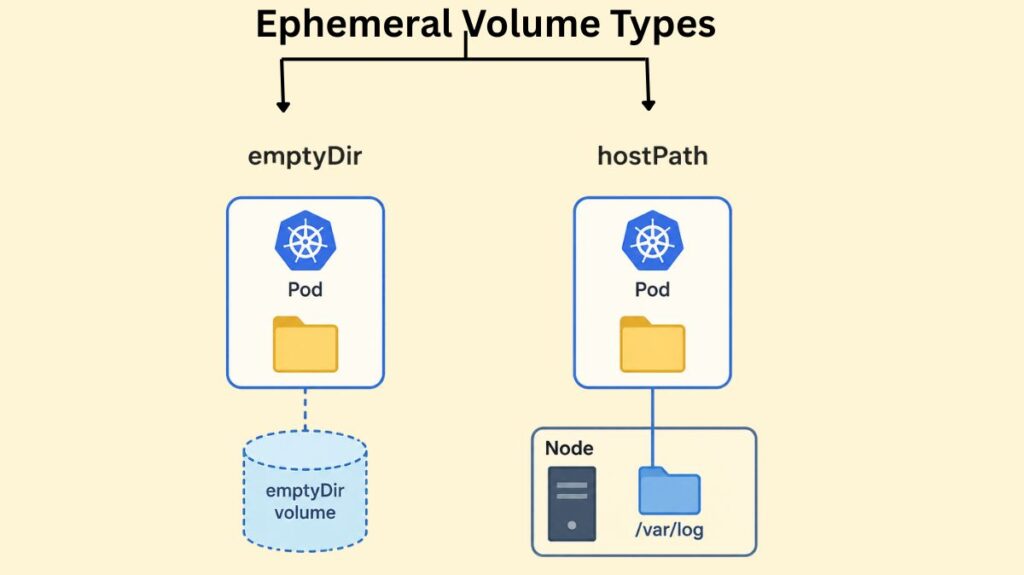
emptyDir
When a Pod is originally empty and allocated to a node, it creates an emptyDir volume. It is frequently utilized as a temporary “scratch space,” such as for costly computations or disk-based mergers.
Code Example: Pod with an emptyDir Volume
apiVersion: v1
kind: Pod
metadata:
  name: test-pd
spec:
  containers:
  - image: registry.k8s.io/test-webserver
    name: test-container
    volumeMounts:
    - mountPath: /cache
      name: cache-volume
  volumes:
  - name: cache-volume
    emptyDir:
      sizeLimit: 500Mi # Optional: Limits capacity
By default, emptyDir volumes are kept on the HDD, SSD, or network storage that supports the node. A fast tmpfs (RAM-backed filesystem) is mounted when emptyDir.medium is set to "Memory" but this goes against the container’s memory limit.
hostPath
A hostPath volume mounts a file or directory straight into the Pod from the host node’s filesystem. For system-level activities, like a Pod that needs to access /var/log to gather system logs, this is helpful.
Code Example: Pod with a hostPath Volume
apiVersion: v1
kind: Pod
metadata:
  name: test-hostpath
spec:
  containers:
  - name: test-container
    image: registry.k8s.io/test-webserver
    volumeMounts:
    - mountPath: /test-pd
      name: test-volume
  volumes:
  - name: test-volume
    hostPath:
      path: /data # Path on the host node
      type: DirectoryOrCreate # Creates the directory if it doesn't exist
Warning: hostPath volumes present significant security risks, as they allow containers to access sensitive host files. They also reduce portability; if a Pod is moved to another node, it will not find the same data.
You can also read What is Kubernetes Cloud Controller Manager?
Configuration and Secret Volumes
Sensitive information and configuration data are injected into apps at runtime by Kubernetes using specific volume types.
- ConfigMap: Inserts files containing non-sensitive configuration data into a pod.
- Secret: Adds private information (such as tokens or passwords). To make sure that secrets are never written to non-volatile storage, these are supported by tmpfs (RAM).
Code Example: Mounting a ConfigMap as a Volume
apiVersion: v1
kind: Pod
metadata:
  name: configmap-pod
spec:
  containers:
    - name: test-container
      image: busybox
      volumeMounts:
      - name: config-vol
        mountPath: /etc/config
  volumes:
    - name: config-vol
      configMap:
        name: log-config # Reference to an existing ConfigMap
The Persistent Volume Subsystem
The Kubernetes PV subsystem protects stateful applications like databases from Pod deletion. Developers handle storage use, while administrators handle storage provisioning.
- PersistentVolume (PV): A PersistentVolume, such as an AWS EBS disk, NFS mount, or GCE Persistent Disk, is a cluster-level resource that symbolizes a storage unit. It doesn’t depend on any Pod that uses it for its lifecycle.
- PersistentVolumeClaim (PVC): A PersistentVolumeClaim represents a user’s request for storage. It outlines specifications for things like access modes and storage capacity (e.g., 5Gi).
- StorageClass (SC): Different storage “tiers” are defined by a StorageClass, which also permits dynamic provisioning. A StorageClass can automatically build a PV when a PVC is provided, saving an admin from having to do it for each request.
You can also read What is a Kubernetes Controller Manager?
Step-by-Step Example: Using Persistent Storage
Step 1: Define a PersistentVolumeClaim
apiVersion: v1
kind: PersistentVolumeClaim
metadata:
  name: mypvc
spec:
  accessModes:
    - ReadWriteOnce # Mounted as read-write by a single node
  resources:
    requests:
      storage: 5Gi # Request 5 Gigabytes
  storageClassName: standard # Use a StorageClass for dynamic provisioning
Step 2: Use the PVC in a Pod
apiVersion: v1
kind: Pod
metadata:
  name: my-pod
spec:
  containers:
    - name: nginx-container
      image: nginx:latest
      volumeMounts:
        - mountPath: /usr/share/nginx/html
          name: storage-volume
  volumes:
    - name: storage-volume
      persistentVolumeClaim:
        claimName: mypvc # Connect the Pod to the PVC
The Lifecycle of PVs and PVCs
- Provisioning: The PV is either dynamically generated by a StorageClass or explicitly constructed by an admin.
- Binding: Only one PV can be tied to a PVC at a time when Kubernetes matches them.
- Using: After a Pod uses the PVC, Kubernetes mounts the volume onto its filesystem.
- Reclaiming: After the PVC is wiped, the reclamation policy (Retain, Recycle, or Delete) governs data handling.
You can also read What is Kube-Proxy in Kubernetes and it’s Lifecycle
StatefulSets and Persistent Storage
For distributed databases, where each replica requires its own distinct disk, standard deployments are frequently insufficient. The identical data would be shared by all three replicas using the same PVC. VolumeClaimTemplates, which automatically provision a distinct PVC and PV for each duplicate Pod (e.g., db-0, db-1), are how StatefulSets handle this. A Pod maintains its distinct state even if it is rescheduled since it “sticks” to its particular Volume.
Code Example: StatefulSet with volumeClaimTemplates
apiVersion: apps/v1
kind: StatefulSet
metadata:
  name: web
spec:
  serviceName: "nginx"
  replicas: 3
  selector:
    matchLabels:
      app: nginx
  template:
    metadata:
      labels:
        app: nginx
    spec:
      containers:
      - name: nginx
        image: registry.k8s.io/nginx-slim:0.8
        volumeMounts:
        - name: www
          mountPath: /usr/share/nginx/html
  volumeClaimTemplates:
  - metadata:
      name: www
    spec:
      accessModes: [ "ReadWriteOnce" ]
      resources:
        requests:
          storage: 1Gi # Each replica gets its own 1Gi disk
Best Practices for Volume Management
- Use StorageClasses: To guarantee portability and scalability in cloud environments, avoid manual PV provisioning.
- Define Reclaim Policies: To avoid unintentional loss in the event that a PVC is erased, use the
Retainpolicy for vital data. - Size Requests Accurately: Make appropriate storage requests to prevent overprovisioning and unnecessary expenses.
- Minimize Access: Only share volumes with containers that need them, not all.
- Avoid hostPath for Persistent Data: Network-attached storage (CSI) or
localpersistent volumes are more portable and durable than hostPath for persistent data. - Monitor Usage: Use tools like
kubectl describe podto view volume status and system commands likedfon nodes to track disk pressure.
You can also read How to create a Secret in Kubernetes? & It’s Lifecycle