

Pod in Kubernetes
Kubernetes’ most basic component, a pod, is the smallest deployable computing unit an administrator may design and manage. Alternative orchestration solutions may use containers as the basic unit, however Kubernetes wraps one or more application containers (like Docker or containerd) into a Pod. Your cluster’s single running process is represented by this logical set of tightly tied containers that must share resources and operate as a single atomic unit.
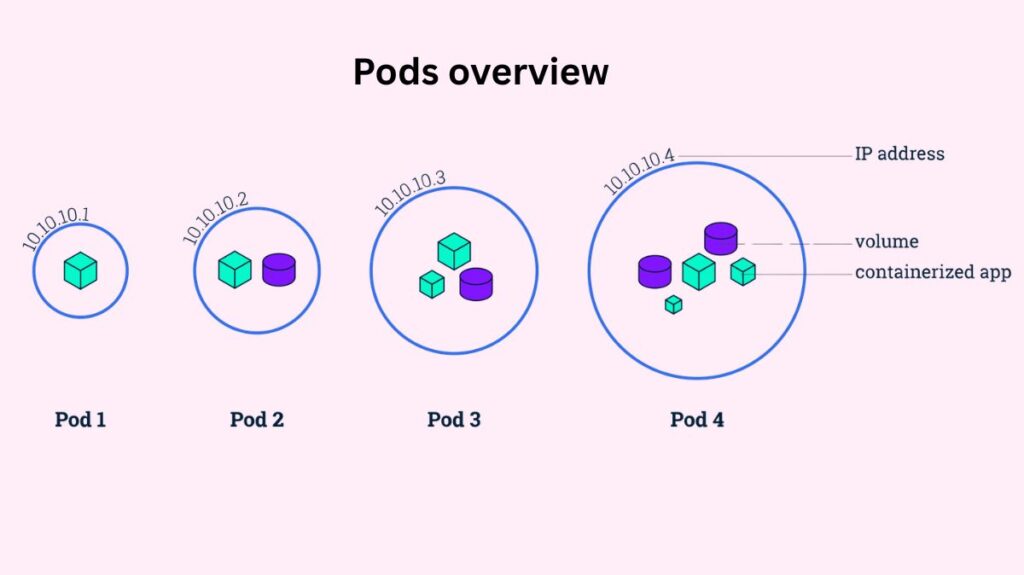
The Architectural Foundation: The “Logical Host”
For the containers it contains, a pod serves as a “logical host” that offers a shared execution environment. This is comparable to programs operating on the same real or virtual machine in non-cloud environments. A collection of Linux namespaces, cgroups, and other aspects of isolation make this shared context possible.There are a number of important shared namespaces and resources in this environment:
- Linux Namespaces: Since containers share the IPC and UTS namespaces, which indicate the same hostname, they can connect using System V semaphores or POSIX message queues in addition to networking.
- Networking: Each Pod in the cluster has its own IP address, regardless of node. A common network namespace controls this IP address and port space, which all containers in that Pod share. Containers in the same Pod can communicate via localhost because they share the network stack.
- Storage: Pod-defined Volumes are accessible to all containers. These volumes make it possible for containers to share data and guarantee that data is preserved even in the event that a particular container breaks and is restarted.
You can also read How to Install Kubeadm in Kubernetes Step by Step Guide
Container Grouping Patterns
Running many containers per Pod is effective, although one is typical. Pod containers are scheduled to the same virtual or physical node by Kubernetes. Symbiotic containers require this proximity to perform so well together that running them on separate machines is absurd.
The following are typical multi-container patterns:
- Sidecar Pattern: To offer supplementary services like logging, data synchronization, or network proxying, a helper container operates in tandem with the primary application container. For instance, while the primary web server container provides static material, a sidecar may retrieve it from a Git repository onto a shared disk.
- Init Containers: Specialized containers known as “init containers” operate and finish before the application containers do. They are frequently employed in database schema setup, certificate generation, and environment variable initialization.
- Anti-Patterns: Placing containers that may scale separately, like a MySQL database and a WordPress frontend, in the same Pod is typically regarded as a mistake. Even if only the frontend requires more resources, grouping them forces you to scale both at the same rate because the Pod is Kubernetes’ Unit of Scaling.
The Pod Lifecycle and Phases
Understanding that pods are transient and mortal is one of the most important ideas. Pods are not long-lasting entities; after they are generated, they carry out their purpose and then end. A pod’s lifespan has several high-level stages:
- Pending: Kubernetes has authorized the Pod, but container images are still pending. This could be due to waiting for the scheduler to find a node or downloading a picture slowly.
- Running: All containers are constructed and the Pod is connected to a node. At least one container is restarting or running.
- Success: All pod containers quit with status 0 and won’t restart. This is the end for Pods with limited tasks, such Job-supervised ones.
- Failed: All containers in the Pod have terminated, and at least one container failed.
- Unknown: Pod’s state is unknown, mainly due to a network connectivity issue with the node where it should be functioning.
You can also read How to install Kubectl in Kubernetes Explained Briefly
Management via Controllers
Since individual Pods don’t scale or self-heal on their own, it’s usually not advised to create them directly in production settings. A pod doesn’t get rescheduled if it fails or the node it is hosted on goes down; it just dies. Kubernetes makes advantage of higher-level workload resources (controllers) to handle this:
- Deployments: Used to handle rolling updates, maintain stateless applications, and guarantee a certain number of replicas are always operating.
- StatefulSets: Used in applications like databases that need permanent storage and stable network identification.
- DaemonSets: Useful for system functions like log collectors, they guarantee that a copy of a certain Pod executes on all (or some) cluster nodes.
- Jobs: Designed for one-time batch operations.
Resource Management and Scheduling
Kubernetes enables you to set resource requests and limitations for each container inside a Pod in order to guarantee cluster stability. The Scheduler uses a request, which is the minimum amount of CPU or RAM that the container is guaranteed to have, to deploy the Pod on a node that has enough capacity. The system may terminate a container if its memory limit is exceeded. A limit is the absolute maximum amount of resources that a container can use.
Pod placement can be further controlled with advanced scheduling features:
- PID Limits: To prevent fork bomb assaults from depleting node resources, administrators can set podPidsLimit to limit the amount of processes a Pod may spawn.
- NodeSelectors and Affinity: Based on labels, these rules “attract” Pods to particular nodes. For example, a high-compute Pod might be placed on a node with a GPU.
- Taints and Tolerations: To ensure that sensitive nodes only execute particular workloads, nodes can utilize taints to “repel” Pods unless a Pod has a corresponding toleration.
You can also read Kubernetes Controller Manager vs Cloud Controller Manager
Health Monitoring and Networking
Using probes, the Kubelet agent on each node keeps an eye on the Pods’ health. Liveness probes in Kubernetes check if a container is alive; if they fail, the Kubelet restarts it using the Pod’s restartPolicy. A container’s readiness for network traffic is determined by readiness probes.
A CNI (Container Network Interface) plugin facilitates networking by implementing a “flat” network over the entire cluster. This eliminates the need for NAT and enables direct communication between all Pods. Kubernetes uses Services to provide a stable, permanent IP address (ClusterIP) that load balances traffic to a collection of healthy Pods because Pod IPs are dynamic and vary anytime a Pod is recreated.
Operational Interaction
Administrators interact with Pods using the kubectl command-line tool. This interaction can be imperative (using commands like kubectl run or kubectl create) or declarative (using kubectl apply with a YAML manifest). Key commands for troubleshooting include:
kubectl get pods: Lists the status and basic info of Pods in a namespace.kubectl describe pod: Provides detailed events and configuration data for a specific Pod.kubectl logs: Retrieves the standard output logs from a container.kubectl exec: Allows you to run commands or open a shell inside a running container for interactive debugging.
Encasing containers in the Pod abstraction, Kubernetes provides complicated scheduling, shared resources, and self-healing for distributed, cloud-native applications to scale.
Security and Organization
Namespaces, which serve as virtual clusters to separate resources between groups or environments, are where pods are arranged. Pod Security Admission (PSA), which enforces criteria such limiting privileged containers or mandating that containers run as non-root users, can be used to further strengthen security. Lastly, you may use NetworkPolicies to limit which Pods can talk to one another, thereby building a “firewall” around your workloads.
You can also read What is a Kubernetes Controller Manager?